

SP Property - Need Price On Property List Without The Area Metrics
IP
Iwona Pawlowska
Hi, I defined the default area metrics to m2 (square meteres) instead of Sqft. However I want to show only the price for the whole apartment - not divided by the area. So I am entering the full price but still in properties listing I can see for example 399.000 PLN / m2. I don't want to show the "/ m2".
86 Answers
Order by
Oldest

Rashida Rahman
Accepted AnswerHi there!
Thanks for your query.
In that case you need to enable fixed price option there as follows: https://prnt.sc/22dj6nh
Then your price will not devided by area.
Best Regards
IP
Iwona Pawlowska
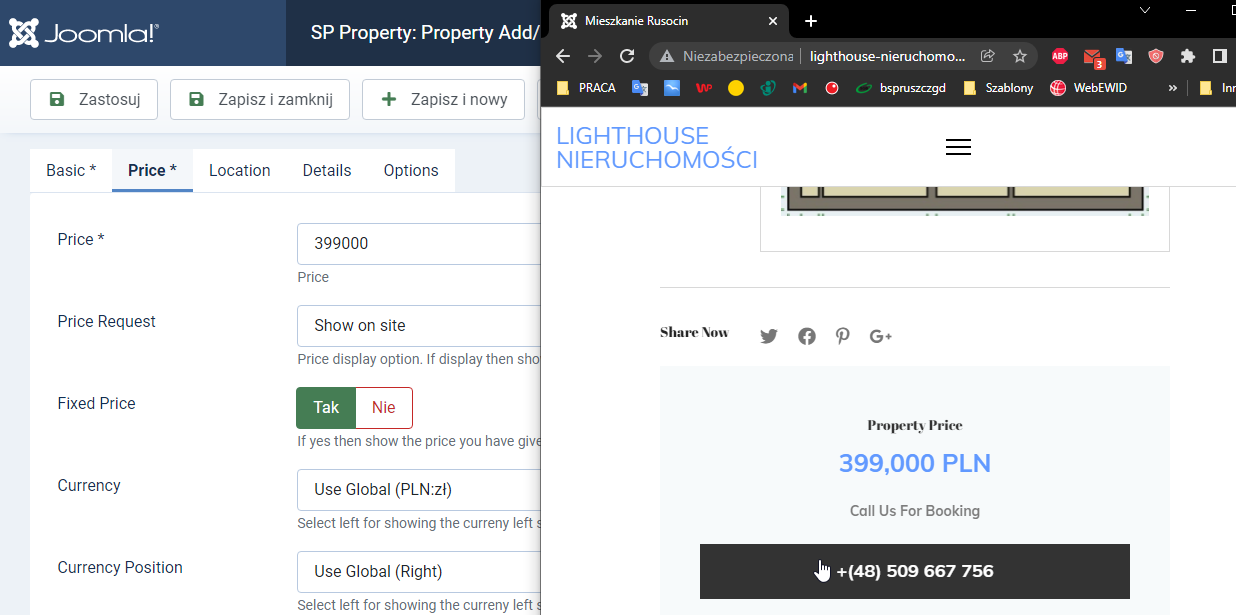
Accepted AnswerHi, the thing is that I am using "fixed price" already and it looks well on the property details page: ![http://lighthouse-nieruchomosci.pl/images/2021-12-10%2015_07_53-mieszkanie%20rusocin.png]
However on the property list is still shows "/ m2": ![http://lighthouse-nieruchomosci.pl/images/2021-12-10%2015_11_12-mieszkania.png]
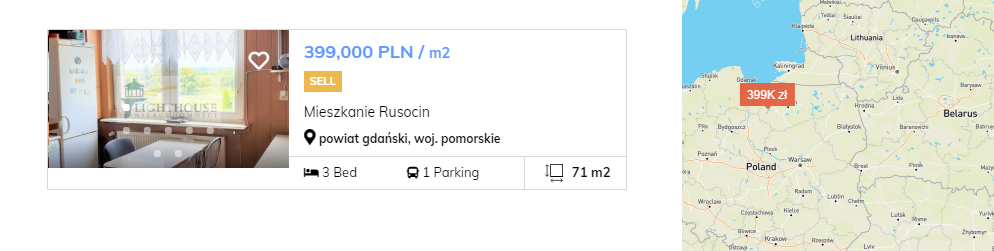
Also I would like to show the full price on the map - not 399K but 399.000

Toufiq
Accepted AnswerI am really sorry from my support team. Please share a screenshot that you want to exactly and share your site administrator access & FTP access. I will check & get back to you soon. Thanks
S
Siniša Ravlić
Accepted AnswerOn home page everything is ok: https://prnt.sc/268j29j
When you click on SEE ALL, or when you create module in menu to show properties.... https://prnt.sc/268j42q
....than properties have area metrics with price and can't change: https://prnt.sc/268j6by
I'm sorry but I can't share Administrator and FTP passwords.
S
Siniša Ravlić
Accepted AnswerThis page lists all properties:
https://splitskivali.hr/sve-nekretnine
Menu options for this page looks like: https://prnt.sc/268jiab https://prnt.sc/268jkdz
and you can see here that price is set to fixed in property: https://prnt.sc/268jomj
Toufiq
Accepted AnswerPlease share administrator access & FTP access via hidden content area. Thanks
S
Siniša Ravlić
Accepted AnswerCan you upgrade that to your extension so that it doesn't change after update? Regards, Sinisa
Toufiq
Accepted AnswerYou are most welcome. Will you please spend some to write a review about our product and support quality?
IP
Iwona Pawlowska
Accepted AnswerHi Toufiq, can you please share the solution here? I opened this thread and you helpedto Sinisa :) Of course I am not upset but I need my issue to be solved the same way. Willie Smith is also facing the same (as seen in this thread) - I think it would be good to share the resolution with the community.
Also as mentioned in the first reminder I would like to show the full price on the map - not 399K but 399.000 - please help with this as well.
BR Wojtek
Toufiq
Accepted AnswerShare a screenshot what exactly you want & share your site administrator access. Thanks
IP
Iwona Pawlowska
Accepted AnswerDear Toufiq, really? I explained what I want in the initial question and attached screenshots to prove that despite I am using "fixed price" setup the prices are shown with "/ m2" suffix - which I don't want as I entered the final value of the whole property. Sinisa (in this topic) said and proved that he has exactly the same issue. Now you are asking me "what I want"? Since you already resolved Sinisa's issue why not share the resolution on the forum so anyone can see it and contribute? Isn't it the purpose of the support forum for members? Or do you think that each one who face the same issue should open a new ticket and wait 4 weeks for your help like me? In that case please close this forum and serve only private support via email - there would be no difference. I remind you that there is another user facing the same issue and I guess he hopes to find the solution here - if you will help me offline he would not know the solution!!!!
T
tokyloop
Accepted AnswerI have the same problem, can you help me? Problem with SP Property Properties mod Total Price - Show the total price of the property? I don't want it to show the price per meter https://archive.joomshaper.com/forums/problem-with-module-sp-proprierty-proprierties-with-fixed-price-mix-always-it-with-meters This file is no longer available Same problem, hope it can be solved
Toufiq
Accepted Answer@Iwona Pawlowska Will you please provide me the Joomla administrator access & FTP access to check the issue? I will check & get back to you soon. Thanks
IP
Iwona Pawlowska
Accepted AnswerStill I don't understand why not share the resolution on forum? But I am too desperate since I am waiting since 1 MONTH, hence please see the credentials in the hidden content. Please be aware that I reported two issues:
- unwanted metrics in the whole price in properties listing - I can see for example 399.000 PLN / m2. I don't want to show the "/ m2".
- on the map I want to show the price like 399.000 and not 399K
IP
Iwona Pawlowska
Accepted AnswerHi Toufiq, I can't see the change on my website - there is still a spinner spinning and no properties are shown now on the list.
Regarding the FTP access - when I provide "[email protected]" the "something" means the FTP account username.
One more point regarding the map - I would like it to focus closer to my properties - now the map shows almost the whole Europe while my properties are located in the northern Poland only - please zoom in on the map.
Toufiq
Accepted Answer
IP
Iwona Pawlowska
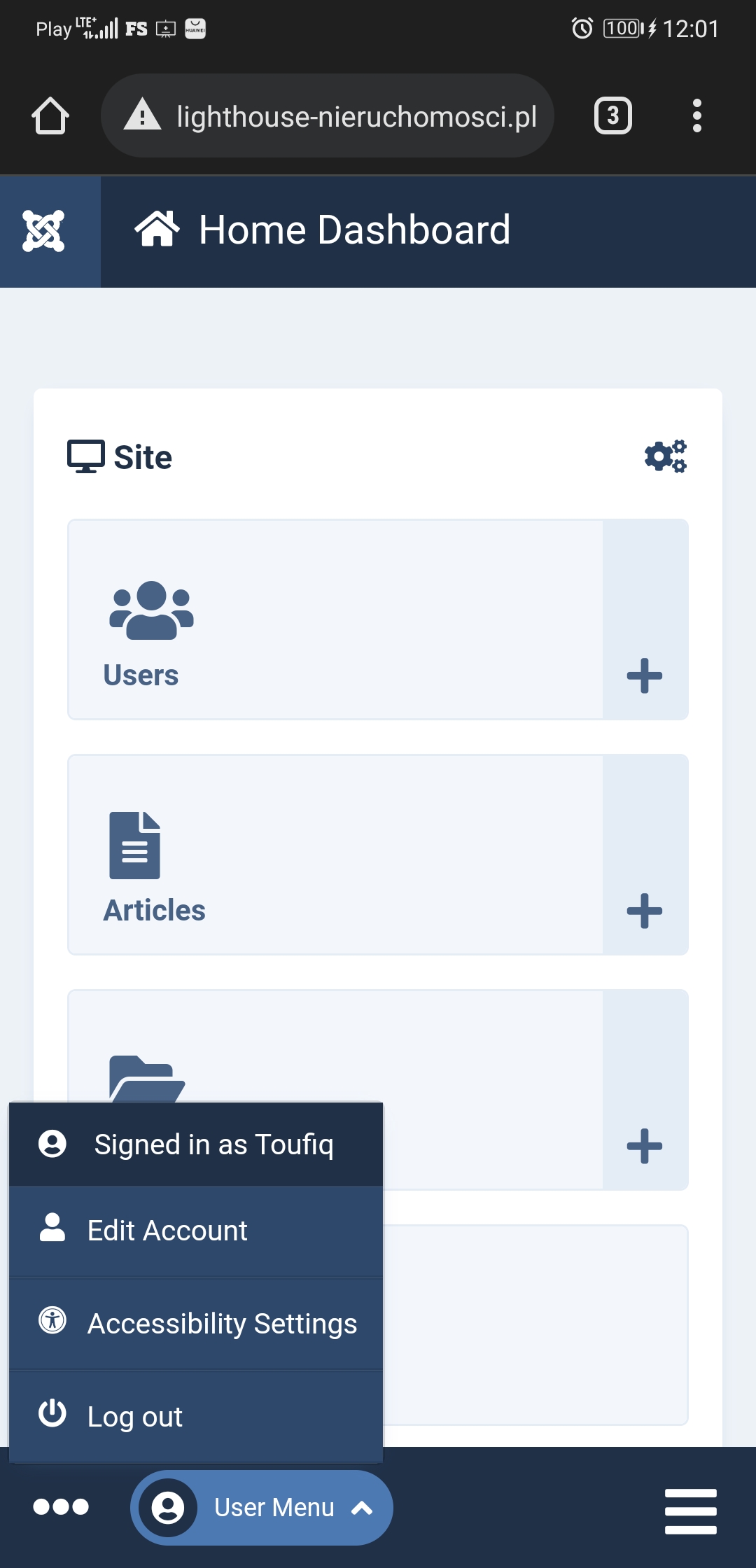
Accepted AnswerI can login using your credentials: http://lighthouse-nieruchomosci.pl/images/screenshot_20220111_120101_com.android.chrome.jpg
IP
Iwona Pawlowska
Accepted AnswerIt works - please see the screenshot - I logged in using the same credentials.
Toufiq
Accepted AnswerFTP access doesn't work
Download the file and replace the file on this file location
components/com_spproperty/models/maps.php
IP
Iwona Pawlowska
Accepted AnswerHello Toufiq, the FTP access works but the username must be composed as "[email protected]" - there was some change recently on the hosting.
The prices of the properties are no more divided by the metrics - thanks. The price on the map is also better - it is not 499K anymore, but now the currency doesn't fit the marker on the map, it is in the second line - I would like to have the price in segments like 1,490,000 PLN (or zł) and of course fitted to the marker size.
Also I would like you to zoom in the map, I don't need to see the Europe, zoom in on Northern Poland only - this is where the properties are located.
best regards
Toufiq
Accepted AnswerIf you need customization then to hire freelancer. Cause, Support policy fully prohibited provide the customization support. Thanks
IP
Iwona Pawlowska
Accepted AnswerZooming the map is also considered as customization?
My another issue is that I disabled "Add to favorite" option but the "heart" icon is still visible on the properties listing site (on the thumb) and links user to the login screen - I really want to disable it. I have another issue with amenities icons. Even tough I chose "SPproperty Icon Pack" for the amenity called "Ogrodek" in doesn't show the icon on the property site.
BR
Toufiq
Accepted AnswerAdd to favorite
Solved
Unwanted metrics in the whole price in properties listing - I can see for example 399.000 PLN / m2. I don't want to show the "/ m2".
Solved
on the map I want to show the price like 399.000 and not 399K
Solved
IP
Iwona Pawlowska
Accepted AnswerFully agree - those three are solved - can you please share the solution here so other forum members can contribute and quickly fix their issues?
Can you check also the icons issue I mentioned?
Can you elaborate about map zoom - you consider this as a customization? Is there a way user can manage this themselves? I believe that among the template users there are langer or smaller companies - this would be useful.
BR
Toufiq
Accepted AnswerFully agree - those three are solved - can you please share the solution here so other forum members can contribute and quickly fix their issues?
I have just commented some code.
IP
Iwona Pawlowska
Accepted AnswerStill for the users that paid for the template and support it would be better to search the forum and find a detailed answer about their issue straight away than wait for the solution for a month like me - don't you think? There was also another user asking for help in the same matter.
How about the other issues I mentioned (zoom, icons) - can you answer or do I need to open another support case?
BR
Toufiq
Accepted AnswerWhich i have modified i don't want to share. Cause, after implement this modification if you update the extension your modification will reset.
How about the other issues I mentioned (zoom, icons) - can you answer or do I need to open another support case?
Not clear this issue, Please explain.
S
Siniša Ravlić
Accepted AnswerDear Toufiq, just one more question.We have properties more expensive than 1 million € - 1.000.000 and this component can't show price higher than that. Can that somehow be changed? RegardsRegards
S
Siniša Ravlić
Accepted AnswerHere is backend price: https://prnt.sc/26d7d3m
Here is frontend (maximum 1.000.000): https://prnt.sc/26d7cjw
IP
Iwona Pawlowska
Accepted Answer- Issue with amenities icons. Even tough I chose "SPproperty Icon Pack" for the amenity called "Ogrodek" and selected an icon it doesn't show the icon on the property details site.
- Also I would like you to zoom in the map, I don't need to see the Europe, zoom in on Northern Poland only - this is where the properties are located. Can I choose the map zoom? To be closer to my area?
@Sinisa - there is another topic about it - I had the same problem with milions and it helped me.
IP
Iwona Pawlowska
Accepted AnswerHello Toufiq, since you didn't reply - let me rearticulate my other issues:
- Issue with amenities icons. Even tough I chose "SPproperty Icon Pack" for the amenity called "Ogrodek" and selected an icon it doesn't show the icon on the property details site. The only Icon I can use is the "check" - please help to make the amenity icons working properly.
- Also I would like you to zoom in the map, I don't need to see the Europe, zoom in on Northern Poland only - this is where the properties are located. Can we define the map zoom somewhere?
S
Siniša Ravlić
Accepted AnswerDear Iwona, did you enter the coordinates correctly? Because it shows the map correctly to me...
https://splitskivali.hr/prodaja-sve-nekretnine/58-dvosoban-stan-znjan-garaza
IP
Iwona Pawlowska
Accepted AnswerHi Sinisa, the map on the propery details page is shown correctly. My issue is somewhere else - I am showing the properties listing in a "half map" mode - http://lighthouse-nieruchomosci.pl/index.php/mieszkania Here the map view is too wide.
IP
Iwona Pawlowska
Accepted AnswerHello Toufiq, since you didn't reply - let me rearticulate my other issues:
- Issue with amenities icons. Even tough I chose "SPproperty Icon Pack" for the amenity called "Ogrodek" and selected an icon it doesn't show the icon on the property details site. The only Icon I can use is the "check" - please help to make the amenity icons working properly.
- Also I would like you to zoom in the map, I don't need to see the Europe, zoom in on Northern Poland only - this is where the properties are located. Can we define the map zoom somewhere?
IP
Iwona Pawlowska
Accepted AnswerHi Toufiq, as the username please use FULL "[email protected]"
IP
Iwona Pawlowska
Accepted AnswerI don't know how. But it's easy to undeestand. Open the link: http://lighthouse-nieruchomosci.pl/index.php/domy There is a map on the right. It shows almost the whole Europe which I don't need as my properties are located only in Northern Poland. I need this map to show a smaller region, to be "closer" , "narrow".
IP
Iwona Pawlowska
Accepted AnswerIt would be perfect if it can be 1 step less close (I mean to see a bit more of area). Can I control it myself (where is the code)? In case I will add a property in wider area.
Toufiq
Accepted AnswerYou are most welcome. Will you please spend some to write a review about our product and support quality?
IP
Iwona Pawlowska
Accepted AnswerDear Toufiq, now I noticed that the "Newest properties" module on the home page shows the price multiplied by size: http://lighthouse-nieruchomosci.pl/images/najnowsze.png In other places the price is shown properly.

Also still problems with icons - I set a new icon for "Miejsce parkingowe" but on the property page it shows a different icon: http://lighthouse-nieruchomosci.pl/index.php/rents/54-dom-w-rozynach The same for "Piwnica" - I defined another icon in "property features". It looks like it concerns fontawesome icons.
J
joe
Accepted AnswerIwona,
You have the patients of a kindergarden teacher and the technical writings skills of a lawyer.
IP
Iwona Pawlowska
Accepted Answer@joe
I learned it here :)
It is not that easy to get what you need from support :)
Toufiq
Accepted Answer@Iwona Pawlowska here is the file location if you want to use your own icon then you can upload here
http://lighthouse-nieruchomosci.pl/images/estate/icons/heating.png

J
joe
Accepted AnswerNo, issue. Just a friendly courtisy bump since I spent 1/2 hour reaing this post.
IP
Iwona Pawlowska
Accepted AnswerHello Toufiq, I don't have my own icons. I would like to have the fontawesome icons working. Now they are not working - as you see I changed the icon in Property Features (Piwnica, Miejsce Parkingowe) but this is not reflected on the website.
IP
Iwona Pawlowska
Accepted AnswerPiwnica still not ok.
Miejsce parkingowe - solved.
I would like to be sure that whatever icon I will choose in the future - it will work.
IP
Iwona Pawlowska
Accepted AnswerHello Toufiq, unfortunately this is still not working properly.
In the "property features" I defined:
- SPproperty icon "balcony" for "Balkon"
- Fontawesome icon "fa-cubes" for "Piwnica"
Both icons are displayed as a "checkmark" icon on the website: http://lighthouse-nieruchomosci.pl/index.php/rents/46-mieszkanie-rusocin
BR
IP
Iwona Pawlowska
Accepted AnswerA GENTLE REMINDER.
Hello Toufiq, unfortunately this is still not working properly.
In the "property features" I defined:
- SPproperty icon "balcony" for "Balkon"
- Fontawesome icon "fa-cubes" for "Piwnica"
BUT both icons are incorrectly displayed as a "checkmark" icon on the website: http://lighthouse-nieruchomosci.pl/index.php/rents/46-mieszkanie-rusocin
BR
IP
Iwona Pawlowska
Accepted AnswerDear Toufiq, the icons works now fine, thanks. Still unsolved issue that I reported 2 weeks ago - I noticed that the "Newest properties" (Najnowsze oferty) module on the home page shows the price multiplied by size: http://lighthouse-nieruchomosci.pl/images/najnowsze.png - those are not the fixed prices I defined in the backend of each property. Please correct the module to show the "fixed price".
In other places the price is shown properly.
IP
Iwona Pawlowska
Accepted AnswerAll good now, thanks.
What will happen if I would update the template to a new version - will I loose all the fixes? Or are they already implemented in the new version?
IP
Iwona Pawlowska
Accepted AnswerHello Toufiq, I don't know why but the icons are still not correct. For example "Miejsce parkingowe" please check - I don't want to have a train as an icon. I tried to change the icon from backend but it is not working - please fix this.
It's annoying, now I've added a new property http://lighthouse-nieruchomosci.pl/index.php/rents/65-dom-kleszczewo with brand new features for "Sauna" and "Pompa ciepła" - but on the user end the icons are shown as ticks - not what I chose. Please make it working - when my support period ends I don't wont to struggle with every next icon.