Image not displaying on Facebook posts - Forum | JoomShaper
Solved Templates

Image not displaying on Facebook posts

Asked by Saint Maur International School 4 years ago Last activity 4 years ago

Accepted answer

Marked as the solution
Paul Frankowski Senior Staff

I changed/added only one Image for one article, but if you added FaceBook API ID maybe it helped as well.

You're welcome, please mark topic as solved

8 more replies

Ariba Staff

Hello

Thank you for your query. Please try using a different image type, use jpg , not jpeg or other type.

Facebook offcial requirements

  • The minimum allowed image dimension is 200 x 200 pixels.
  • The size of the image file must not exceed 8 MB.
  • Use images that are at least 1200 x 630 pixels for the best display on high resolution devices. At the minimum, you should use images that are 600 x 315 pixels to display link page posts with larger images.

If you have any hotlink protection enabled, that can also be the issue. Check cPanel setting and disable hotlink protection and see if that fixes the issue.

Saint Maur International School Asked this

Hello, thank you for your response. the anti-hotlinking on this hosting is not a problem for the other sites I am hosting on it. I have turned off the anti-hotlinking anyway, just in case, but it does not solve the issue.
Also, the image type and dimensions are well within advised standards so that is not the issue either.
I have several site built upon your framework and templates and this is th eonly one that has this issue.
Do you have any othe ridea? thanks

Ariba Staff

Could you please provide your admin access? Use the hidden mode to share the log in credentials.

Saint Maur International School Asked this

thanks, please fidn the credentials below

Paul Frankowski Senior Staff

If I may...

Similar problems also gets WordPress users, so I am not sure if it's releated with our template.

Paul Frankowski Senior Staff

I saw that you have TAGZ component which is for OG tags, where you can also set image etc.

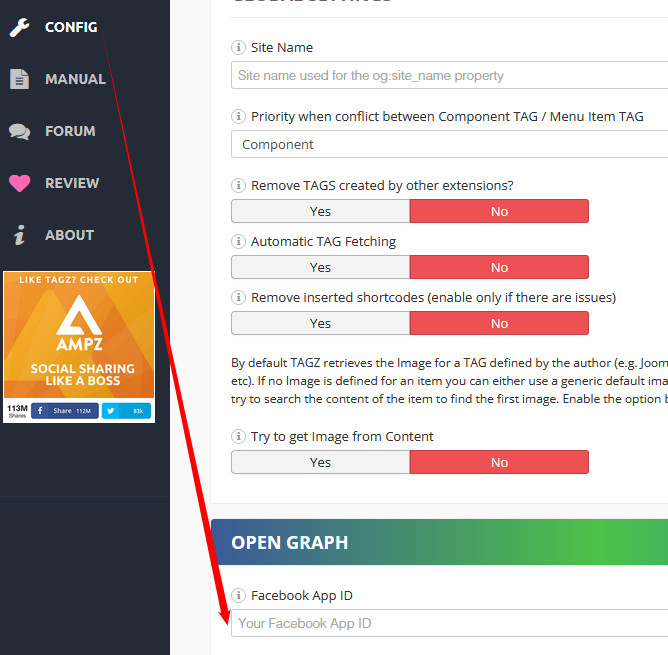
After I choose there a image for that article - its OK, but you have to add your Facebook APP ID in settings to works smoothly with FB

foto_8800_2022.jpg

Saint Maur International School Asked this

Hi Paul,
I don't know if you changed anything in the settings but all the images are now displaying on Facebook again. I am not quite sure why but thank you for lookng into it.

Saint Maur International School Asked this

Hi Paul. That's the strange thing, I did not add the API but all the articles seem to display OK, not only the one you modified. Besides, the TAGS plugin was actually unpublished all along. Perhaps it was soemthing on Facebook's side, I don't know.

Log in to reply.