

Image Not Displaying On Facebook Posts
SS
Saint Maur International School
Until recently, the posts from my website which I used to share on Facebook showed up with an image appropriately but now, I just have an empty space. When checking a page out Facebook debugger, it returns an error message:
Provided og:image URL, https://yokohamaaikidojo.com/images/2022/08/07/aikido-seminar-cambridge-02.jpg could not be processed as an image because it has an invalid content type.

Any idea?
thanks
9 Answers
Order by
Oldest

Paul Frankowski
Accepted AnswerI changed/added only one Image for one article, but if you added FaceBook API ID maybe it helped as well.
You're welcome, please mark topic as solved

Ariba
Accepted AnswerHello
Thank you for your query. Please try using a different image type, use jpg , not jpeg or other type.
Facebook offcial requirements
- The minimum allowed image dimension is 200 x 200 pixels.
- The size of the image file must not exceed 8 MB.
- Use images that are at least 1200 x 630 pixels for the best display on high resolution devices. At the minimum, you should use images that are 600 x 315 pixels to display link page posts with larger images.
If you have any hotlink protection enabled, that can also be the issue. Check cPanel setting and disable hotlink protection and see if that fixes the issue.
SS
Saint Maur International School
Accepted AnswerHello, thank you for your response. the anti-hotlinking on this hosting is not a problem for the other sites I am hosting on it. I have turned off the anti-hotlinking anyway, just in case, but it does not solve the issue. Also, the image type and dimensions are well within advised standards so that is not the issue either. I have several site built upon your framework and templates and this is th eonly one that has this issue. Do you have any othe ridea? thanks

Ariba
Accepted AnswerCould you please provide your admin access? Use the hidden mode to share the log in credentials.
Paul Frankowski
Accepted AnswerIf I may...
Similar problems also gets WordPress users, so I am not sure if it's releated with our template.
Paul Frankowski
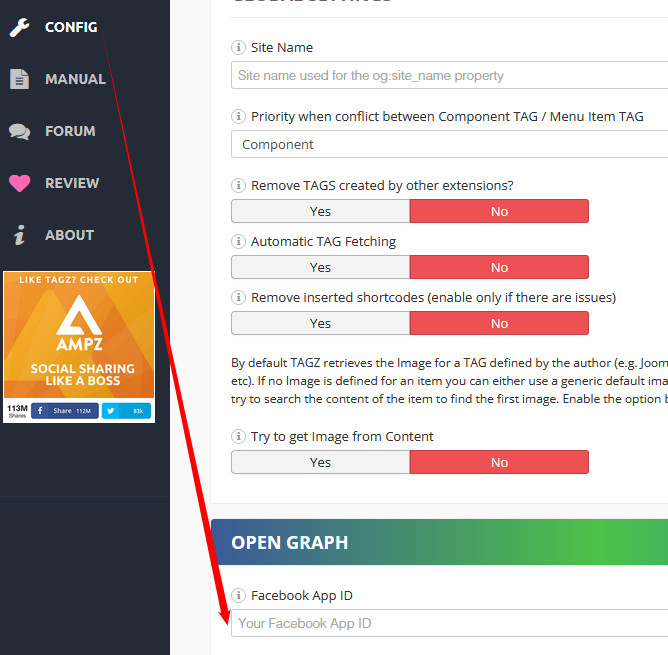
Accepted AnswerI saw that you have TAGZ component which is for OG tags, where you can also set image etc.
After I choose there a image for that article - its OK, but you have to add your Facebook APP ID in settings to works smoothly with FB
SS
Saint Maur International School
Accepted AnswerHi Paul, I don't know if you changed anything in the settings but all the images are now displaying on Facebook again. I am not quite sure why but thank you for lookng into it.