Hi,
I don't understand why my images don't display in Full article view...
It seems in the html inspector that the feature is disabled and can't get through re-activating it.
Could you help me?
Solved
General
Full article image doesn't display
Accepted answer
Marked as the solution
Toufiq Senior Staff
Please check now.
10 more replies
Olivier DELORON Asked this
Any idea?...
Olivier DELORON Asked this
To specify the problem: I noticed that the div with the image was placed into comments, as you can see in the page code.


Pavel
4 years ago
· edited
Hi Olivier.
I am not an employee of support. I suppose this is a bug in the template.
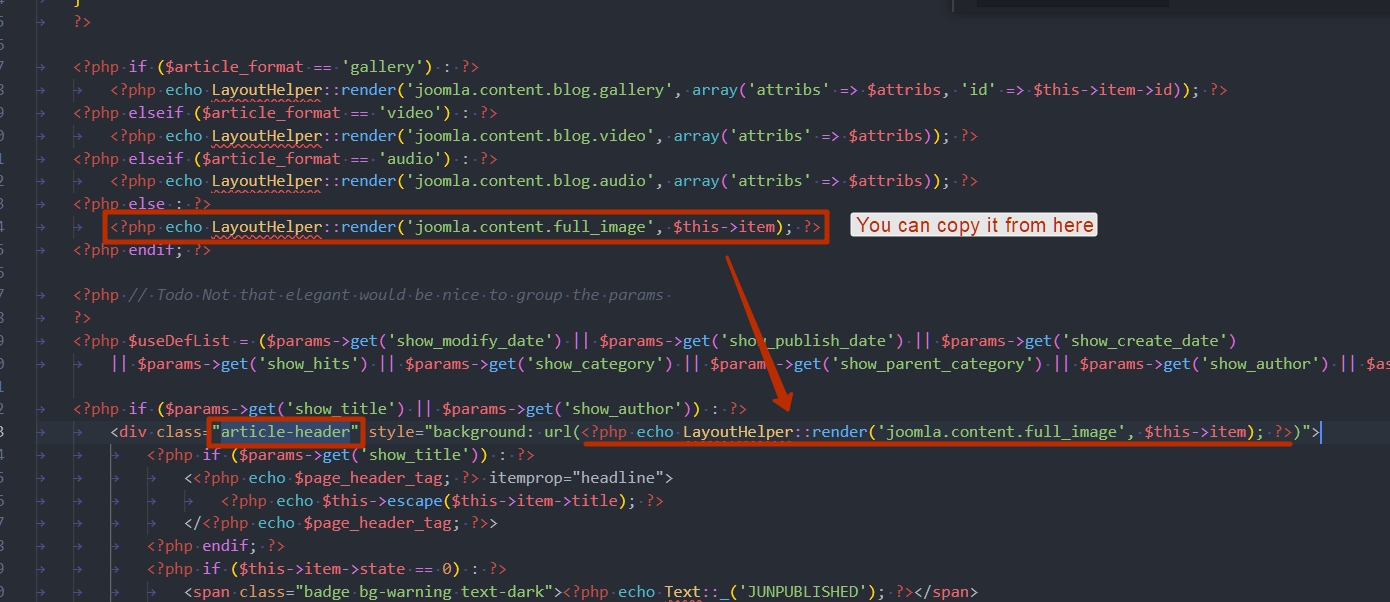
Check the file /plugins/system/helixultimate/overrides/com_content/article/default.php.
On my screenshot, the file from the standard Helix. This may not match the accuracy of your file. In this example, I simply explain the principle.
Make sure this line is in your file.
Olivier DELORON Asked this
Hi Pavel,
Thanks for your help.
Indeed the line you mentionned wasn't present in the "default.php" file. Well I did the change as you adviced but nothing changes then and the image is still not displaying in the article...
Any other idea of what I should check?
Toufiq Senior Staff
Hi there,
Thanks for contacting us. Sorry for the inconvenience. Will you please provide me the Joomla administrator access to check the issue? I will check & get back to you soon.
-Thanks
Olivier DELORON Asked this
Hi Toufiq,
Please find it below in hidden content.
Thanks in advance
Olivier DELORON Asked this
Thanks a lot Toufiq,
Thus you modified the default.php file in the template by removing the "comment".
Won't it be cancelled with the next update? Wouldn't it better to create an override?
Toufiq Senior Staff
Before update keep an backup this file.
Olivier DELORON Asked this
Well OK...
Thanks
Toufiq Senior Staff
You are most welcome :)
Log in to reply.