Kunena Forum links are not working correctly - Forum | JoomShaper
Solved Templates

Kunena Forum links are not working correctly

Asked by Patricia Lawson 5 years ago Last activity 3 years ago

Hello,
I am using LMS template with Kunena Forum built in. I installed it with the QuickStart package. I have a few problems:

My website is public: help.thinkiq.com

  1. There are linking problems in the Kunena package:
    When I try to Search (eg try this page: https://help.thinkiq.com/index.php/support-forum/welcome-mat) the links are broken; I see this:
    Notice: Undefined variable: module in /home/customer/www/help.thinkiq.com/public_html/templates/shaper_varsita/html/mod_menu/default_component.php on line 44

I don't think I should be searching in the LMS component: I should only search INSIDE the content of the Kunena component....

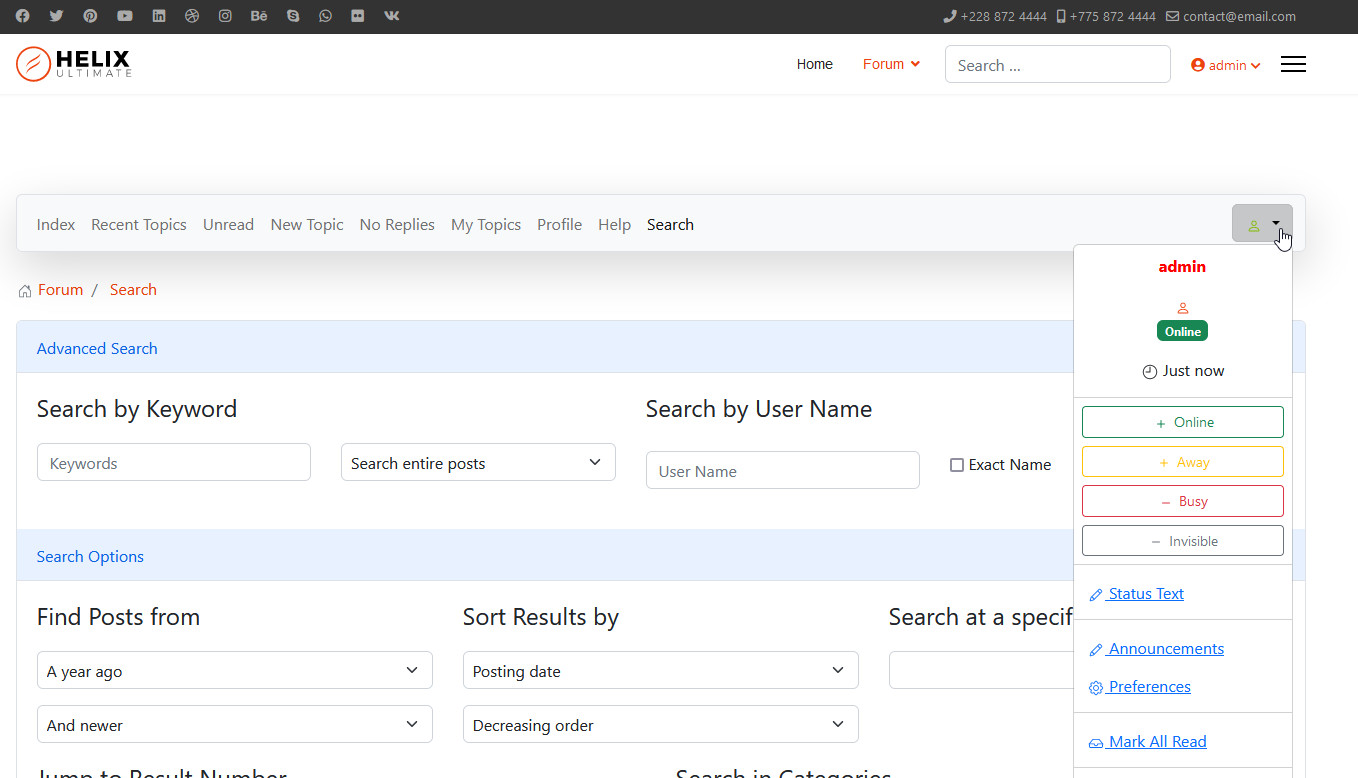
  1. On the main page of the forum (https://help.thinkiq.com/index.php/support-forum) I see a navbar icon at the top right that does nothing and I see two log-in modules on the right side.

Please help.

Accepted answer

Marked as the solution
Toufiq Senior Staff

Glad to heard that your problem solved. Will you please close the forum post and don't forget to give an upvote. Thanks

11 more replies

Toufiq Senior Staff

Hi there,

Thanks for contacting us. Sorry for the inconvenience. I have solved your problem. Will you please check & let me know.

-Thanks

Patricia Lawson Asked this

Hello Toufiq,

I believe the Search is fixed now. I had the Forum off-line, so perhaps you couldn't see the other problems:

  1. On the main page of the forum (https://help.thinkiq.com/index.php/support-forum) I see a navbar icon at the top right that does nothing
  2. and I see two log-in modules on the right side of the same (main page)

Thank you in advance.

Toufiq Senior Staff

Hi there, Can you share a screenshot? Thanks

Patricia Lawson Asked this
5 years ago · edited

You can see the problem if you browse to the URL i provided

https://imgur.com/a/lQK4H1d

I think you have to browse to the website to see the menu problem. It doesn't seem to work correctly. I am not sure if it is supposed to be hidden on desktop or not. Once I saw it open a rich Seach dialog, but I am not sure when it worked....

Thanks!

Toufiq Senior Staff

Please check now and let me know. Thanks

Patricia Lawson Asked this

Now I see two menus: a vertical textual menu AND the 'hamburger' menu"
Both work:
https://imgur.com/a/qRJUtF3

I prefer only the 'hamburger', but it needs to work.

Toufiq Senior Staff

Does it works with Joomla default Template of Protostar? Thanks

Patricia Lawson Asked this

Hello Toufiq,
Thanks for getting the login menu on the forum working properly.

The hamburger menu class is 'hidden-desktop' but it is still showing on the desktop. I cannot tell how the forum interacts with helix, but this menu shouldn't show up.
The horizontal menu that is on the page is correct and displays correctly.
https://help.thinkiq.com/index.php/forum/index

You can see the issue in Inspect.
Thanks in advance.

Pat

Toufiq Senior Staff

Did you change login access & can you share a screenshot about the issue? Thanks

Patricia Lawson Asked this

Toufiq,
I updated the Kunena forum with the latest template (BlueEagle5) and the problem no longer exists.

Thanks

Log in to reply.