I've uploaded .json file trough file manager in cPanel to Joomshaper templates for joomla, but still have error message - Forum | JoomShaper
Staff replied Templates

I've uploaded .json file trough file manager in cPanel to Joomshaper templates for joomla, but still have error message

Asked by Kunnle Peter 3 years ago Last activity 3 years ago

I've followed these steps:
*Here is the most current Google Fonts list (Jan 2022), so you don't need any API.

webfontsUNZIPfirst.zip

Download above file
Unzip file
use FTP tool (or File Manager from cPanel) and copy .json file here: /templates/edulif/webfont
If you have any file inside, delete first. To upload a new one.*

After these steps I still recieve the message for "Travus" template:
Missing webfonts.json file. Please go to advanced > Font Settings and add Google Font Api and update.

Do you have any idea how to proceed?
Thanks,
Adam

7 replies

Kunnle Peter Asked this
3 years ago · edited

UPDATE: I was able to figure out that I need a folder and the file inside. That is good. No more message like the above, however I can not see the template fully, actually I can't see much.

Can you help me here?

Paul Frankowski Senior Staff
3 years ago · edited

Hi Peter,

however I can not see the template fully, actually I can't see much.

Can you make screenshot and make link to that image, otherwise I don't know what is wrong.

I hope you know that if you installed only template site is empty, no demo data! Only that one you added already.
Only Quickstart have demo content.


If you are German webmaster - do not use Google Fonts loaded from Google US server. Otherwise your company or client may pay a huge fine >> https://www.joomshaper.com/documentation/sp-page-builder/sp-page-builder-4/google-fonts-and-dsgvo-gdpr

Paul Frankowski Senior Staff

can you please help me how to install the Quickstart?

QS installation is not part of typical support, in most cases we share only tips.Beside you didn't mention about which QS we are talking about.

Kunnle Peter Asked this

I would like to use Travus template. That is why I payed for joomshaper.. :)

Kunnle Peter Asked this
3 years ago · edited

Dear Paul, the TRAVUS QS template does not have an XML file... please help me here...

Paul Frankowski Senior Staff
3 years ago · edited

QS =/= Template

You cannot install QS inside current Joomla website. It requires both fresh space and a database where you can install it like the Joomla - step by step.

Why you don't read documenation?

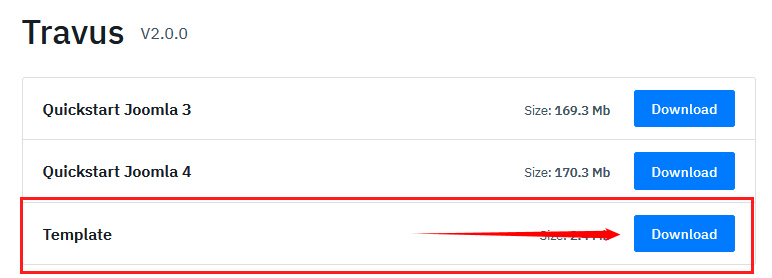
If you have installed Joomla already you can install only template package, that file

122.jpg

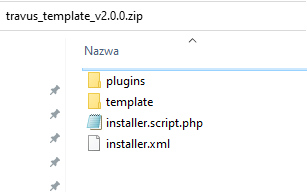
and yes, it include installer.xml file !

123.jpg

Log in to reply.