Canvas Submenu is not displayed - Forum | JoomShaper
Solved Templates

Canvas Submenu is not displayed

Asked by Holger Busch 2 years ago Last activity 2 years ago

Hello, I am using Joomla 4 with the shaper_helixultimate template in the acutal version.
My problem is, that the submenu in the canvas menu is not shows. The first yes, but not the second level.
I would be amazing, if I can solve this today, because the site should go online tomorrow :-).

Thanks, Holger

Accepted answer

Marked as the solution
Paul Frankowski Senior Staff
2 years ago · edited

Hi Holger,

there is "magic" tip that helps in 90% cases.

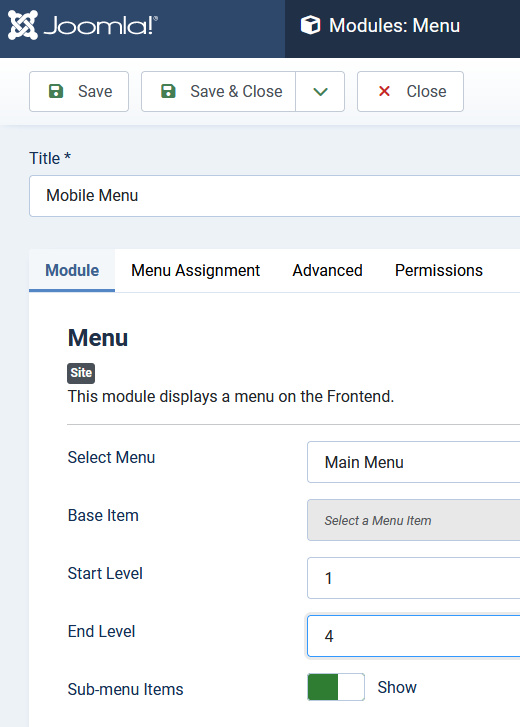
  1. In Module Manager - open Menu module published in "offcanvas" position, I hope you have that module
  2. In option "End Level" change from "All" to "5" or "4" (it doesn't matter)
  3. Make sure that "Sub-menu Items" isset to YES (Ja)
  4. Save changes and recheck again
  5. If helped, ufff :)
  6. If not, in Template Options > Menu > Off-Canvas > Maximum Level : 5 or 4 > Save changes
  7. Clear Joomla cache, and recheck

info_1728_2023.jpg

5 more replies

Paul Frankowski Senior Staff

On Monday will be Helix Ultimate 2.0.16 update with PHP 8.2 support. It allows you to switch to that PHP version without any errors. And yes, it will work with Joomla 4.4 and 5.0.x.

Holger Busch Asked this

That is the solution. I will got never the idea that end level "all" will not work.
Thanks a lot.

Paul Frankowski Senior Staff

It's not that "All" do not work, it works, but changing settings > Save & Close helps, later you can use even "All", but who normal has 10 deep submenu structure, hahahah

You're welcome.

Holger Busch Asked this

Amazing logic with changing and clicking save and close.
I am just happy, that I have my sub menu :-)
Thanks from Germany.
Holger

Paul Frankowski Senior Staff

Like in on times, please turn off and on your computer - and may help, hahah.

Log in to reply.