I buyed just now a personal plan and downloaded new version of extensions to update my site J3.10.12.
I installed SP Page Builder Pro vers. 3.8.10 without errors, but when I downloaded and installed SP LMS vers. 4.0.8 my site is disappeared at all: in home page frontend and also in administrator page!!!
How can I fix it?
Tx
Solved
Extensions
SP LMS installation
Accepted answer
Marked as the solution
Paul Frankowski Senior Staff
This Custom CSS should help:
@media screen and (min-width: 820px) {
article.item .content-wrap
{padding-left: 80px;}
}
Alvas Asked this
Thanks a lot!!! Fixed it!
20 more replies

Ofi Khan Staff
Hello al
Please share a screenshot of your issue to understand it better. Take a screenshot and share via any platform. For example: Lightshot or Imgur
Best regards
Alvas Asked this
My pages (home page & Administrative page) are totally clear, with error 500.
https://www.uni3.it/j4/
https://www.uni3.it/j4/administrator/
Paul Frankowski Senior Staff
2 years ago
· edited
If you have access to J! admin:
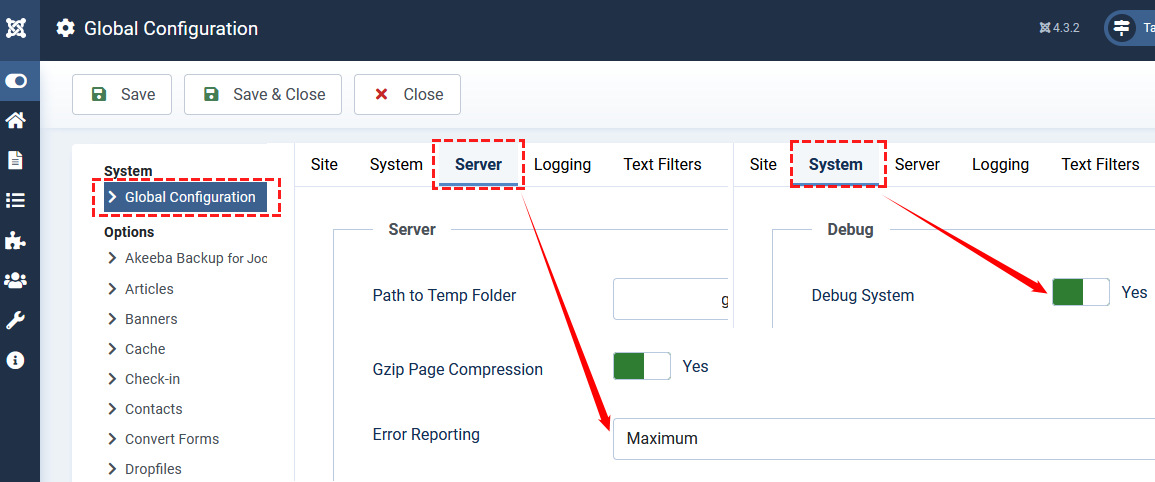
If not, edit configuration.php file (FTP) and edit those lines, to set this values:
public $debug = true;

public $error_reporting = 'maximum';
Then you should see more about Error details.
BTW
- I hope you know that Joomla 3.10 support ended in Sep 2023?
- What PHP version you have set?
Alvas Asked this
2 years ago
· edited
Ok, this is the error that appear:
Fatal error: Cannot declare class plgSystemSplmsupdater, because the name is already in use in /web/htdocs/www.uni3.it/home/j4/plugins/system/splmsupdater/splmsupdater.php on line 0
I have J3.10.12 installed and the pre-upgrade analysis lists many row of probably incompatibility, also after I upgraded SP Page Builder Pro vers. 3.8.10, Template Educon, SP Simple Portfolio vers. 2.07. There are many plugin with warning!! I can't attach the screenshot in this text area :-( (Ther isn't the button to attach!).
- Yes, I know that Joomla 3.10 support ended in 2023 and it's for this reason I'd upgrade at J4!
- Now (in J3.10, before upgrade) PHP version is 7.4
How can I fix it?
Tx in advance
Alvas Asked this
Can I have support of you? Tx
Paul Frankowski Senior Staff
2 years ago
· edited
By now disable plugin SP LMS Updater from Extensions Manager.
If your J! Admin do not work use FTP and:
- rename folder: plugins/system/splmsupdater/
- then disable plugin SP LMS Updater from J! Admin.
Alvas Asked this
Perfect!!! I regained access to Front & Administrative pages!!!
But now, how can I proceed to upgrade at J4???
If I launch the Joomla upgrade, I see the summary that you can see here: https://drive.google.com/drive/folders/1M2POQ3zNJK0lRweEVV5GJMYRyR8j8S-j?usp=sharing.
But I already updated SP Page Builder, SP LMS, Educon Template and other extensions, but into pre-update check to J4 seems like is not enough for proceed. How con I fix it?
Tx a lot
Paul Frankowski Senior Staff
Ignore and upgrade. BACKUP first.
SPPB 3.8.10 can be used ONLY inside Joomla 4.4x, not J5.
Alvas Asked this
Ok, thanks a lot!
Your suggestions are OK: I updated to J4.4.2.
How can I proceed now?
Can I rename at orignal name the folder: plugins/system/splmsupdater/ and can I enable SP LMS Updater from J! Admin?
If I'd update at J5, can I update SP Page Builder Pro vers.5 AFTER update Joomla?
Thanks
Paul Frankowski Senior Staff
yes, you can try.
Alvas Asked this
Ok, thanks.
I tried to rename at original name the directory of LMS plugin, but I receive an error:
https://drive.google.com/drive/folders/1M2POQ3zNJK0lRweEVV5GJMYRyR8j8S-j?usp=sharing
How can fix it?
Alvas Asked this
Can I have support of you? Tx
Paul Frankowski Senior Staff
Today, now is Friday night, sorry, but NO DEVELOPERS HELP until monday.
PLEASE - remind me on Monday morning.
Alvas Asked this
Good morning, today is tuesday and I'm waiting your precious support. Tx a lot
Alvas Asked this
Good morning, I'm still waiting your support! I have to fix the error on online site and I have difficult to deliver the site at my client!
Can I've your support?
Tx
Alvas Asked this
2 years ago
· edited
Here I am!
There are many issue:
- I tried to rename at original name the directory of LMS plugin, but I receive an error: https://drive.google.com/file/d/12AZqH4-EvA7LHXajhLRA-pjrg-aaMGf_/view?usp=sharing
- In many point of module in frontpage I visualize: "Deprecated: htmlspecialchars(): Passing null to parameter #1 ($string) of type string is deprecated in /web/htdocs/www.uni3.it/home/nic/templates/shaper_educon/html/layouts/chromes/sp_xhtml.php on line 28"
- Into blog pages: "Deprecated: strtotime(): Passing null to parameter #1 ($datetime) of type string is deprecated in /web/htdocs/www.uni3.it/home/nic/templates/shaper_educon/html/com_content/category/blog_item.php on line 30"
- Text over image: https://drive.google.com/file/d/1m0O5J0rq6L9N6OaJB1edK5I43-o6LoB4/view?usp=sharing
- Image of site in smartphone screen, with menu over the page (see red arrows) and a strange character (see yellow arrow): https://drive.google.com/file/d/1C3QiRYIMocMmNOG3NNS-m8PHhqE32qy5/view?usp=sharing
How can fix it?
Thanks a lot!
Paul Frankowski Senior Staff
2 years ago
· edited
Sorry for the delay.
- If you reinstalled component, you don't have to touch it.
- Not every template fully support PHP 8.2 , sorry! That's why you may have those messages "Deprecated...."
- this same
- How you added that image? For it me it looks that you used in Blog options tab, but this format of image doesn't fit. You should use horizontal images for intro, min. 1260px of width.
2 & 3 - check template version, and by now hide errors from Global Configuration.
Paul Frankowski Senior Staff
2 years ago
· edited
- To fix it, please use below Custom CSS
@media screen and (max-width: 760px) {
.hidden-sm, .hidden-xs {display: none !important; visibility: hidden;}
.offcanvas {visibility: visible;}
}
 .offcanvas {visibility: visible;}
 .offcanvas-menu .offcanvas-inner .sp-module .sp-module-content > ul {   margin: 0 5px; display: block;}   #sp-menu > .sp-column .sp-module { margin-top: 0;}
A VERY IMPORTANT QUESTION:
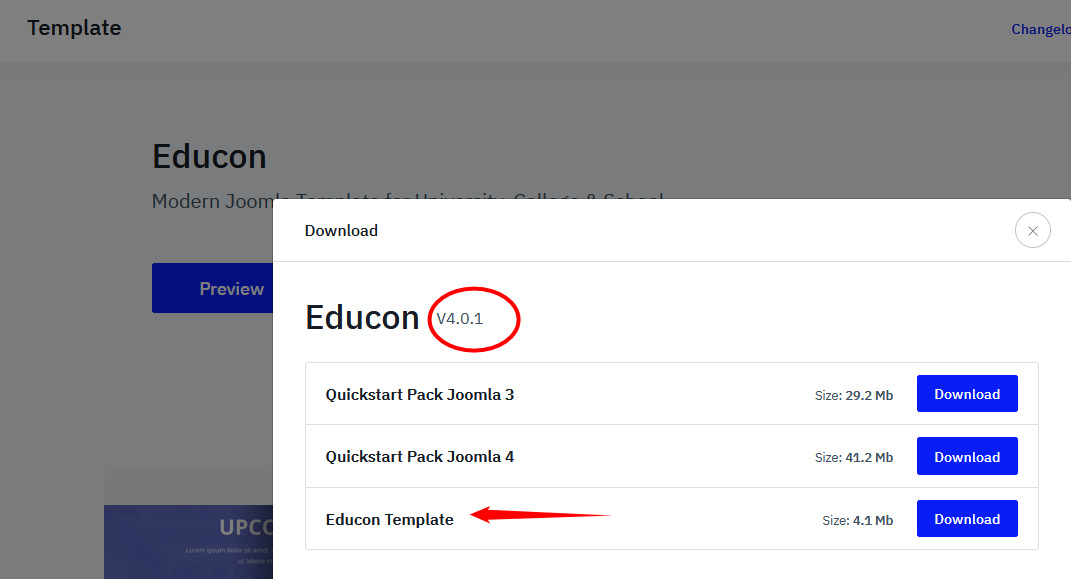
Have you updated Educon template to last version?
On your site there should be Version 4.0.1 installed.
Alvas Asked this
Thank you for reply.
- I reinstalled the component many time, vers. 4.08, with file com_splms_fullpackage_v4.0.8.zip. At end of installation I receive the same error that I showed in the previous message and the only solution is to rename the directory that you suggest me!
- Ok, I disabled Debug and error messages, but I don't think is the better way to resolve
- the same
- The image is set into Introduction Image and not Block Option (see attached image) and the situation is the same for every articles, independently if image is orizontal or vertical https://drive.google.com/file/d/1leR381fPSQ-RflKmdi7XK5VWczlaBMY9/view?usp=sharing and https://drive.google.com/file/d/1Ku-1m9_4f5TmMKC1waclPgTT9xrANhkm/view?usp=sharing
- Ok for fix error with the custom CSS, but, at first, where I can fix and what are the step to introduce customize css? And... in case of upgrade of site can I loose this code? For example, if I update at J5?
- For Template I assure you I installed Educon ver. 4.0.1 exactly how you show me
- I still have J4 version and can I install SP Page builder Pro vers. 5? Or is better to upgrade at J5 and after upgrade SP Page Builder Pro ver 5?
Tx a lot
Alvas Asked this
Can I have your support, please!? Many times your replay it's very late...
Paul Frankowski Senior Staff
I don't have J5 or PHP 8.2 version just from my pocket. This is independent of me.
About 5. If you will add custom CSS where we teach in Helix documenation, you will not lose it during update.
About 7. I don't know the answer, I never tried in that template, you can try on subdomain with backup.
Alvas Asked this
Tx a lot for your fast reply!
Now I'll go to Helix documentation to teach how add custom CSS.
But how fix about 4? See here: https://drive.google.com/file/d/1m0O5J0rq6L9N6OaJB1edK5I43-o6LoB4/view?usp=sharing
Tx in advance if your reply now.
Alvas Asked this
Ok, I solved problems for smartphone, but it's still present this one:
https://www.uni3.it/nic/index.php/ultime-notizie/248-8-gennaio-ripartono-i-corsi
https://www.uni3.it/nic/index.php/ultime-notizie/249-nel-corso-di-psicologia-si-parla-di-insonnia
https://www.uni3.it/nic/index.php/ultime-notizie/246-nel-corso-di-geografia-si-parla-di-acqua-in-agricoltura
where the text it's over image and this is setting of articles:
https://drive.google.com/file/d/1oA06QHAwDb-SulWH5JZFrOpSjLbJhiXk/view?usp=sharing
https://drive.google.com/file/d/1Xf58rAmK-jIjlUFGH6TD-cEt3NLt9f9p/view?usp=sharing
How can I fix it?
Thank you
Alvas Asked this
Can I receive your help? Tx
Log in to reply.