Mobile hamburgermenu problem - Forum | JoomShaper
Solved Helix Framework

Mobile hamburgermenu problem

Asked by Mia 2 years ago Last activity 2 years ago

Hello,

we have a mobile menu with sublinks for one item. If clicked on the item(text), the submenu doesnt open.
It works only by clicking the "down-"Icon. How can we make open the submenu if clicked on the menuitem(text) ?
Screenshot: https://snipboard.io/zLb9xO.jpg

Thank you.

Accepted answer

Marked as the solution
Pavel

Hi.

Try this CSS code

.offcanvas-menu .offcanvas-inner .sp-module ul > li .offcanvas-menu-toggler {
    inset: 0;
    text-align: right;
}

14 more replies

Rashida Rahman Staff

Hi there!

Thanks for reaching out.

If the menu has no redirection link then it can be achived. Please share your site URL here. I will share custom CSS for you.

Best Regards

Mia Asked this

Thanks, but it didnt helped. No change.

Pavel
2 years ago · edited

Hi. This cannot be. It works 100%. I do not see that you added this code anywhere.

Mia Asked this

Code is added in the Custom CSS section from the shaper_helix3 theme, as usual. Please see screenshot https://ibb.co/zH51gPr
Even with the "!important" tag its not working. CSS/JS compression and Less to CSS are off, Joomla Cache and /temp are cleared.
You can see it yourself with the account data provided in the hidden content field here.

Pavel
2 years ago · edited

Hi.

Perhaps you have several template styles and you added the code to the wrong template style.

For example, this code also does not work (not determined)
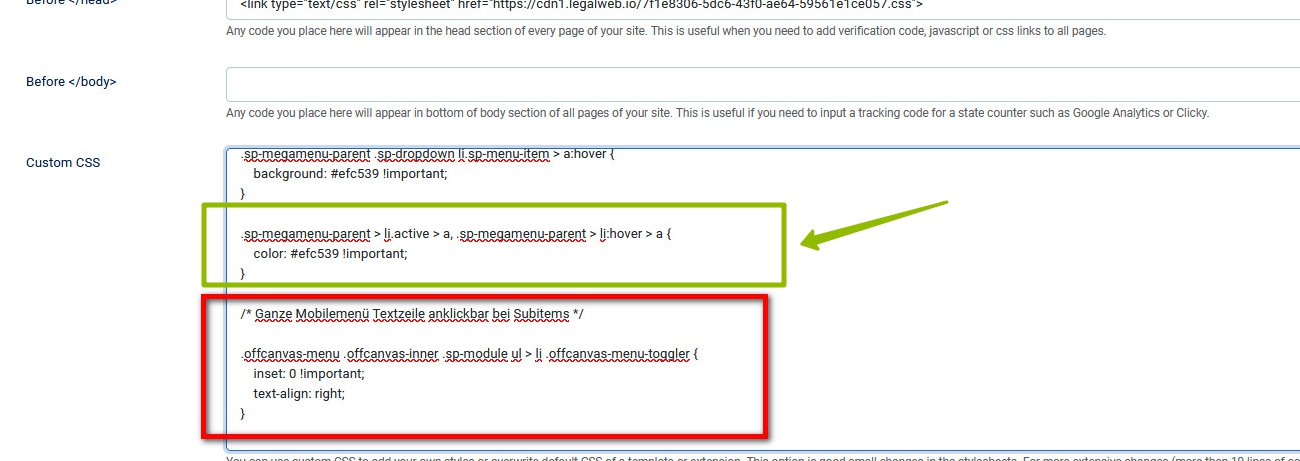
Add the code here /templates/shaper_helix3/css/custom.css instead of adding it to the template style settings.

Code is added in the Custom CSS section from the shaper_helix3 theme, as usual.

Template style settings > Custom CSS field is not best place for code.
Use this field only for small fragments of the code and only in case if you have several template styles and you want to unique them. In all other cases, place your code in custom.css file.


MoneyPeet

You can also use this piece of javascript. Put in the template -> Custom Cde -> Custom Javascript.
Works fine for me.

jQuery(function($) {
    $(document).on("click", ".menu-deeper", function(event) {
        if (event.target.classList.contains('menu-toggler')) return;
        if (event.target.children.length) {
            event.preventDefault();
            event.stopPropagation();

            $(this)
                .toggleClass("menu-parent-open")
                .find(">.menu-child")
                .slideToggle(400);
        }
    });
});

Regards, Peter

Mia Asked this

Hello Pavel,

thank you very much, in the custom.css the code now works for the shaper_helix3 template.

We tried to replicate it on another installation with shaper_helixultimate template, but there it doenst work.
Please, do you have also a code for shaper_helixultimate for us? (or do you want me to open a new ticket?)

@Peter: Thank you too, we also tried the JS snippet, but it was not working for us.

Pavel

Hi. Here is for Helix Ultimate

.offcanvas-menu .offcanvas-inner ul.menu > li.menu-parent > a > .menu-toggler {
    width: 100%;
    text-align: right;
}

(or do you want me to open a new ticket?)

I'm not an employee of support :)

Log in to reply.