need to change the hover color on my menu. - Forum | JoomShaper
Solved Templates

need to change the hover color on my menu.

Asked by Charley Hankins 5 years ago Last activity 5 years ago

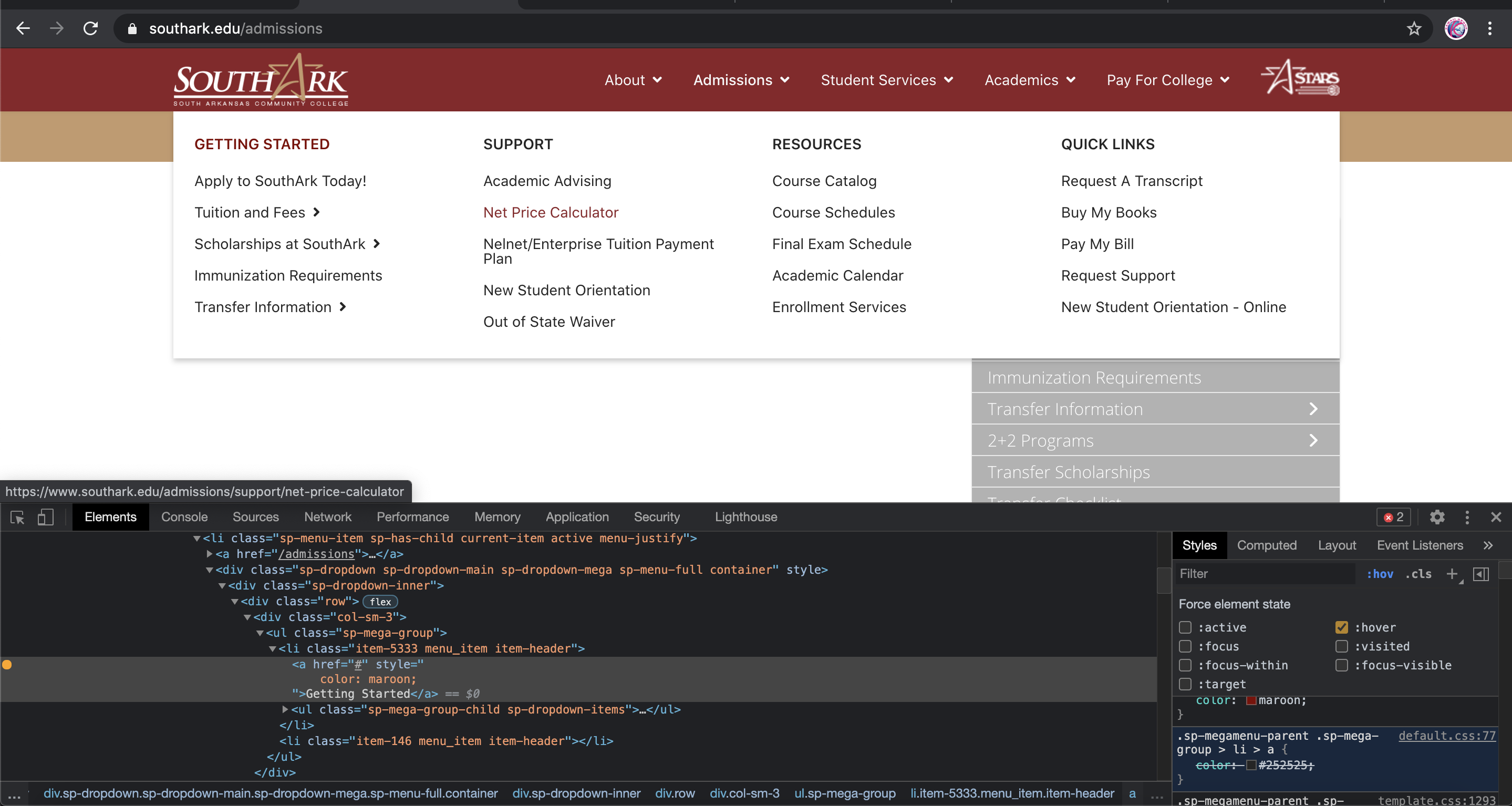
The hover color on my mega menu is blue. I need to change it to marroon.

You can see it here:
southark.edu

What code do I need to put in my Custom CSS to accomplish this?

(It only happens on the home page. The color is correct when one is in an internal page)

Thanks,
CH

Accepted answer

Marked as the solution
Ariba Staff

Hello

The CSS code can be added there from our end. No problem at all, i will check your website and provide the Code. Kindly allow me some time.

9 more replies

Ariba Staff

Hello

Please share your administrator access here . Use the Hidden Content box to share the credentials.

Thank you

Charley Hankins Asked this

I am apprehensive about sharing this. What are you planning to do?

Charley Hankins Asked this

ok. Thanks very much!
CH

Ariba Staff
5 years ago · edited

Hello

You have to add this code in the Custom CSS.
The sub menu is maroon now when you hover on it.

.sp-megamenu-parent .sp-mega-group > li > a:hover {
        color: maroon;
}

Screen Shot 2021-04-23 at 11.53.29 PM.png

Charley Hankins Asked this

Sorry. That didn't work. The links are still blue.

Ariba Staff
5 years ago · edited

Hello

I have checked from my end, the code that i have provided to you has not been used properly as i can see. Can you please insert the full code as it is in Custom CSS just like this:

.sp-megamenu-parent .sp-mega-group > li > a:hover {
        color: maroon;
}

If it still does not work, please share your administrative access.

Charley Hankins Asked this

Still not working. I have inserted my administrative credentials.

Thanks,
CH

Ariba Staff

Hello,

Sorry I just saw you have inserted the custome code in template style - "shaper_helixultimate - Default (pages)". And it was working for all the pages except the Home page.

Now I have added the code in "shaper_helixultimate - Default (HOME PAGE)" as well. Now its working on all pages.

Charley Hankins Asked this

Ah. I hadn't considered that. Thanks.

Log in to reply.