Title image height in Restora template - Forum | JoomShaper
Staff replied Templates

Title image height in Restora template

Asked by gemmajoom 5 years ago Last activity 5 years ago

How can i reduce the height of the cover image of the pages where the title appears?
( see attached image https://ibb.co/vcT9kX6 )

I tried with these custom css but it doesn't work:

#sp-title {
    height: 80px !important;
}
.sp-page-title {
    height: 80px !important;
}


8 replies

Ofi Khan Staff

Hello gemmajoom

Please use this CSS to Template Options -> Custom Code -> Custom CSS

#sp-title .sp-page-title{
    padding: 100px 0px;
}

Best regards

Muntasir Sakib Staff

Hello there,

Change the padding instead of adding Height custom CSS code. That will solve the issue.

Thanks!

gemmajoom Asked this

I found that it is the article featured image of the blog option to change, not the title image.
How to do?

Ofi Khan Staff

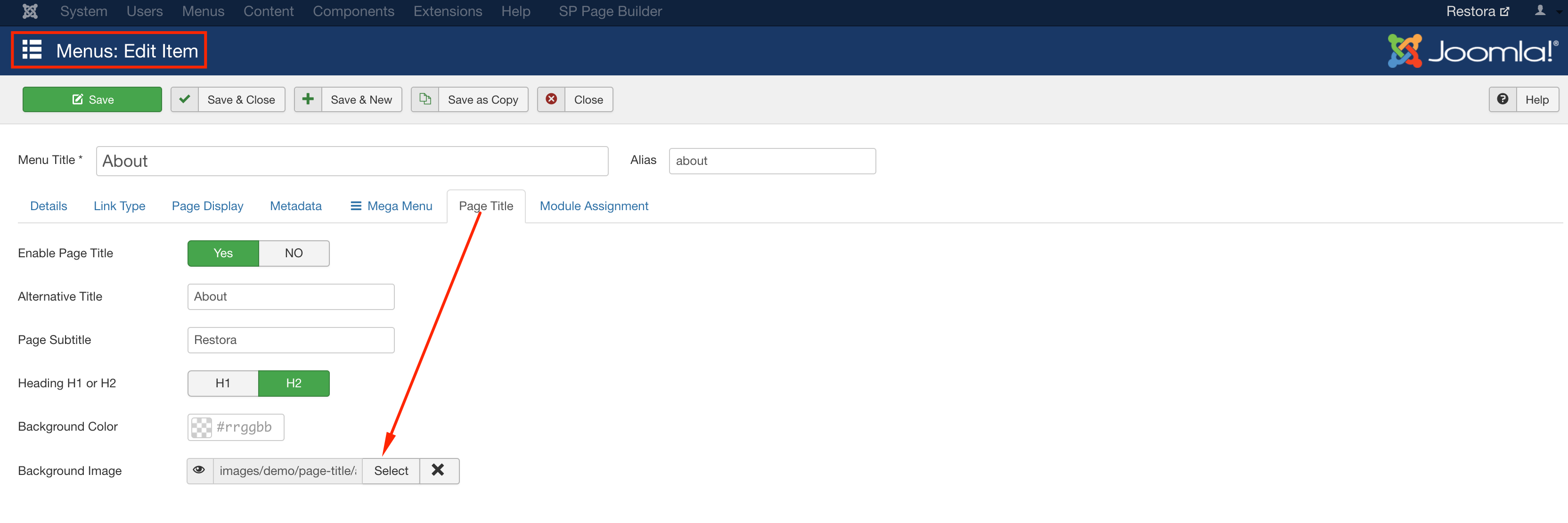
You can change the image in the Main Menu -> About -> Page Title -> Background Image

Screenshot at Apr 24 16-30-04.png

gemmajoom Asked this

on the Restora Template, Background Image of page title does not work, the image is not displayed, so I had solved the problem with the featured image of the native joomla article

gemmajoom Asked this

How can i reduce the height of the featured image of the native joomla article?

Pavel

Hi.

.view-article .article-full-image img {
    height: 200px;
}

or

.view-article .article-full-image img {
    height: 200px;
    width: 100%;
    object-fit: cover;
}
Ofi Khan Staff

Pleaes try the CSS given by Pavel.

Log in to reply.