

Configure Blog Title & Images In Luxyort Template
W
wedesign4me
Where do you configure the large image under the blog article title in Luxyort? And how do I remove the FB sharing icon and move the date to be under the article title? I installed from quickstart.

11 Answers
Order by
Oldest

Toufiq
Accepted Answer
W
wedesign4me
Accepted AnswerThat does not tell me what I want to know. I want to know how that section is designed/configured. It has a background set to a specific height. Where is that configured? It has the Date then Article Title followed by Social Sharing. Where is that. What determines that. What if I want to change the font of the Article Title and move the date underneath the Title, how do I do that?

Paul Frankowski
Accepted AnswerHi. About image - as you saw it takes whole space, it means that wider looks better. Try to use 1960px of width
About Social
Those are social share icons - you can disable them from Template Options - Blog - Details - Social Share (On/Off)
Paul Frankowski
Accepted AnswerAbout Font
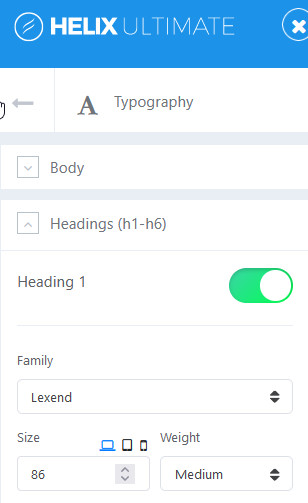
By default we used Google Font - Lexend, Article title is H1. It means that you can change that from Template Options - Typography - Headings (H1-H6) - Heading 1 (here)
W
wedesign4me
Accepted AnswerI'm not being clear. Some pages have the big hero image and some don't. I want to know the difference in how these pages are constructed. Note that the top image and text placement differs in the below screenshot from the "offers" pages.
 Differs from:
Toufiq
Accepted AnswerHi there, The second banner image comes from article image. First one comes from title image. Thanks
W
wedesign4me
Accepted AnswerSo if I want to create 2 pages from scratch with each of those header layouts, what would be the steps for the top one and waht would be the different steps for the bottom?
Toufiq
Accepted AnswerCan you share a screenshot that you want to do exactly? I will try to do my best for you. Thanks
W
wedesign4me
Accepted AnswerI'm tired. I'm leaving joomla. I pay you guys good money for functionality that wordpress has by default and you can't even understand my requests for clarification. I'm tired of having to go back and forth with these forum posts and still not understanding how the bloody page is composed. I'm tired. I'm through. I'm out.
Paul Frankowski
Accepted AnswerNumbers of default features in Joomla is bigger than in Wordpress. All is based on webmaster expirence. If you are WP guy sometimes it's hard to switch thinking. It is a matter of ingrained habits.
We can create you video tutorial if this may help.
Toufiq
Accepted AnswerIf you build two page using page builder then you can deceide which elements you want to top or bottom. Besides, if you create an article then the design will be look like second screenshot. But, If you want Joomla defult design, Please let me know and share your administrator access. I will replace the main file of Helix. Thanks
So if I want to create 2 pages from scratch with each of those header layouts, what would be the steps for the top one and waht would be the different steps for the bottom?