Strings - modify Events Component - Forum | JoomShaper
Solved Templates

Strings - modify Events Component

Asked by John 1 year ago Last activity 1 week ago

I am using a bit ot a combination of the SP Strings template, but over-ridden with the Rythm template and all works fine except for one area.

The Albums and Artists works fine.

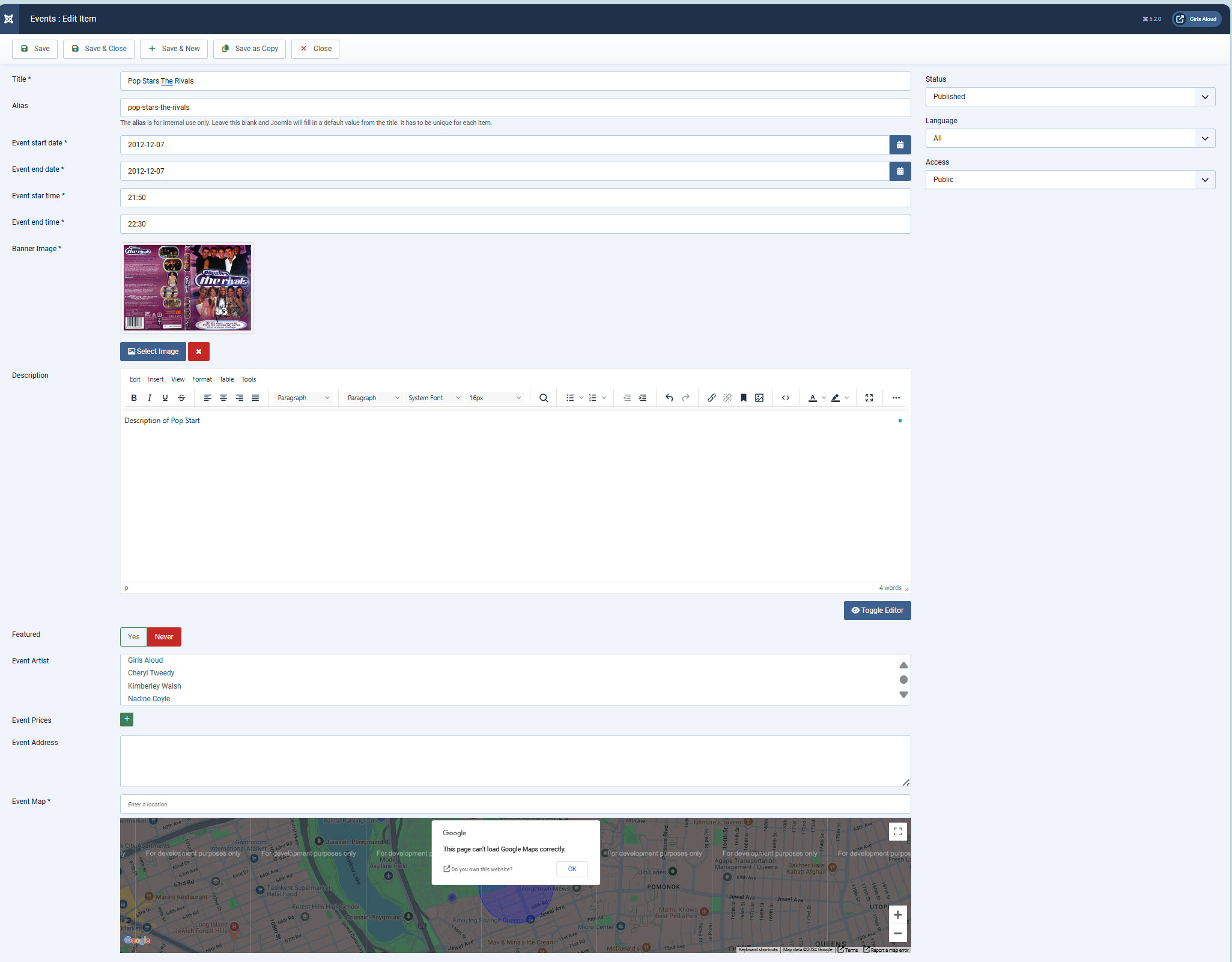
For the Events Component, I am using it to display Blu-rays and DVDs and I want to remove:

Event Start Date, Event end date, Event Start Time, Event End Time, Event Prices, Event Address and teh Event Map, so Event just shows:

A photo of the DVD/BluRay and a description of the disk.

How can I do this please. Any advice would be much appreciated.

https://nicolaroberts.uk/images/GAEventedit.jpg
https://nicolaroberts.uk/images/GAEventpage.jpg

So basically, delete everything from the blue Event Time & Dates blue area downwards.

Thanks in advance

Accepted answer

Marked as the solution
Atick Eashrak Shuvo Staff

Please add the following CSS code to your Template Options -> Custom Code -> Custom CSS to hide those section in the frontend

.spstrings-event-schedule, .spstrings-event-pricing, .spstrings-event-maps{
    display: none;
}

6 more replies

Atick Eashrak Shuvo Staff

Hi there,

Thank you for reaching out. Unfortunately, the component cannot be modified directly; however, you can hide the unnecessary sections using custom CSS. Follow this documentation to use custom css https://www.joomshaper.com/documentation/helix-framework/custom-code-css-js-meta#documentation-heading-3

John Asked this

Thank you for responsing so quickly and confirming that custom CSS can be used to hide sections of the template.

While I am OK with HTML coding, I need to admit that writing the code to exclude sections is way beyond my abilities. Would you be willing to suggest the code for one of the sections that I would like excluded so I can learn from it how to exclude the others?

Thank you again for your resposne.

John Asked this

Thank you so much, you are a star!

Pius Degonda

I have the same problem as John. I've been able to hide everything so far. But I'd also like to hide the artists. So, the artists. What else do I need to enter? For example, (spstrings-event-schedule,)

Atick Eashrak Shuvo Staff

Hi,

We sincerely apologize for the inconvenience.

Could you please share the page URL where you’re trying to hide the artists, along with a screenshot highlighting the specific section you want to hide?

Once we have these details, we’ll check the page and let you know the appropriate string or setting to use.

Thank you for your cooperation.

Pius Degonda

Yes, please excuse me. It's the “Unsere Künstler” section.
Everything needs to be removed, from “Chaiseraugschter Chilbi...” up to and including the picture of the guy with the guitar and the link behind it.

Thank you very much

Atick Eashrak Shuvo Staff

Please add the following CSS code to your Template Options -> Custom Code -> Custom CSS

body.view-event .spstrings-event-info ~ .section-title,
body.view-event .spstrings-event-info ~ .section-title ~ .row {
    display: none !important;
}

After applying the change, please make sure to clear both your Joomla cache and your browser cache to see the updated result.

Pius Degonda

Great, that works. Thank you so much.

Atick Eashrak Shuvo Staff

You're very welcome! I'm glad to hear that it worked. Please feel free to reach out if you need any further assistance.

I have a humble request: If you could spare a moment to leave us feedback, it would mean a lot to our team and inspire us to continue improving. You can share your review at the following links:

  1. Trustpilot Review
  2. SP Page Builder Review
  3. EasyStore Review

We truly appreciate your support!

Log in to reply.