Does anyone know how to force the favicon to display in safari?
Staff replied
Helix Framework
My favicon not displaying in Safari
4 replies

Mehtaz Afsana Borsha Staff
Hi
Thanks for contacting us. If your favicon isn't showing up in Safari then the most likely culprit is browser caching where Safari is displaying an older version of your favicon, you might need to clear your browser cache or try accessing the site in incognito mode to see the updated icon.
-Regards.
pixelfuzion Asked this
I have done all that... still does not display. Even pulled it up on an unrelated computer and does not work. I was told there needs to be aspecific additional line of code for Safari to display the icon.

Paul Frankowski Senior Staff
1 year ago
· edited
Hi,
- For Safari browsers you need extra files. Apple Touch Icon (for iOS and macOS) uses the apple-touch-icon for adding websites to the home screen or bookmarks.
File Format: PNG (.png)
Key Sizes:- 120x120 pixels: Standard iPhone Retina.
- 152x152 pixels: Standard iPad Retina.
- 167x167 pixels: iPad Pro.
- 180x180 pixels: iPhone Retina HD.
Here is example HTML Link Tag that you should use as well, in Template Options > Custom Code > Before Head.
<link rel="apple-touch-icon" sizes="180x180" href="/apple-touch-icon.png">
Create, and upload those image files (.png and .ico) in root folder:
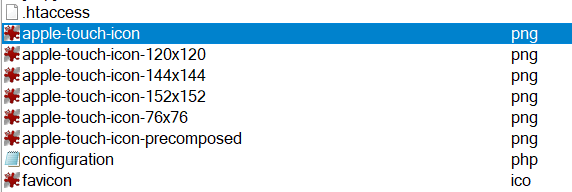
Mehtaz Afsana Borsha Staff
Hi
Is this solved now? If yes, you can then close this post by accepting the answer.
Log in to reply.