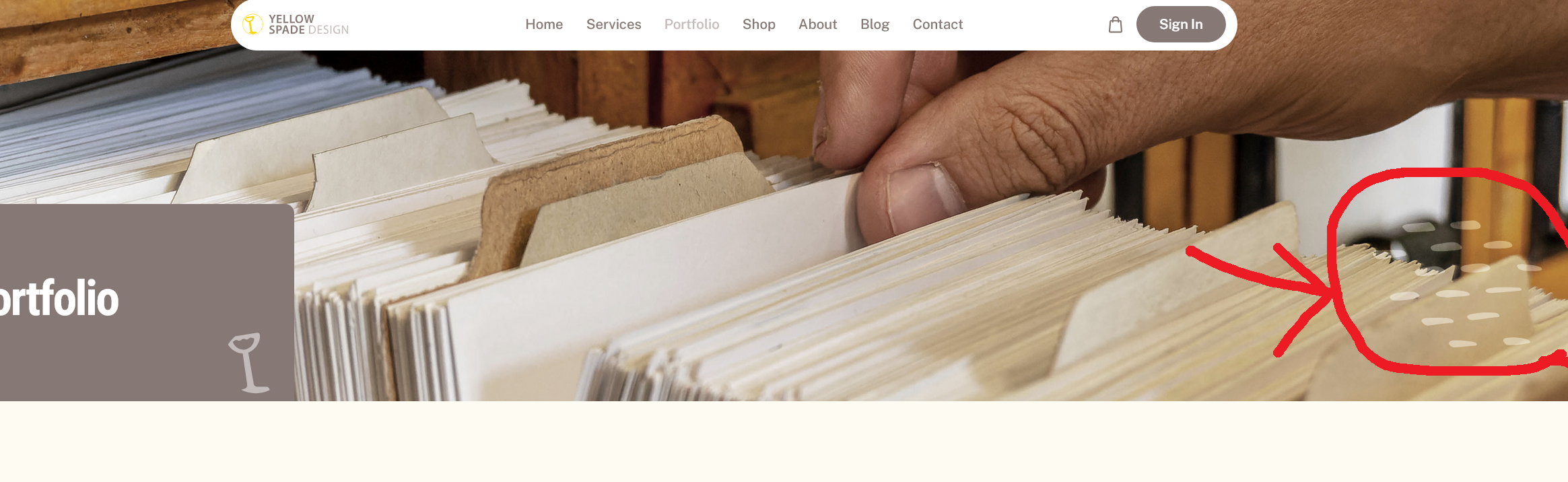
Hi,
could someone please advise how to remove the html element at the bottom right of the Portfolio page header image ?
https://www.yellowspadedesign.com/index.php/portfolio
(Nectar Template)
With kind regards,
Steve.
Hi,
could someone please advise how to remove the html element at the bottom right of the Portfolio page header image ?
https://www.yellowspadedesign.com/index.php/portfolio
(Nectar Template)
With kind regards,
Steve.
Oh. I thought it was part of your image ;]
.sp-page-title::after { background-image: none; visibility: hidden;}
Hi Steve,
If you talk about sort of vine glass / part of spade image... use that to hide it
 .sp-page-title > .container::before,  .sp-page-title > .container::after
{display: none; visibility: hidden; }If you thought about different element, please share link to screenshot image. Add red arrows to show me details.
BTW
To make that brown box smaller use padding with smaller values for that class name: .sp-page-title > .container { }
Paul,
many thanks for your message.
I've highlighted the element here..
with kind regards,
Steve.
Hi Paul and many thanks for your message.
Just tried that in custom css but unfortunately did not work?
With kind regards,
Steve.
Hi Paul,
I've found a workaround, which will work ok for now.
Many thanks again for you your help.
Wity kindest regards,
Steve.