

BUG - Can't De-select HTML Element From Text Block
ZC
Zack Clobes
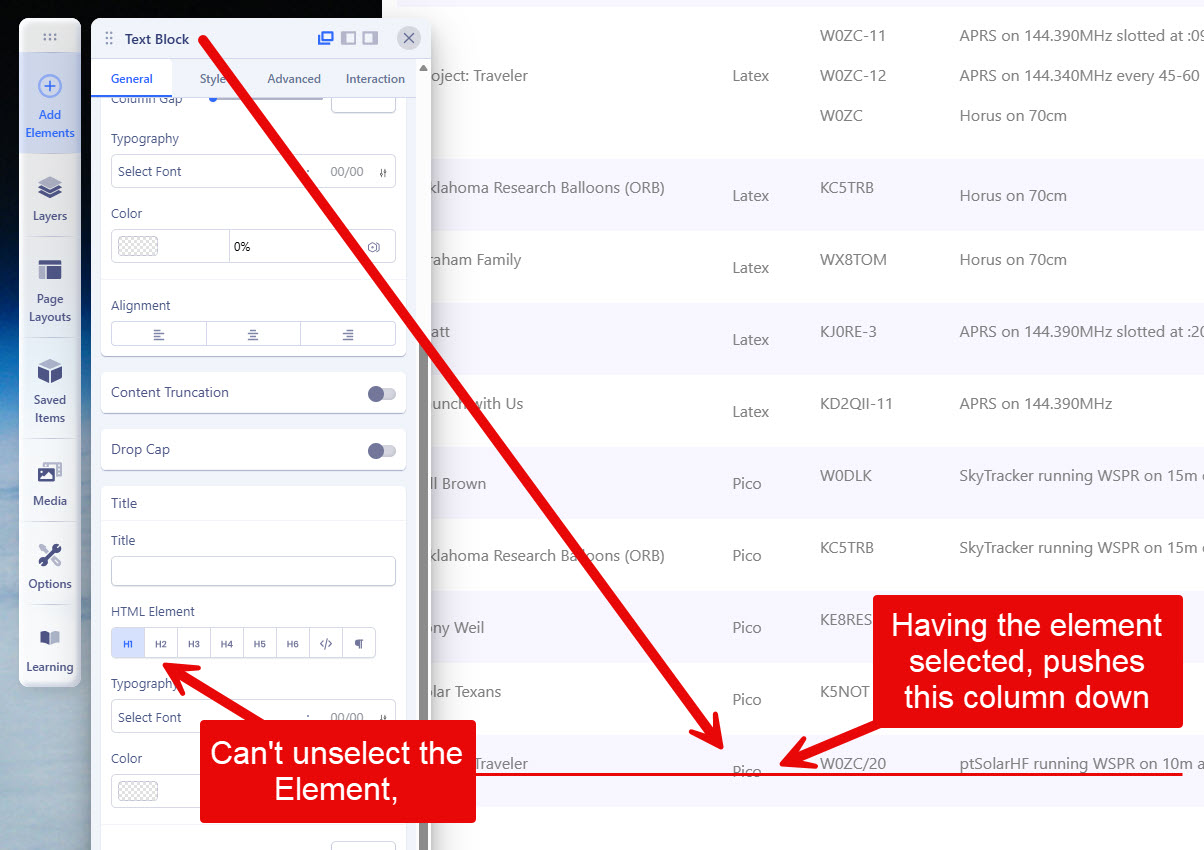
I have a table inside of an SP Page on my site. One column isn't lined up the way that all of the others are, and I tracked the issue down to the Title configuration, which I don't use. The problem is that the element "H1" was selected, and it's pushing a margin/padding down on the actual text.
The screenshot shows the H1 being selected, and how the other columns on that row are all lined up, except for the second column.
I've tried H1-H5 plus the other two icons whatever they are. I've made sure that there's nothing in the Title text field that could be causing problems. To test, I clicked the H1 on one of the other cells that wasn't impacted, and the problem appeared there as well.
Link to the page that's impacted: https://www.superlaunch.org/launch/registered-flights
13 Answers
Order by
Oldest

Mehtaz Afsana Borsha
Accepted AnswerHi,
Thanks for contacting us. Could you please keep a full site backup and give me your super admin access? So that I can check.
-Regards.
ZC
Zack Clobes
Accepted AnswerNo, it's still the same. I posted a Hidden message yesterday with the login credentials requested. I've copied them here.
Mehtaz Afsana Borsha
Accepted AnswerHi
Hi,
I've set up a test page on your site, and the feature is functioning as expected on my end.
As shown in the attached screenshot, please ensure you are applying this to the Title element specifically, as it does not affect the main text body. Let me know if you have any questions!
ZC
Zack Clobes
Accepted AnswerThe problem is the Content option when it's in a table. I added a new table to your Test page, and as soon as I typed a single letter in the first column, first row of the table, the vertical alignment got messed up. I didn't even have to press the H1 to mess it up.
Mehtaz Afsana Borsha
Accepted AnswerHi,
Could you please keep a full site backup and try the latest version of page builder? Reinstall the page builder and then try again.
Mehtaz Afsana Borsha
Accepted AnswerHi,
Is this solved now? If yes, you can then close this post by accepting the answer.
ZC
Zack Clobes
Accepted AnswerThis site is in the middle of a conference and I can't take it down to test something like this.
But I did reproduce the test on another site. This particular site is just a landing page that had a single page. I started by trying to reproduce the problem. Then I uninstalled SP Page Builder and re-installed as you suggested. The problem is still there and didn't magically go away on its own.
Steps to reproduce:
- Open a page in Front-end viewer.
- Create a new 12-column row.
- Add a table to the newly created row
- Adding the table will automatically populate the table with a list of names (Ronald, Roger, Luca, and Mary)
- Click on any of the fields in the table, such as the last name of "Curiel".
- In the dialog where you can edit all of the properties of the text box (that's contained within the table), add the work "BROKEN" after the original name. So for example, "Curiel BROKEN".
When you look at the resulting table, you will see that the rows are no longer aligned.
All of my sites do this, and they were all on the latest version (currently 6.6.2, but it was doing this before this version).
Mehtaz Afsana Borsha
Accepted AnswerHi,
I have done all of this that you suggested. See my screenshot below; it seems ok in my end.
And I am also able to select HTML elements.
ZC
Zack Clobes
Accepted AnswerLook closer at your "Curiel Broken" cell. The vertical alignment is off from the other three columns on that row.
As I've looked at it deeper, I'm not sure the issue is actually around the H1/H2/H3/etc, or if it's just the Text Box is messed up somehow.
But there's still no way to de-select the H1/H2/H3. I don't care about that, but I do care about the text not lining up.