Greetings,
When i copy and paste my website copy into the TEXT BLOCK addon element the line height looks normal. However on the frontend saved website the gap is a lot larger between the lines and looks a little unsual.
Is there a solution?
Greetings,
When i copy and paste my website copy into the TEXT BLOCK addon element the line height looks normal. However on the frontend saved website the gap is a lot larger between the lines and looks a little unsual.
Is there a solution?
About text "P1 gibt dir das praktische Fundament für diese Arbeit. (...)
In diesem Präsenzseminar wirst du Schritt für Schritt (...)"
yes, trash code is inside. Example:
<p class="p1"><span style="font-size: 18px;">P1 gibt dir das praktische Fundament für diese Arbeit.</span></p>
It looks that you copied it from different resource. You have few options to remove it.
Sorry, I know apps for Windows only. In general, it's not issuse with our extension, but user actions.
Hello,
Thanks for reaching out to us. Could you please share temporary administrator access to your Joomla backend? You can provide the credentials securely in the hidden content section. Also, please take a full backup of your site before we make any changes.
Please, mentioned the page name where you add this.
Once I have access, I’ll investigate further and see what’s causing the issue. Let me know once you’ve shared the details!
Best regards,
Hi Christopher,
It depends on what style is hidden inside Text, sometimes text include styles (style="font-size....; font-weight...."). 2nd, it also depends on default template styles.
Make a simple test, first copy text to Notepad , copy & paste again.
Here is example from your website, look closer into source code syntax
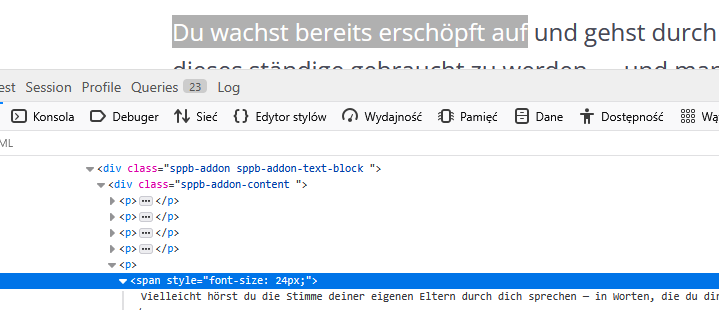
In general, it's not recommended method in 2026! We teach that even studends for last couple of years.
Below are the login infos
Please review Paul’s comment. I created a test page and copied content from our documentation, and the frontend appears to be working correctly as expected.
Thanks
Sorry, i don't really understand what Paul is referring to. What is Notepad?
The website copy is being pasted directly from Pages (Apple Version of Word). For what ever reason on the page below the top paragraph of text works fine, but under the heading: GRUNDKURS PRANA-HEILUNG is the line space bigger??
This happens when you copy text from another source — it may bring hidden styles along with the content.
Please share the page URL so I can check it properly.
Thanks.
Every editor like Word, MS Word, OpenOffice add extra hidden code.
You need sort of Notepad or notepadd++ or html editor that is CLEAN no trash code.
I cannot find about what part of Text you're talking about.
sorry i forgot to add the link.
Could you recommend a notepad or html editor? Writing the website copy directly on the website simply won't work, due to the editing and feedback.
This time problem is from Addon settings.
If for text "Neue Vitalität durch..." you used font-size 40px , line-height value must be at least 40px, not 32px as you set.
Great, thanks. That all makes sense now

