Buenos días estoy creando una página a partir del template Onepage y quiero saber como poder poner en el menú principal un enlace al teléfono y al correo de la empresa. En lugar de poner teléfono me gustaría mostar un icono como esta en la sección de contacto.
Solved
Templates
Locked
Telefono y Mail en menú principal
Accepted answer
Marked as the solution
Paul Frankowski Senior Staff
is all clear now? If yes, mark topic as solved.
8 more replies
Angel Asked this
Good morning, I'm creating a page using the OnePage template and I'd like to know how to add a link to the company's phone number and email address to the main menu. Instead of adding a phone number, I'd like to display an icon like this in the contact section.
The website is https://nutrientesespeciales.qliofactory.com/
Paul Frankowski Senior Staff
1 year ago
· edited
First read: https://www.joomshaper.com/documentation/joomla-templates/qubic/how-to-disable-onepage-scrolled-links
2nd, in Menu item settings choose phone icon
Warning!
You do not have access to the Administrator section of this site.
can you set use Super User/Administrator account!!
Angel Asked this
Thanks, the link is working for me now. You can see it at nutrientsespeciales.qliofactory.com/, but now I want to change the text to a phone icon. How can I do that?
Paul Frankowski Senior Staff
1 year ago
· edited
Still
You do not have access to the Administrator section of this site.
Double check before sharing! Please respect our time.
Watch my video, in your case should be similar >> https://www.youtube.com/watch?v=iJL3rSqVb1U
Angel Asked this
Hello again, as I'm almost finished with the project, I have two questions. How can I make the paragraphs of text in TREATMENTS and CONTACT not appear in capital letters?
How can I change the image that appears when opening any of the products?
Thank you very much.
Angel Asked this
I also need to be able to translate the view button to 'Ver y Descargar'
Paul Frankowski Senior Staff
11 months ago
· edited
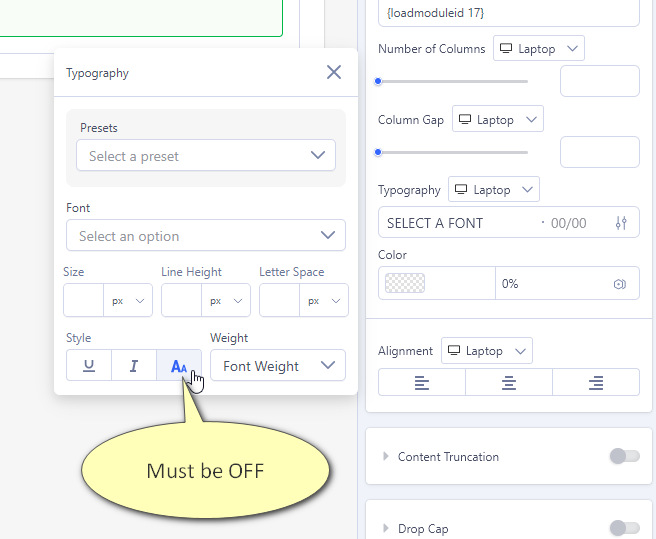
In Text addon change value inside Typography, right now you have Style text-transform: uppercase , turn it off (screenshot, in my example is ON)
Angel Asked this
OK thanks.
Paul Frankowski Senior Staff
About SP Simple Portoflio translation >> look inside documenation :: https://www.joomshaper.com/documentation/joomla-extensions/sp-simple-portfolio/how-to-translate
Angel Asked this
Hello, it's not working... before posting on the forum, I already tried changing the ini files
I have changed those constants in en-GB.com_spsimpleportfolio.ini and it does not work. I even created a copy for Spanish es-ES.com_spsimpleportfolio.ini with the modifications:
COM_SPSIMPLEPORTFOLIO_SHOW_ALL="Mostrar todo"
COM_SPSIMPLEPORTFOLIO_VIEW="Ver y descargar fichas"
Now I've tried directly from Joomla, creating an Override, but nothing, it's still the same. I've cleared the cache, tried hidden in other browsers...
This question is locked, so it takes no new replies. Have a similar problem? Ask a new question.