

[Locked] Telefono Y Mail En Menú Principal
A
Angel
Buenos días estoy creando una página a partir del template Onepage y quiero saber como poder poner en el menú principal un enlace al teléfono y al correo de la empresa. En lugar de poner teléfono me gustaría mostar un icono como esta en la sección de contacto.
11 Answers
Order by
Oldest
A
Angel
Accepted AnswerGood morning, I'm creating a page using the OnePage template and I'd like to know how to add a link to the company's phone number and email address to the main menu. Instead of adding a phone number, I'd like to display an icon like this in the contact section.
The website is https://nutrientesespeciales.qliofactory.com/

Paul Frankowski
Accepted AnswerFirst read: https://www.joomshaper.com/documentation/joomla-templates/qubic/how-to-disable-onepage-scrolled-links
2nd, in Menu item settings choose phone icon
Warning! You do not have access to the Administrator section of this site.
can you set use Super User/Administrator account!!
A
Angel
Accepted AnswerThanks, the link is working for me now. You can see it at nutrientsespeciales.qliofactory.com/, but now I want to change the text to a phone icon. How can I do that?
Paul Frankowski
Accepted AnswerStill
You do not have access to the Administrator section of this site.
Double check before sharing! Please respect our time.
Watch my video, in your case should be similar >> https://www.youtube.com/watch?v=iJL3rSqVb1U
A
Angel
Accepted AnswerHello again, as I'm almost finished with the project, I have two questions. How can I make the paragraphs of text in TREATMENTS and CONTACT not appear in capital letters? How can I change the image that appears when opening any of the products? Thank you very much.
Paul Frankowski
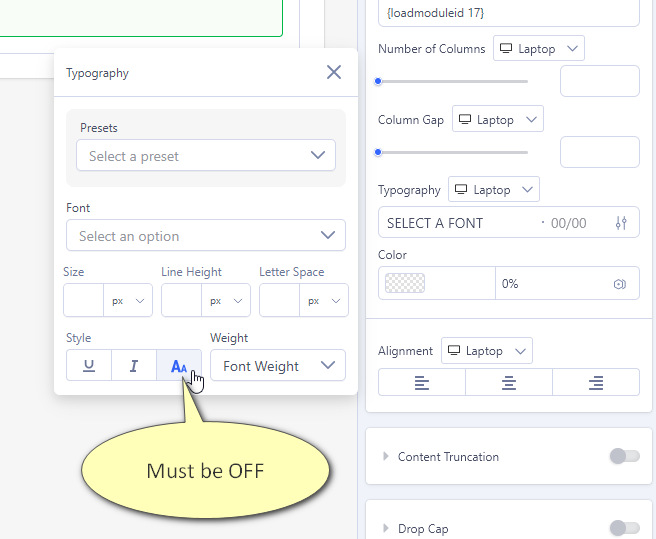
Accepted AnswerIn Text addon change value inside Typography, right now you have Style text-transform: uppercase , turn it off (screenshot, in my example is ON)
Paul Frankowski
Accepted AnswerAbout SP Simple Portoflio translation >> look inside documenation :: https://www.joomshaper.com/documentation/joomla-extensions/sp-simple-portfolio/how-to-translate
A
Angel
Accepted AnswerHello, it's not working... before posting on the forum, I already tried changing the ini files I have changed those constants in en-GB.com_spsimpleportfolio.ini and it does not work. I even created a copy for Spanish es-ES.com_spsimpleportfolio.ini with the modifications:
COM_SPSIMPLEPORTFOLIO_SHOW_ALL="Mostrar todo" COM_SPSIMPLEPORTFOLIO_VIEW="Ver y descargar fichas"
Now I've tried directly from Joomla, creating an Override, but nothing, it's still the same. I've cleared the cache, tried hidden in other browsers...
This topic is locked