Hello,
how can I hide a section and its contents in mobile landscape view, i.e., when I rotate my phone from portrait to landscape? There is a switch that hides it in mobile view, but only in portrait mode.
Thank you.
Staff replied
SP Page Builder
how hidden section on mobile landcape?
3 replies

Paul Frankowski Senior Staff
7 months ago
· edited
Hi.
As I remember we have aslo that
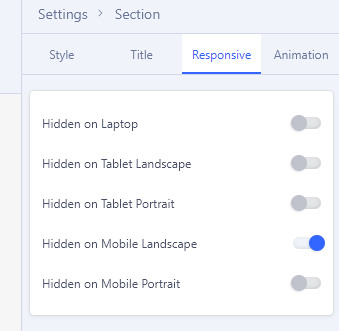
the same is for Addons.
But becuase there are huge number of different phones and screen resolutions, it may not work all smartphones. Then you have to use Custom CSS to increase that range.
Paul Frankowski Senior Staff
7 months ago
· edited
Example CSS - how it may look like
@media screen and (max-width: 860px) and (min-width: 541px) {
   #sp-page-builder  .sppb-hidden-sm {display: none !important;}
}
but first above option (Hidden on Mobile Landscape) must be ON to make it work.
By default in SPPB we used
@media (min-width:576px) and (max-width:767.98px){.sppb-hidden-sm{display:none!important}}
Paul Frankowski Senior Staff
Add it inside custom.css or Custom CSS in Template Options to make it work on whole website.
If OK, please mark topic as solved.
Log in to reply.