

How Hidden Section On Mobile Landcape?
P
pranky
Hello, how can I hide a section and its contents in mobile landscape view, i.e., when I rotate my phone from portrait to landscape? There is a switch that hides it in mobile view, but only in portrait mode. Thank you.
3 Answers
Order by
Oldest

Paul Frankowski
Accepted AnswerHi.
As I remember we have aslo that
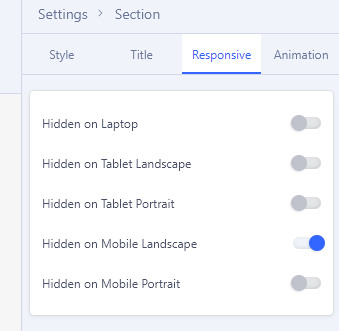
the same is for Addons.
But becuase there are huge number of different phones and screen resolutions, it may not work all smartphones. Then you have to use Custom CSS to increase that range.
Paul Frankowski
Accepted AnswerExample CSS - how it may look like
@media screen and (max-width: 860px) and (min-width: 541px) {
   #sp-page-builder  .sppb-hidden-sm {display: none !important;}
}
but first above option (Hidden on Mobile Landscape) must be ON to make it work.
By default in SPPB we used
@media (min-width:576px) and (max-width:767.98px){.sppb-hidden-sm{display:none!important}}