Hello,
I added a YouTube Video as a slide and I have the "Video Volume Icon" set to yes, but the audio still doesn't work.
Kind regards,
John
Hello,
I added a YouTube Video as a slide and I have the "Video Volume Icon" set to yes, but the audio still doesn't work.
Kind regards,
John
Playing audio is discouraged by many browsers and it is not practical too. You can check Chrome's Autoplay Policy for example.
Best regards
Hi Ofi,
Then please explain why there is a button provided to toggle the audio on/off?
SP Page Builder provides the option so the user can turn the audio on and off with this button, this is the function that I am referring to not working.
Kind regards,
John
I have checked Slideshow addon on my localhost and sound works. Audio is muted for background video but on addon it works.
Hi Ofi,
I'm still having issues here. I have a video in the background, the audio button option is set to yes and no sound. There is no option to use a video addon under slider content.
How do I add a video add-on to a slideshow?
Kind regards,
John
You can set video background for slideshow addon and audio plays there.
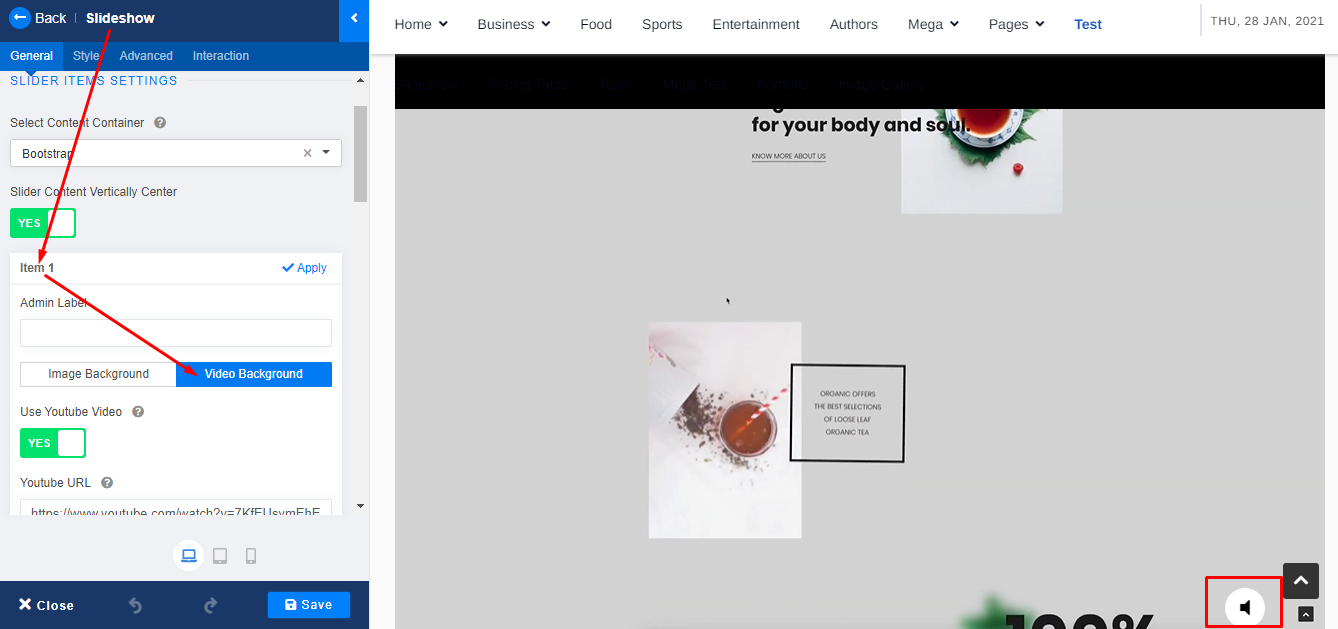
Hi Ofi,
That is exaclty what I have done, but it doesn't work.
I edit with the backend editor, I rarely ever use the frontend editor.
Kind regards,
John
Please share your administrator access in the Hidden Content box to check.
Sure thing, credentials added.
I have created a new page Slideshow Video. Please check that page. Audio is working.
Hi Ofi,
I found the issue, it seems that you cannot have two slideshows on the same page. I duplicated the slideshow you created and the audio stopped working.
Is there a way to fix this?
I'm in need of more than one slideshow on a page.
Kind regards,
John
Sorry, I do not know the solution. You might try Raw HTML addon and make slideshows with audio.
Hi Ofi,
Can you make the development team aware of the issue?
It seems that it is a Javascript conflict. When you click on the audio button to play the audio, this javscript error shows in Chrome Console.
js_slider.js:7 Uncaught TypeError: Cannot read property 'player' of undefined
    at n.controlVideoVolumn (js_slider.js:7)
    at HTMLDocument.dispatch (jquery.min.js?5931834c112773f834017e4c9abf641f:2)
    at HTMLDocument.v.handle (jquery.min.js?5931834c112773f834017e4c9abf641f:2)
controlVideoVolumn @ js_slider.js:7
dispatch @ jquery.min.js?5931834c112773f834017e4c9abf641f:2
v.handle @ jquery.min.js?5931834c112773f834017e4c9abf641f:2
Kind regards,
John
Any update on this. I am using Vimeo videos in the slider and I can not get the sound turned on.
Hello Raymond Barrett
Please use the latest SP Page Builder and check your issue. If not solved, then post a new question regarding your issue. We will check and help you.
Best regards
