shaper_helix3 - menu item ordering - Forum | JoomShaper
Solved Templates

shaper_helix3 - menu item ordering

Asked by Schär 6 months ago Last activity 6 months ago

Hi
A client from us has a Joomla5 site with shaper_helix3 template:
https://falbe.ch/
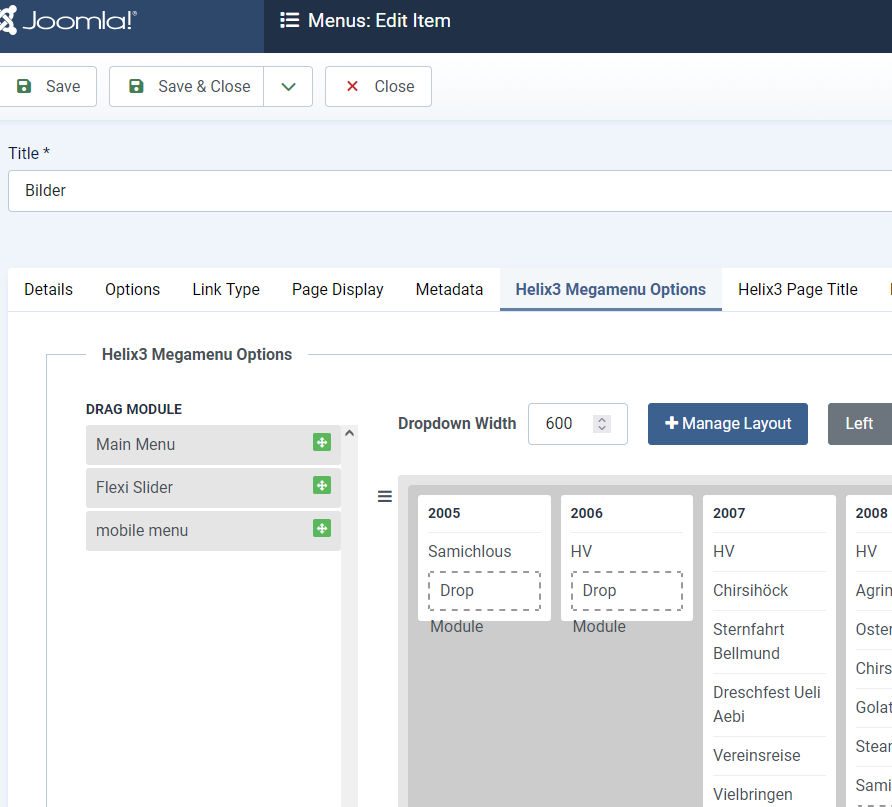
on 'Bilder' (Images) there are images from different years shown. But in the desktop menu the order is reversed and the item/year 2026 is not shown at all.
'2026' should be at first place and the other years listed in descending order.

Do you have a hint for me what can cause that behaviour?

Thanks
Roger

Accepted answer

Marked as the solution
Paul Frankowski Senior Staff
6 months ago · edited

Done, you have 2026 block now. I had to click "Reset" button (green one) that works as Refresh/Reload.


Please mark topic as solved. Danke.

4 more replies

Paul Frankowski Senior Staff
6 months ago · edited

Hi,

Somebody who wanted this kind of menu is crazy. But let's do not talk about that and focus on solution. Go here and using Mouse move objects (years blocks) between. Set 2025 first .... etc. Then Save changes.

info_3041_2026.png


Schär Asked this

Hi Paul
Ok, thank you, that worked.
But can you tell me why is '2026' not showed/available here? In mobile menu it is at 1st place.

Schär Asked this

Ok, thanks, now it's correct.

Regarding
Somebody who wanted this kind of menu is crazy

Yes, it’s not ideal, but it’s what the customer wants. We offer advice, but we do not judge ;-)

Paul Frankowski Senior Staff

I know... clients pays.... demands.

Log in to reply.