Shaper_helix3 - Menu Item Ordering - Question | JoomShaper

Shaper_helix3 - Menu Item Ordering

S

Schär

Template 1 week ago

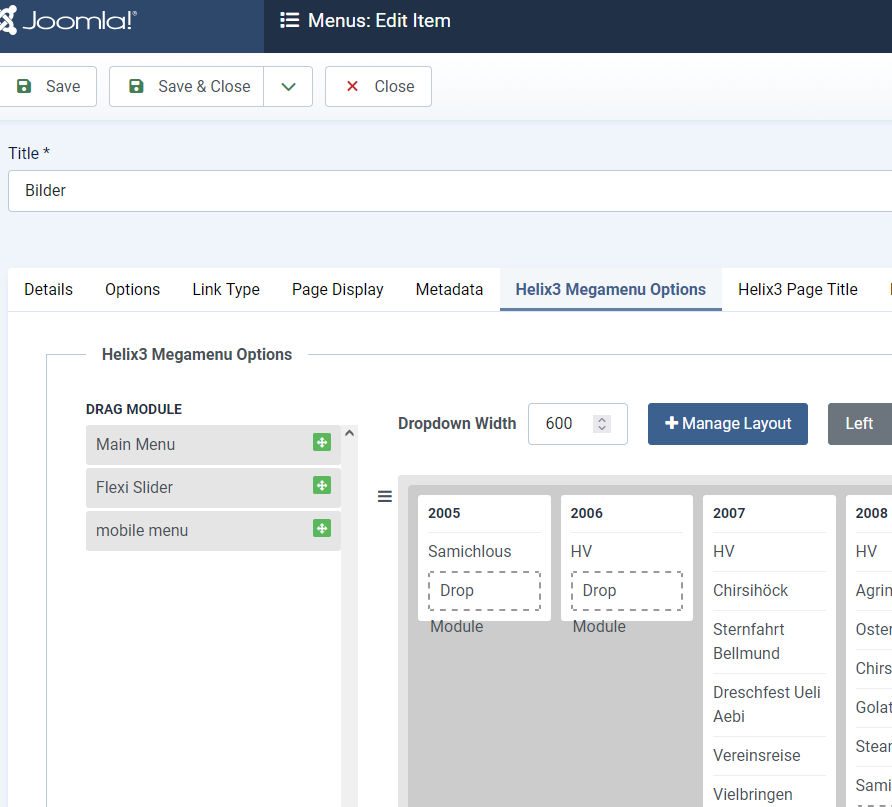
Hi A client from us has a Joomla5 site with shaper_helix3 template: https://falbe.ch/ on 'Bilder' (Images) there are images from different years shown. But in the desktop menu the order is reversed and the item/year 2026 is not shown at all. '2026' should be at first place and the other years listed in descending order.

Do you have a hint for me what can cause that behaviour?

Thanks Roger

0
5 Answers
Paul Frankowski
Paul Frankowski
Accepted Answer
Senior Staff 1 week ago #220958

Done, you have 2026 block now. I had to click "Reset" button (green one) that works as Refresh/Reload.


Please mark topic as solved. Danke.

0
Paul Frankowski
Paul Frankowski
Accepted Answer
Senior Staff 1 week ago #220948

Hi,

Somebody who wanted this kind of menu is crazy. But let's do not talk about that and focus on solution. Go here and using Mouse move objects (years blocks) between. Set 2025 first .... etc. Then Save changes.

info_3041_2026.png


0
S
Schär
Accepted Answer
1 week ago #220954

Hi Paul Ok, thank you, that worked. But can you tell me why is '2026' not showed/available here? In mobile menu it is at 1st place.

0
S
Schär
Accepted Answer
1 week ago #220962

Ok, thanks, now it's correct.

Regarding Somebody who wanted this kind of menu is crazy

Yes, it’s not ideal, but it’s what the customer wants. We offer advice, but we do not judge ;-)

0
Paul Frankowski
Paul Frankowski
Accepted Answer
Senior Staff 1 week ago #220963

I know... clients pays.... demands.

0