
Opt-in addon questions - Forum | JoomShaper
Solved SP Page Builder

Opt-in addon questions

Asked by Tilen Harc 6 months ago Last activity 5 months ago

Hi guys!

I have a few questions about the Opt-in addon:

  1. Where (which .ini file) do I change the label for the EMAIL field?
  2. I have a button to submit the email, that is than added to the mailing list. In the button settings I have this options: https://ibb.co/xKPCSK6K but nothing happens? I would like to have a landing page, that is shown after a user submits to the newslatter... Is this even possible?
  3. If option 2 is not possible, where and how to I style this "green" text, that says the entry was submitted? https://ibb.co/JWWYktt9

The URL is https://www.lex-pixel.si/mi2new2026

Best regards!
Tilen

Accepted answer

Marked as the solution
Paul Frankowski Senior Staff
6 months ago · edited

Hi Tilen,

each component in Joomla has single language file for front-end, for example,
language\en-GB\en-GB.com_sppagebuilder.ini

Use Joomla Language Override feature to change language phrase, do not touch .ini file.


;Optin Form;
 COM_SPPAGEBUILDER_ADDON_OPTIN_FORM_EMPTY_API="Please insert your API key for"
COM_SPPAGEBUILDER_ADDON_OPTIN_PLATFORM_EMAIL_PENDING="We need to confirm your email address. To complete the subscription process, please click the link in the email we just sent you."
COM_SPPAGEBUILDER_ADDON_OPTIN_PLATFORM_EMAIL_CONFIRMED="Your subscription to our list has been confirmed. Thank you for subscribing!"
COM_SPPAGEBUILDER_ADDON_OPTIN_PLATFORM_EMAIL_UPDATED="Your email was updated successfully."
COM_SPPAGEBUILDER_ADDON_OPTIN_PLATFORM_EMAIL_EXIST="You are already subscribed."
COM_SPPAGEBUILDER_ADDON_OPTIN_PLATFORM_EMAIL_ERROR="Some problem occurred, please try again."
COM_SPPAGEBUILDER_ADDON_OPTIN_PLATFORM_EMAIL_DUPLICATE_USER="This user is already exist. Please try with new email."

For "email" placeholder phrase use & override that one: COM_SPPAGEBUILDER_ADDON_AJAX_CONTACT_EMAIL

Newsletter addon do not have <label> field only placeholder that is displayed inside <input> field.
Tilen Harc Asked this

Hi!
Damn, I looked at this AJAX line and did not simply try it.. thank you!

1 more reply

Paul Frankowski Senior Staff
6 months ago · edited
  1. OK, we will check that.

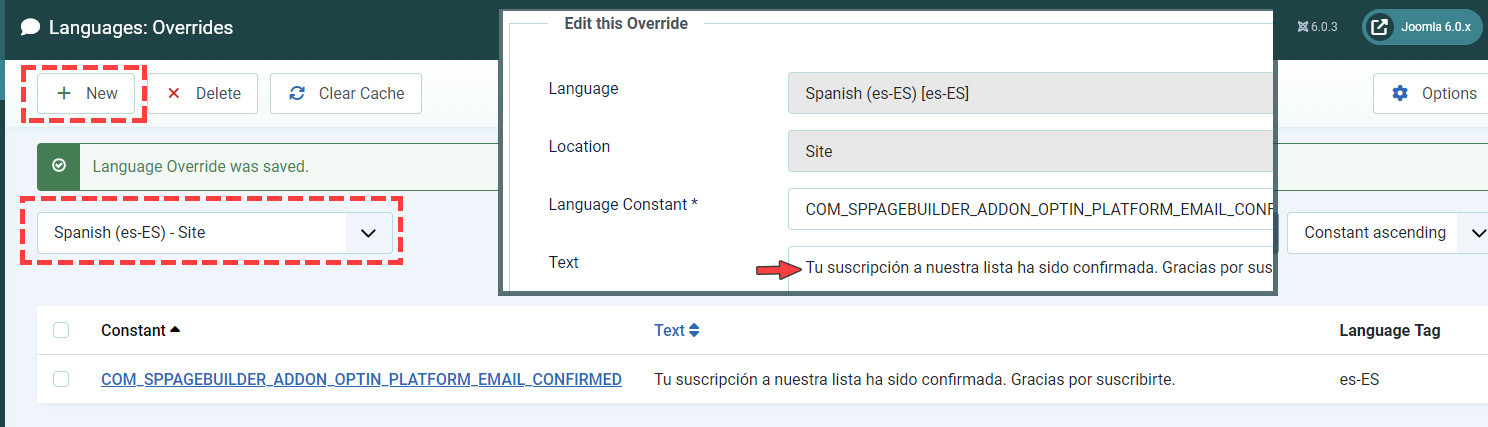
  2. Look up, at all phrases list, find which one you want to override, and do it. I suggest to translate all.

Example for ES
language_phrase_override_j6.jpg

Tilen Harc Asked this

Under the 3. I meant to change the look - not the translations - this I already (with your previous help) did :)

Log in to reply.