Accessibility / Lighthouse Issue: ARIA labels on elements and translation of navigation strings - Forum | JoomShaper
Staff replied SP Page Builder

Accessibility / Lighthouse Issue: ARIA labels on elements and translation of navigation strings

Asked by Kairos 3 months ago Last activity 1 month ago

Body:
Hello Joomshaper Support Team,

I am reaching out because we are facing an accessibility and performance optimization issue on our website, which is negatively impacting our Google PageSpeed / Lighthouse metrics (specifically regarding automated navigation and accessibility parameters). https://drive.google.com/file/d/14IV1lT4kKAVv-M2GYLEOdLnZDOHyWWlf/view?usp=sharing

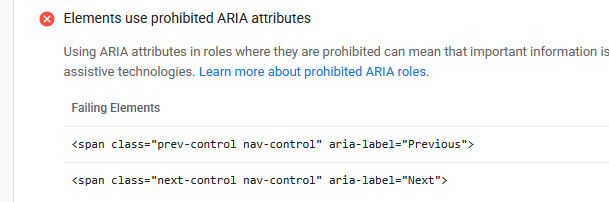
Upon analyzing the PageSpeed report (see attached https://drive.google.com/file/d/1XjCDiYMSq25GCDJSsrHgFJ-jkOegArQB/view?usp=sharing), we noticed that ARIA labels are currently being applied to <span> elements rather than semantic interactive elements. According to W3C and accessibility standards, ARIA attributes like aria-label should be used on interactive elements such as <button> or <a>, rather than generic text containers like <span>.

We would like to know:

Template Override / Structure Change: How can we safely change these specific <span> elements to <button> elements within your framework/extension? Is there a specific layout file we should override in our template HTML folder?

String Translation: We also need to translate the pagination/navigation string "Previous" into Italian ("precedente"). What is the best practice to achieve this? Should we use the standard Joomla language override (COMSPPAGEBUILDER... or similar), or is it hardcoded in a specific view file?

Please find the Google PageSpeed screenshots attached for your reference.

Thank you in advance for your professional support and guidance.

Best regards,

9 replies

Paul Frankowski Senior Staff
3 months ago · edited

Ciao.

About phrases, use Joomla Language Override and translate those :

COM_SPPAGEBUILDER_ARIA_NEXT="Next"
COM_SPPAGEBUILDER_ARIA_PREVIOUS="Previous"

or translate inside italian SPPB lang file.

Paul Frankowski Senior Staff
3 months ago · edited

About 1st question, issue, tell me addon name from which you have that accessibility warning ?

For me it looks it was carousel , our HTML code:

<div class="sppb-carousel-extended-nav-control"><span class="prev-control nav-control" aria-label="Previous"><i class="fa fa-angle-left" aria-hidden="true"></i></span><span class="next-control nav-control" aria-label="Next"><i class="fa fa-angle-right" aria-hidden="true"></i></span></div>

As you noticed we don't have <a> or <button> there. I will talk with our developer to solve it. I have two ideas.

Kairos Asked this

Thank you. Will updating to future versions resolve this issue? Can this be resolved by July

Paul Frankowski Senior Staff
3 months ago · edited

Yes, it should be in this month. I shared with developer all infos already, but becuase of time zone differences he will check it after the weekend.

Kairos Asked this

"Thank you, let's keep this ticket open and I will write to you on July 10th as a reminder."

Kairos Asked this

Hello, I am writing, as agreed, as a reminder for this ticket. Could you now guide me on how to resolve the issue (Accessibility / Lighthouse issue: ARIA labels on elements and translation of navigation strings)?

Kairos Asked this

Unfortunately, I am unable to answer that. I contacted you expecting you would know. When you informed me in July that you would report this to the development team, I assumed you were aware of the potential cause of the problem.
It could be a slider or a carousel.?

Paul Frankowski Senior Staff
1 month ago · edited

I know, but not all depends on me. I will ask again with more details this time. Anyway, I know how to fix it in sourcecode.


By now (today):

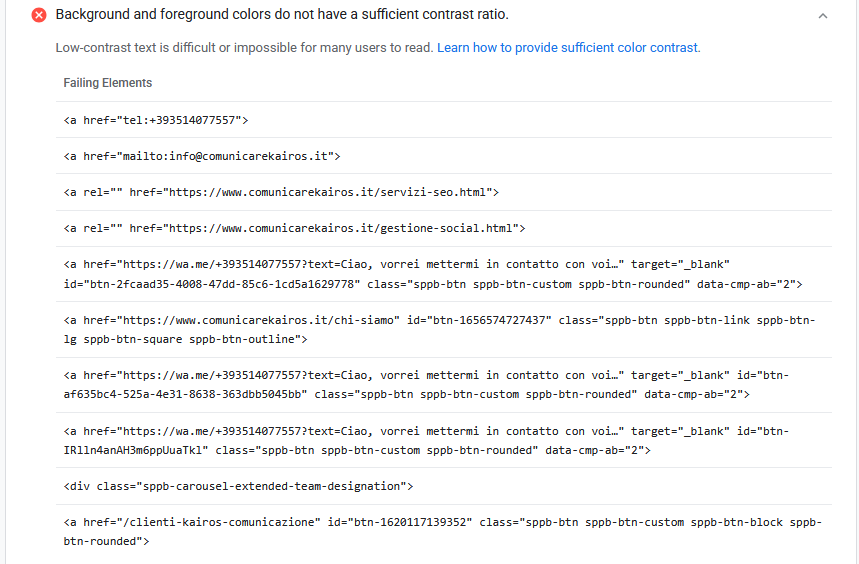
1. Improve that color contrast here

acc.png

  1. You can also disable Arrows in carousel addon used in "Il nostro Team" then 1st issue will be hidden. Besides you have navigation dots under.

Then you will get more score points in pagespeed-insights tester.

Paul Frankowski Senior Staff

Here is temporary fix for that

acc2.png

Download, unzip file and using FTPreplace orginal file here: components/com_sppagebuilder/assets\js\

File (zip): sp_carousel.zip

remember to do that also after SPPB 6.9.0 update (!)

Log in to reply.