Accessibility / Lighthouse Issue: ARIA Labels On Elements And Translation Of Navigation Strings - Question | JoomShaper

Accessibility / Lighthouse Issue: ARIA Labels On Elements And Translation Of Navigation Strings

Kairos

Kairos

SP Page Builder 2 weeks ago

Body: Hello Joomshaper Support Team,

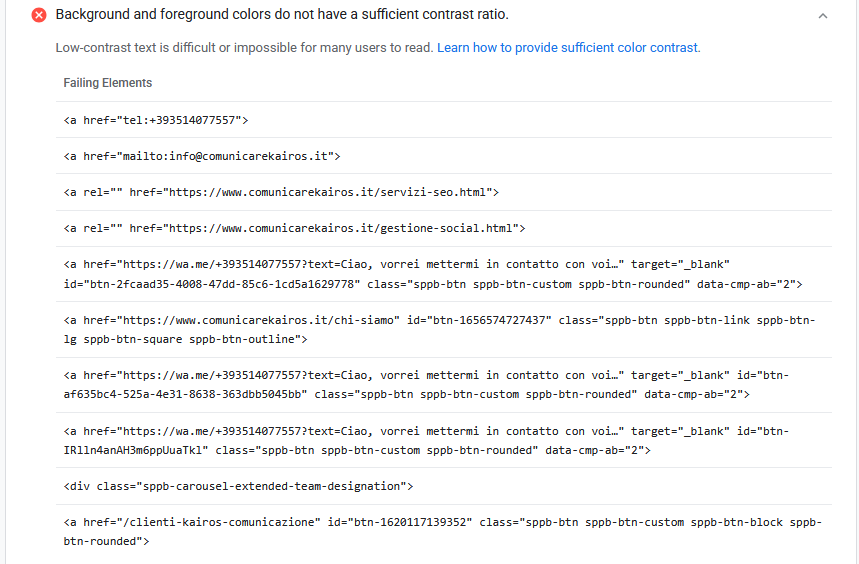
I am reaching out because we are facing an accessibility and performance optimization issue on our website, which is negatively impacting our Google PageSpeed / Lighthouse metrics (specifically regarding automated navigation and accessibility parameters). https://drive.google.com/file/d/14IV1lT4kKAVv-M2GYLEOdLnZDOHyWWlf/view?usp=sharing

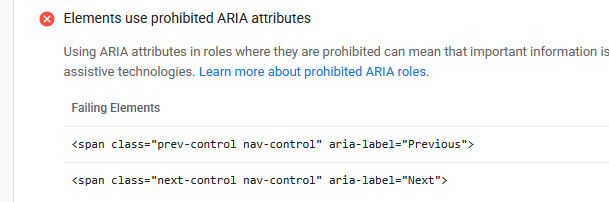
Upon analyzing the PageSpeed report (see attached https://drive.google.com/file/d/1XjCDiYMSq25GCDJSsrHgFJ-jkOegArQB/view?usp=sharing), we noticed that ARIA labels are currently being applied to <span> elements rather than semantic interactive elements. According to W3C and accessibility standards, ARIA attributes like aria-label should be used on interactive elements such as <button> or <a>, rather than generic text containers like <span>.

We would like to know:

Template Override / Structure Change: How can we safely change these specific <span> elements to <button> elements within your framework/extension? Is there a specific layout file we should override in our template HTML folder?

String Translation: We also need to translate the pagination/navigation string "Previous" into Italian ("precedente"). What is the best practice to achieve this? Should we use the standard Joomla language override (COMSPPAGEBUILDER... or similar), or is it hardcoded in a specific view file?

Please find the Google PageSpeed screenshots attached for your reference.

Thank you in advance for your professional support and guidance.

Best regards,

0
5 Answers
Paul Frankowski
Paul Frankowski
Accepted Answer
Senior Staff 2 weeks ago #226902

Ciao.

About phrases, use Joomla Language Override and translate those :

COM_SPPAGEBUILDER_ARIA_NEXT="Next"
COM_SPPAGEBUILDER_ARIA_PREVIOUS="Previous"

or translate inside italian SPPB lang file.

0
Paul Frankowski
Paul Frankowski
Accepted Answer
Senior Staff 2 weeks ago #226903

About 1st question, issue, tell me addon name from which you have that accessibility warning ?

For me it looks it was carousel , our HTML code:

<div class="sppb-carousel-extended-nav-control"><span class="prev-control nav-control" aria-label="Previous"><i class="fa fa-angle-left" aria-hidden="true"></i></span><span class="next-control nav-control" aria-label="Next"><i class="fa fa-angle-right" aria-hidden="true"></i></span></div>

As you noticed we don't have <a> or <button> there. I will talk with our developer to solve it. I have two ideas.

0
Kairos
Kairos
Accepted Answer
2 weeks ago #226905

Thank you. Will updating to future versions resolve this issue? Can this be resolved by July

0
Paul Frankowski
Paul Frankowski
Accepted Answer
Senior Staff 2 weeks ago #226907

Yes, it should be in this month. I shared with developer all infos already, but becuase of time zone differences he will check it after the weekend.

Please remind me on 10 July, okay. I should know more.

0
Kairos
Kairos
Accepted Answer
2 weeks ago #226915

"Thank you, let's keep this ticket open and I will write to you on July 10th as a reminder."

0