Hi, I have a web at livesports template and after update to SPPB 6.8.0 the images on homepage in articles addon disappeared. When I checked the code, I see double // in the image path.
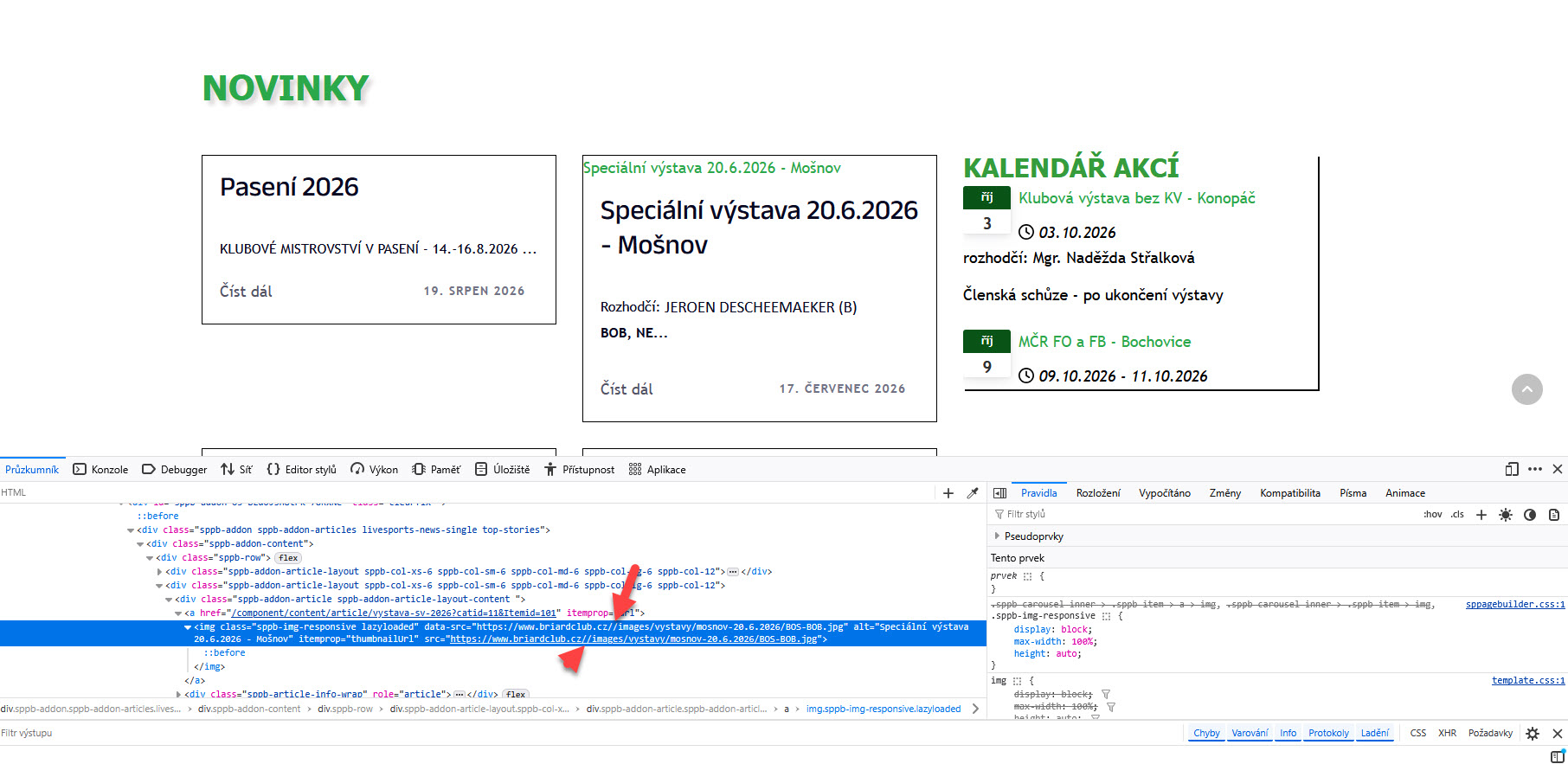
can you please check and advise how to fix it?
Thank you,
Petra
Hi, I have a web at livesports template and after update to SPPB 6.8.0 the images on homepage in articles addon disappeared. When I checked the code, I see double // in the image path.
can you please check and advise how to fix it?
Thank you,
Petra
Hello,
Please check now. All images should be displaying as expected.
I’ve set the thumb size to Thumbnail on article addon setting, so the images can now use the default path from the article image source.
Thanks!
Hello,
Thanks for reaching out to us. Could you please share temporary administrator access to your Joomla backend? You can provide the credentials securely in the hidden content section. Also, please take a full backup of your site before we make any changes.
Once I have access, I’ll investigate further and see what’s causing the issue. Let me know once you’ve shared the details!
Best regards,
Hi Ziaul,
Thank you for reaching out. I'm sharing the credentials below.
Hi,
Image src/data-src was being generated with a double slash after the domain (https://www.briardclub.cz//images/... instead of /images/...), which some server configs treat as a broken path.
Fix: added a rewrite rule to .htaccess right after the first RewriteEngine On to normalize any double slashes to a single slash before other rewrite rules run:
RewriteCond %{THE_REQUEST} //+
RewriteRule ^(.*)$ /$1 [R=301,L]
After adding it, cleared Joomla + host cache and confirmed the image now loads correctly. Let me know if you spot any issues after deploying.
I need some time to investigate the root issues.
Thanks!
Hi,
I am using the Gazette / Newsberg template on an existing site running Joomla 6.
The custom SP Page Builder addons (such as Article Layout, Article Slider, etc.) are working, but article images are not displaying on the frontend.
I already tried adding the .htaccess rewrite rule for double slashes, but it didn't fix the issue.
Could you please help me resolve this so the images display properly?
Thanks!
Alessandra
Please download a backup of your website from Akeeba Backup and then share the backup file with me via Google Drive.
Once you have uploaded the file, please send me the Google Drive link so I can investigate the issue further.
Thank you!
Hi Ziaul,
below in hidden content is link for the jpa, it's safe sharing site in Czechia, don't worry.
Please, share via google drive, your shared link is confusing.
Thanks
Hi Ziaul,
see the google drive link below.
Hello,
I have submit drive access request, please check and approve.
Thanks
I don't see the hidden part of the message with the link.
Maybe because I didn't open the forum question?
Should I open another question?
You cannot view the hidden content of another user. Please create a new post.
Thanks!
Hi Ziaul,
I've approved the request.
Agrital, why would you need the backup of my web?
Sorry, I got confused, I thought the post was from tech support
Hello,
It's seems that, I have found the issues.
Please, delete this from this path: JRoot/components/com_sppagebuilder/addons/articles/-site.php
This is wrong file.
Thanks
Hi Ziaul,
I deleted that file, but the images are not shown at all. Even after clearing cache and in an anonymous window.
Hello,
Please accept my sincere apologies for the delayed response.
Please, check now. I see your site is ok now.
Screenshot: https://prnt.sc/iR0uCTpjI_o-
Thanks.
Hi Ziaul,
I see one out of 4 images. Something is still wrong. I tried adding the image to all locations (intro, full article, blog media) for the first article and still no image is showing. It needs to work for all articles, not for just one. All of them have intro image assigned.
Hi Ziaul,
thanks a lot, it works now. Can you please just describe how you did it for others?
Actually, under Template Styles → Blog → Image Size (screenshot), when you set the image size to Thumbnail, that size is generated for the article image. When you upload an image to an article, this image size information is stored for that article.
Now, if you want to display these articles using an SP Page Builder addon, you need to select the same image size in the addon. If you select a different size, as I mentioned in my previous message, the image may not be displayed.
If you want to use a different image size in Helix Ultimate, you will need to re-add/re-upload the image for each article so the new size is generated. Then, make sure you select the same image size in the Articles addon as well.
Thanks!
