Blog intro page without images after update to Shaper_helixultimate 2.2.10 - Forum | JoomShaper
Staff replied Templates

Blog intro page without images after update to Shaper_helixultimate 2.2.10

Asked by Mich Nic 1 week ago Last activity 1 week ago

Hi,
after a recent hack in SP Page Builder I updated to the latest version 6.9.1 and my template to Shaper_helixultimate 2.2.10. Alas in my intro-blog page the images for the various blog articles are missing. The whole layout is also off, but I guess, that because of the missing images, the needed spaces are different.

Because of the hack and the update the site is already for a long time offline. So I would appreciate your quick response.

Thanks, Mich

5 replies

Paul Frankowski Senior Staff

Hi Mich,

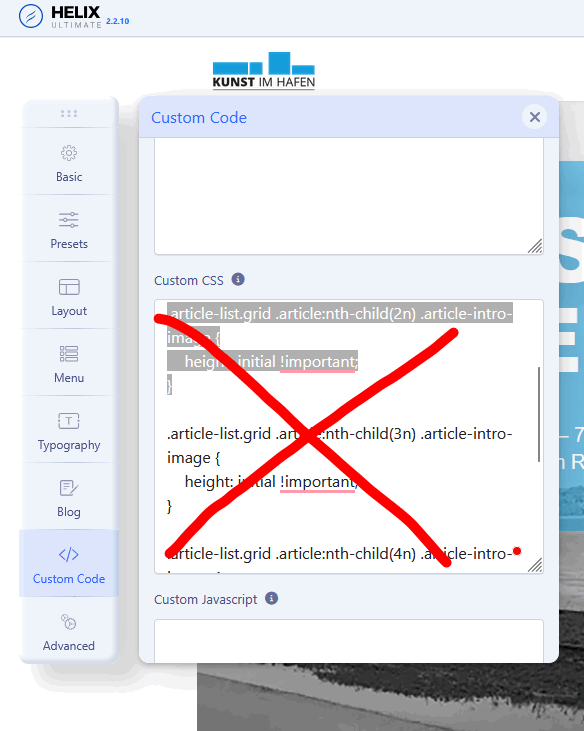
Problem was/is not from Helix update, but Custom CSS added by someone?

.article-list.grid .article:nth-child(n) .article-intro-image {
  height: initial !important;
}

I will check more, what else...

Paul Frankowski Senior Staff
1 week ago · edited

I can confirm, Custom CSS was causing missing images in AKTUELLES (blog view). I deleted that already

all-this.png

Now is OK, if you make any CSS changes think twice what it does.

You're welcome. Have a nice day.

Mich Nic Asked this

Hi Paul,

thank you for finding this code!

I didn´t write it, I am not that capable to write about nth css-childs, like in maths. It must have been left over by the hackers, that I missed while cleaning up their mess.
Without the strange code it does look better, but still many images are not shown. Why is that?

Regards, Mich

Paul Frankowski Senior Staff
1 week ago · edited

Hackers don't add such a CSS code, it doesn't make sense. Unless you have a saboteur on your team.

Paul Frankowski Senior Staff

This time look into custom.css file , line 173

.article-intro-image.float-left {
  height: auto !important;
}

remove it.

Log in to reply.