

Blog Intro Page Without Images After Update To Shaper_helixultimate 2.2.10
MN
Mich Nic
Hi, after a recent hack in SP Page Builder I updated to the latest version 6.9.1 and my template to Shaper_helixultimate 2.2.10. Alas in my intro-blog page the images for the various blog articles are missing. The whole layout is also off, but I guess, that because of the missing images, the needed spaces are different.
Because of the hack and the update the site is already for a long time offline. So I would appreciate your quick response.
Thanks, Mich
5 Answers
Order by
Oldest

Paul Frankowski
Accepted AnswerHi Mich,
Problem was/is not from Helix update, but Custom CSS added by someone?
.article-list.grid .article:nth-child(n) .article-intro-image {
  height: initial !important;
}
I will check more, what else...
Paul Frankowski
Accepted AnswerI can confirm, Custom CSS was causing missing images in AKTUELLES (blog view). I deleted that already
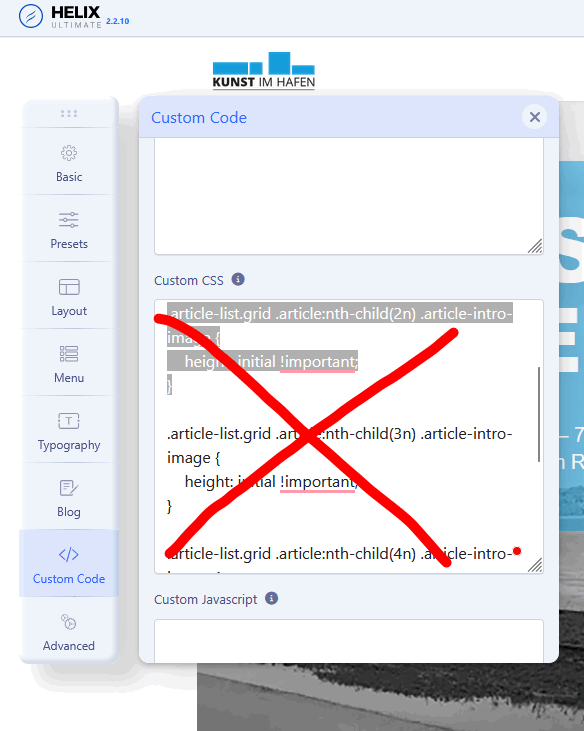
Now is OK, if you make any CSS changes think twice what it does.
You're welcome. Have a nice day.
MN
Mich Nic
Accepted AnswerHi Paul,
thank you for finding this code!
I didn´t write it, I am not that capable to write about nth css-childs, like in maths. It must have been left over by the hackers, that I missed while cleaning up their mess. Without the strange code it does look better, but still many images are not shown. Why is that?
Regards, Mich
Paul Frankowski
Accepted AnswerHackers don't add such a CSS code, it doesn't make sense. Unless you have a saboteur on your team.