Hello,
Can you kindly tell me how I can provide contact info (or get rid of entirely) the "Get in Touch" button in the templates Predefined Header?
Thanks much,
Solved
Templates
Folium template Predefined Header
Accepted answer
Marked as the solution
Rashida Rahman Staff
Hi,
You may accept the answer to help people find it easily and close the post.
Thanks
8 more replies
Rashida Rahman Staff
Hi there!
Would you please give me your site URL here?
I need to provide you custom CSS for the predefined header.
Best Regards

Ariba Staff
Hello
Thank you for your query. Can you please provide your site URL?
Carey Butterworth Asked this
Hello,
The site is still under development, but the development URL is https://vitaltoknow.com/foliumvital/
I have not done anything with the "get in touch" button (but would like to! )
Thanks much,
Rashida Rahman Staff
Please go to Extensions>Module and you will find a module named "Menu Right Button" published on "menu-right" position.
You can simply unpublish the module if you don't want the button.
Or you can modify it within the module too.
Best Regards
Carey Butterworth Asked this
Can't believe I missed that (slaps head). Knew is was probably something simple I was missing....
Anyway thanks, and have a great day!
Ariba Staff
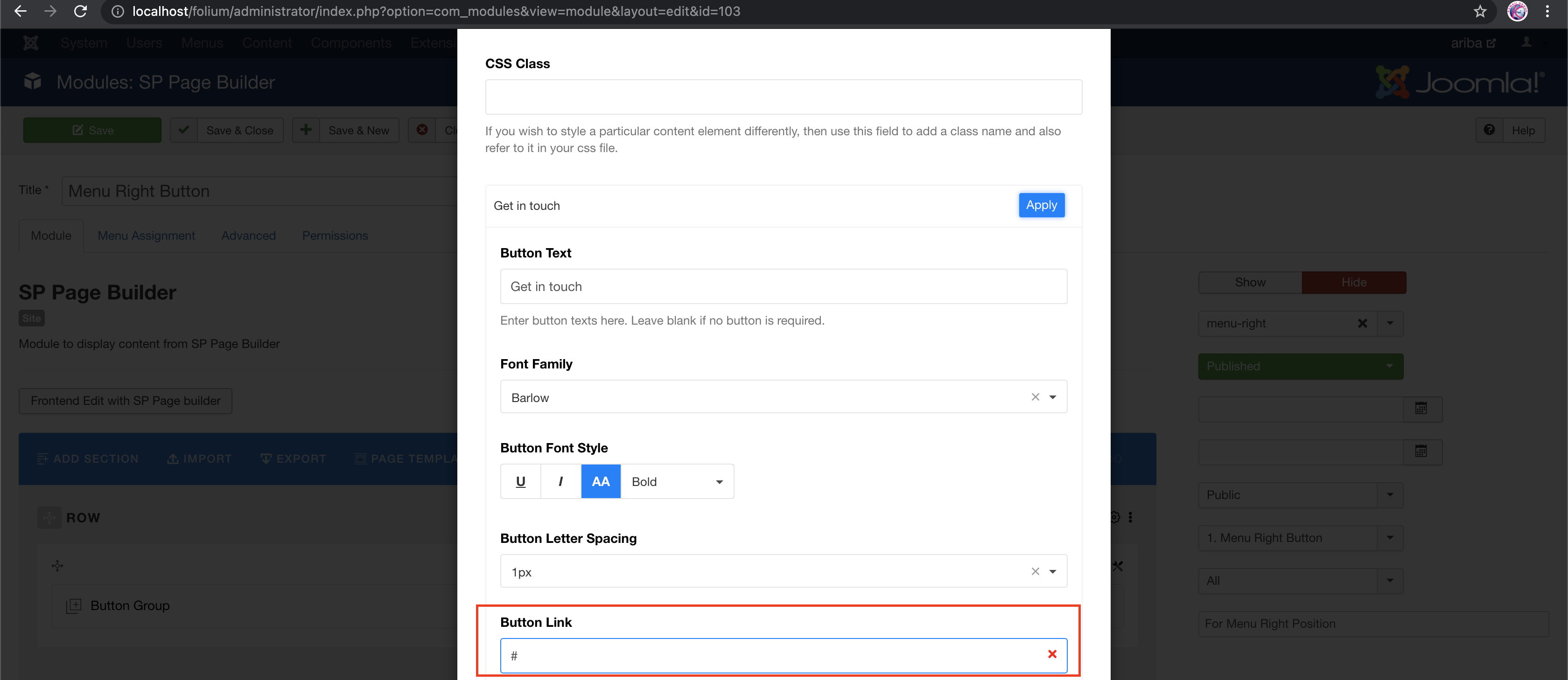
You can go to Extensions -> Module and find Menu right button.
Then click on it to edit.
Go to Button group edit section and search for button named "Get in Touch" . Click on it to edit you will find the option like shown in the screenshot below:
You will find the option to insert Link there.
Ariba Staff
Great to know your issue has been solved already :)
Rashida Rahman Staff
No issues:)
You are always welcome.
Log in to reply.