
After upgrading to Helix Ultimate 2 on my staging site https://www.griffinshill.com.au/stageit/
The menu and page layout colours have completey changed and the iphone 10 display is not feeling full screen
My joomla version is 3.10.0
Solved
Helix Framework
Helix Ultimate 2 upgrade
Asked by Frank
5 years ago
Last activity 5 years ago
Accepted answer
Marked as the solution
Muntasir Sakib Staff
Hello Frank,
Paul is completely right. It would be great if you could hold on for the next update which will be released within a few days. Most of the bugs will be fixed in the enxt update.
Thanks for your patience and for being with us.
24 more replies
Muntasir Sakib Staff
Hello there,
I hope you are doing well.
Would you mind giving us the screenshots of the before and after color effect of Helix Ultimate? Which Helix version are you using by the way? Please share the iPhone 10 display screenshot as well.
Thanks!
Frank Asked this
Hello Muntasir
Thank you for your quick responce. I am upgrading Helix ultimate 1 to Helix ultimate
https://www.griffinshill.com.au is my live site
https://www.griffinshill.com.au/stageit/ is my staging site where the problem started after upgrading from Helix Ultimate 1 to 2.
I am sorry but I dont know how to up load the screen shots here
Thanks

Paul Frankowski Senior Staff
Hi,
If I may.. blue header is a our mistake, sorry for this. Hopefully easy to fix by settings.
Frank Asked this
Hi Paul
Above is a link to a screen shot of the issues.
Below live links to the live website and staging website showing the problem.
https://www.griffinshill.com.au is my live site
https://www.griffinshill.com.au/stageit/ is my staging site where the problem started after upgrading from Helix Ultimate 1 to 2.
Paul Frankowski Senior Staff
Thanks Frank,
If I may suggest something ... please wait for next Helix Ultimate update. Should be soon, in next days.
It should fix most of issues.
I hope you are OK, I saw on TV that in AU the government goes crazy with restrictions, demostration rights.

Jürgen
"Most of the bugs will be fixed in the enxt update." - May be, and others will come.
Since more than one year no update without bugs. And a lot of work to fix it on many Websites.
Thank you very much!
Helix and Pagebuilder are not usable for business-websites anymore.
Paul Frankowski Senior Staff
5 years ago
· edited
... not usable for business-websites anymore.
I would say this about almost any software, even Windows and iOS update can crash whole system, so be a little more sensible in your opinions. Only software that does nothing - has no bugs.

Of course, this is no excuse for us, so we are sorry.
Frank Asked this
thank you for all your support. i know this is a big change. and thanks Paul for your concern about our wellbeing here in Australia. unfortuantely our goverment has not got the vaccine out quick enough but hey we are doing ok and we live in a beautifull part of Australia. I look forwards to your updates and have confidence you guys will get everything working. I have been using a staging site before updating to check for compatibility so has caused no problem for my live site
best regards
Frank
Paul Frankowski Senior Staff
Hi Frank. Hopefully you're smart and you made update on test website. Mistakes, unfortunately, always happen, not always on the test websites we can spot them. I also wait for next update, I have my private projects as well.
Australia is in general a beautiful country, so many areas are still wild. Sorry, that you have mad times now. I hope it would not turn into the MadMax zone. Greetings.
Chris Nichols
Fellow Aussie here Frank. I almost had a very bad day, I applied the updates to a staging site, all went well, only one page title displayed incorrectly. Then I looked at the address bar and noticed I had actually updated the live site. Lucky, even on my staging site, I'm in the habit of doing a full site backup before installing even a minor update, so atleast I had a backup to roll back to if I had to.
Paul Frankowski Senior Staff
Backup is always recommended. In most cases - all you have to do is revert old template files or/and plugin files.
BTW
Users of Joomla 4.0 also doesn't have an easy life, almost every single day they see a message "A New update is ready." Fear to be afraid.

KE Comm
I have the same issue. The Helix Ultimate 2 update completely "destroyed" the layout with Template Travus.
(I don't need help, this is just a "bug report")
If you want to have a look:
Updated (destroyed) site: http://test.chaletalpenliebe.at/ (moved to subdomain)
Live site (recovered from Backup, pre-update): https://chaletalpenliebe.at/
Jürgen
5 years ago
· edited
Hi Paul,
yes, you are right. There is no Software without bugs.
But I am used to be payed for my work. Not to pay for having work. And I like to work together with reliable Partners.
After every update I have to resore backups on several sites because the design ist totally broken, sometimes only white site with ERROR. And I have to wait more than one week for an answer or for next updates. You can check the forum.
273 days and you have one customer less. Sorry.
Paul Frankowski Senior Staff
I agree, that's why I always recommend waiting with update at least few days after premiere day
OR use test subdomain for testing updates.
Something else is update raw helix ultimate and update template based on HU.
I hope next update 2.0.2 will fix most of issues.
Chris Nichols
Keep up the good work Paul and JS team. I've been in the IT industry for 25 years now, and I've never seen a major version update of any software not have some issues, even after extensive beta testing. I remember arriving on site one day and nothing was working, a critical securty update from Ubuntu bricked specific Dell server models, unfortunately, the ones we had. It was a 2 minute job to roll back until Ubuntu released another kernel update.
It is very exciting to have new software, but sometimes it is best to sit back and wait. Read the support forums to see if there is a pattern of issues, and determine if these issues will affect your sites. Then and only then, after you've backed up your site, and tested that you can restore from the backup, deploy the updates. This is just standard practice for any software, not just web platforms.
I've deployed on 3 live sites now, and only 1 site had minor issues with the titles on 2 pages. I've only used custom.css to modify the Helix Ultimate template though, and I don't use any third party plugins apart from Akeeba Backup and JCE Pro. The site that had the minor issues was one of the first that I developed with Helix and Pagebuilder Pro, so it was possibly something I did wrong anyway.
Frank Asked this
Hi Joomshaper team
I am still having trouble with my website not rendering properly on my staging site
it appears custom style is not working correctly and is being overridden by preset 1
evan after updating to the latest versions of helix ultimate 2.03 and pagebuilder 3.7.13
what i have oberved is by udating helix framework first the problem doesn't manifest but once i update the template the web site reverts to preset 1 and my custom styles wont work. also the responsivenes is not working properly on mobile view.
can you please advise what may be causing these issues
thanks
Frank
Paul Frankowski Senior Staff
5 years ago
· edited
@Frank. I think it's task for our developer, becuase more users may have similar problem.
I hope I can share with him access to demo site.
Of course I can fix all those issues by custom CSS, but using Duct Tape solution is not best way, as you know.
Frank Asked this
Thank Paul
Will leave the staging site up so your developer can have a look.
Paul Frankowski Senior Staff
Thanks for confirmation, I sent him access with my comment and screenshots

dolmenhir
5 years ago
· edited
I have been using many of your tools and supporting your work for a few years now.
But it seems to me that you made a mistake in presenting Helix Ultimate 2 as a logical continuation of Helix Ultimate.
The problems encountered by a large number of users as well as the messages on this forum bear witness to this.
You should have presented this new version as an evolution but apart, as was the case with Helix 3 and Helix Ultimate.
But the damage is done, and it's a shame because, in addition to the many bugs we have seen too often in previous updates, it has partly altered the trust we had in you.
But I still want to believe it.
So I hope you can correct this and restore our confidence in you and your products.
Best regards,
JC
Paul Frankowski Senior Staff
Sorry for this, in most cases problem is caused that somehow custom.css is loaded BEFORE template.css - but it's only in templates based on helix, now raw Helix Ultimate.
We are still working to fix this. Really sorry.
Paul Frankowski Senior Staff
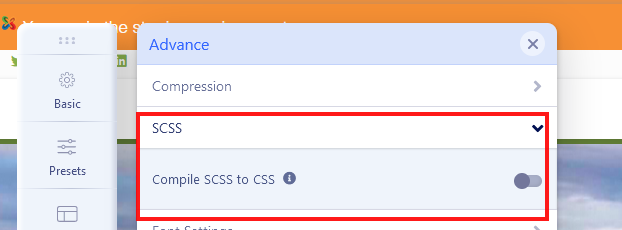
Frank, all you have to do is turn SCSS off after update .... as I did here.
Frank Asked this
Paul
thanks for looking into this. I no longer have the problem with the custom syle not working. However i dont think the problem was caused by scss button as it is switch off on my live site and should have been when i made a staging copy. l think the problem was caused by some custom code which i have removed from my live site and on rebuilding the staging site the problem has gone. The cutom style now works whether i have the scss switched on or off
The site is still not working on mobile properly in regard to not filling the whole screen. You can observe this on an ipad and viewing mobile view
thanks again for looking into this
Kind regards
Frank
Frank Asked this
Hi Paul
i have manged to get my live site working with Helix ultimate two..
not sure how. i reinstalled page builder and helix ultimate and the problem has gone. I also installed joomla 4 on my staginging site and all your extensions work!
However easyblog has some issues and i have a couple of other extensions that need updating before upgrading to joomla 4.
thanks again for your support and all the best for Joomshaper future developments
Log in to reply.