Layout issue - Forum | JoomShaper
Staff replied Helix Framework

Layout issue

Asked by copycat 5 years ago Last activity 5 years ago

Hi,

Installed latest Helix ultimate v2 and fresh Joomla 4. No other extension.

I set layout 3-6-3 in helix layout manager and choose to display one module on right position.

I created Blog layout and noticed that when i'm viewing Categoriy Blog layout then left column (component) is wide enough, but when I enter article view then this left columns gets significant smaller and class row justify-content-center is added.

What can I do to have normal width component collumn and how to remove that class?

3 replies

Ofi Khan Staff

Hello copycat

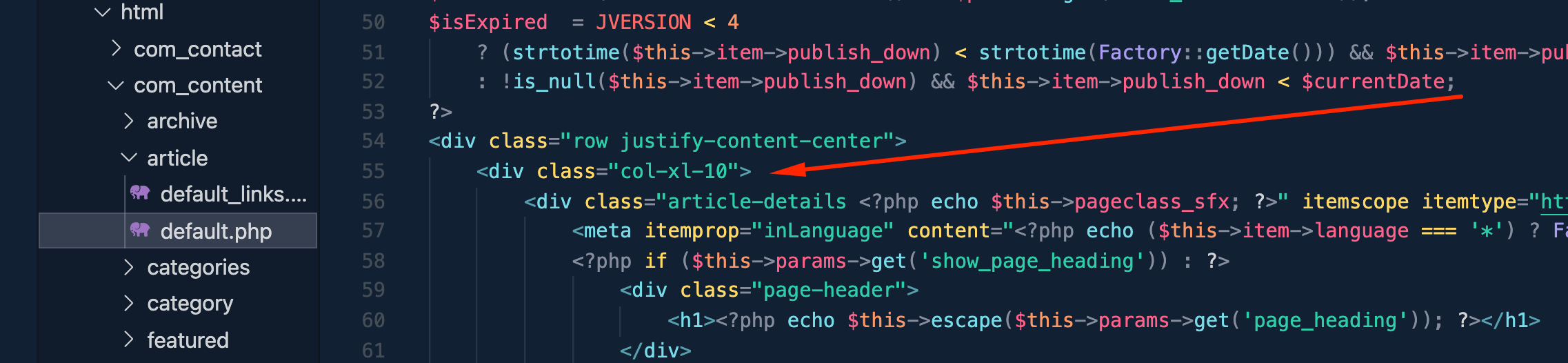
Please go to this location: templates/shaper_helixultimate/html/com_content/article and in the default.php file change on the line 55 from
<div class="col-xl-10">
to
<div class="col-xl-12">

Screenshot at Aug 23 17-06-49.png

Best regards

copycat Asked this

This solved situation, but is this something i will need to do for each website?

Did you wanted this on purpose or it is bug?

Ofi Khan Staff

We actually did it on purpose. But there is an option for you to change in the code.

Log in to reply.