Override(s) to Check Home Dashboard Notification Warning - Forum | JoomShaper
Solved Helix Framework

Override(s) to Check Home Dashboard Notification Warning

Asked by joe 5 years ago Last activity 2 years ago

I am getting the following Notification warning on my Joomla Home Dashboard:

  • "Override(s) to Check 1"

When I click it, it takes me to the following section:

  • "Templates: Templates (Site)"

However, I cannot figure out what I need to do to make the warning go away.

Any assistance would be greatly appeciated.

Video link added to "Hidden Content".

Accepted answer

Marked as the solution
Ofi Khan Staff

You are welcome. Please accept the answer that helped you. It will be then easier to find the solution for the other users with the same issue. There is a button to accept answer after each comment.

4 more replies

Ugur Uygur
5 years ago · edited

Hello,

  1. J!4 Administrator
  2. System
  3. Templates - Site Templates
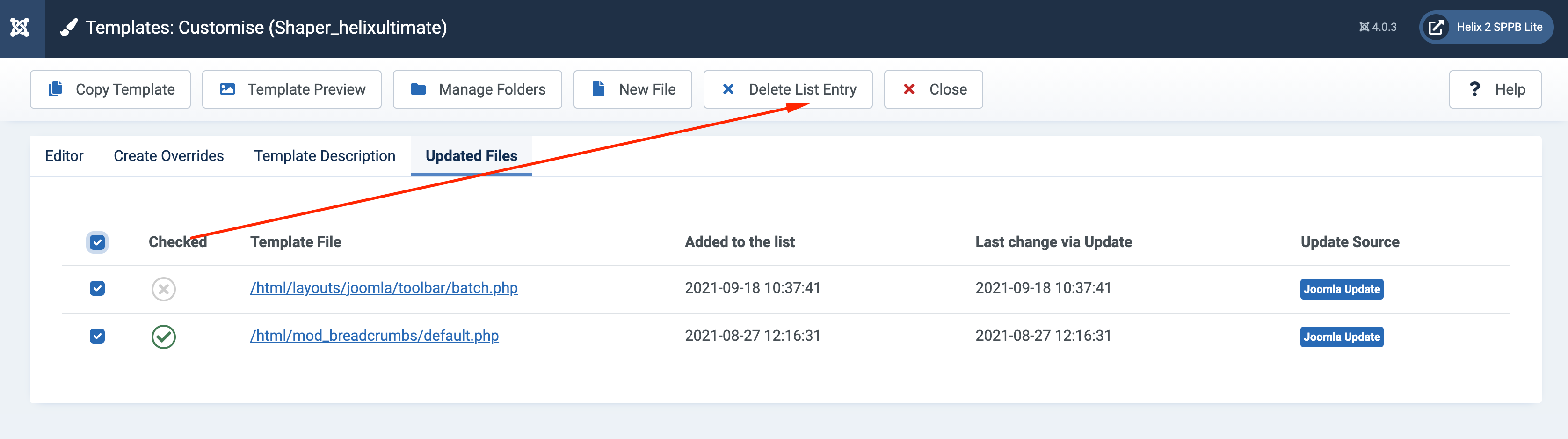
  4. Shaper_helixultimate Details and Files - Updated Files tab,
    you can see

https://imgur.com/a/oCOdyEk

Regards

Ofi Khan Staff

Hello joe

If you click on Delete Entry, then the warnings will be gone. These files are overriden by the latest Joomla update.

Screenshot at Sep 18 16-53-35.png

Best regards

joe Asked this

Yes, you suggestions worked.
Thanks for teaching me how to manage the warning.

Sabrina

good morning,
I never quite understood what to do when overreads appear to me after updating joomla. Can I safely delete them or will I have problems so is it better to overwrite them?

thanks for the answer

Ofi Khan Staff

Hello Sabrina

This shows the file changes in the update. You can simply ignore them.

Best regards

Log in to reply.