Portfolio drill down not working from the PORTFOLIO - Forum | JoomShaper
Solved Extensions

Portfolio drill down not working from the PORTFOLIO

Asked by Integrin Enterprise Solutions 4 years ago Last activity 4 years ago

Hi, I'm using SP Simple Portfolio with floox template, And i have removed the menu items under PORTFOLIO menu. As the Menu items are needed only for selecting the layout, i have pre-selected a layout from /administrator >> Extensions >> Modules >> Portfolio >> Portfolio Module >> [Select Layout Settings] & Columns, Portfolio Drilldown works only when i select a menu-item from PORTFOLIO Menu, In a production system, i would imagine the administrator will preselect the Portfolio > Layout Settings from Administrator menu and not have the user select the Layout from PORTFOLIO > Menu Item; As i mentioned earlier, the portfolio drilldown only works when i select a Portfolio > Menuitem, but when i navigate tot he item > Drilldown without clicking the Portfolio > Menu item, the drill down shows a 404, i'm also able to reproduce the issue in cleaninstall of floox template using Quickstart package.

I have captured the details in the included video, pls can you assist
https://youtu.be/mbNUrrwS8SQ

Accepted answer

Marked as the solution

35 more replies

Toufiq Senior Staff

Hi there,

Thanks for contacting us. Sorry for the inconvenience. Please don't disable the layout menu. If you no need the layout menu then you can hide from it menu item. But, To check the details you need the menu item of layout.

-Thanks

Integrin Enterprise Solutions Asked this
Thanks Toufiq for the response, however this issue occurs even when i do not disable the Layout menu, i have captured the details & issue in an installation based on Quickstart floox template without any custom changes, Pls advise 

https://youtu.be/u3IUrg-0qyM
Toufiq Senior Staff

Hi, Sorry for the inconvenience. Will you please provide me the Joomla administrator access to check the issue? I will check & get back to you soon. 

-Thanks

Integrin Enterprise Solutions Asked this

Thanks Toufiq for looking into this, i have granted access to our dev environment and provided details in the hidden area

Toufiq Senior Staff

Can you give me FTP access? Cause, After disable SEF the link works fine. Thanks

Integrin Enterprise Solutions Asked this

Thanks Toufiq for looking into this, if you need files to be dropped in a specific location pls let me know and i can drop the files, this is my laptop, and i'm unable to grant FTP access

Toufiq Senior Staff

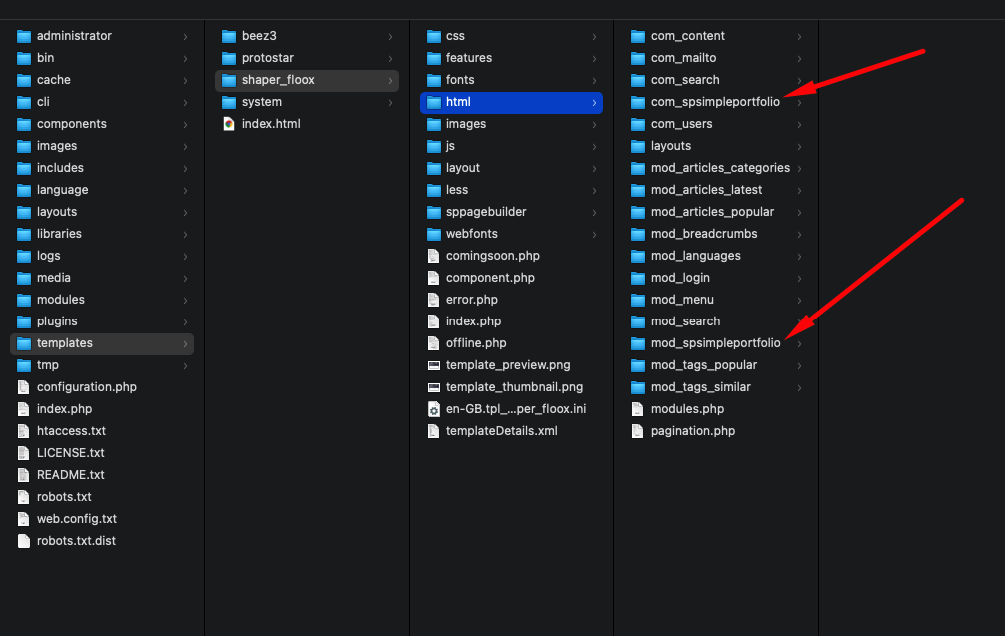
Delete the override simple portfolio directories and rename the .htaccess file (Just for the check)

Integrin Enterprise Solutions Asked this

Thank you Toufiq for your suggestion, just to make sure i do the right thing, pls can you give the full directory path, that needs to be removed, also i will be trying this in www.dev1.integrines.com/administrator (Please note dev1)

Integrin Enterprise Solutions Asked this

Thanks for the details Toufiq,

Before renaming .htaccess
clintu2@lt-clintu2:/var/www/html/floox_quickstart_j3_v1.9/www.integrines1.com$ find . -name .htaccess
./plugins/editors/acyeditor/acyeditor/.htaccess
./libraries/vendor/.htaccess
./administrator/components/com_acymailing/logs/.htaccess

After renaming .htaccess
clintu2@lt-clintu2:/var/www/html/floox_quickstart_j3_v1.9/www.integrines1.com$ find . -name .htaccess
[No file]

Renamed to .htaccess_ORIG
clintu2@lt-clintu2:/var/www/html/floox_quickstart_j3_v1.9/www.integrines1.com$ find . -name .htaccess_ORIG
./plugins/editors/acyeditor/acyeditor/.htaccess_ORIG
./libraries/vendor/.htaccess_ORIG
./administrator/components/com_acymailing/logs/.htaccess_ORIG

Also removed the overrided Simple Portfolio Directories [Folder contents below]
clintu2@lt-clintu2:/var/www/html/floox_quickstart_j3_v1.9/www.integrines1.com/templates/shaper_floox/html$ ls
com_content com_search layouts mod_articles_latest mod_breadcrumbs mod_login mod_search mod_tags_similar pagination.php
com_mailto com_users mod_articles_categories mod_articles_popular mod_languages mod_menu mod_tags_popular modules.php

and I restarted Apache Web server after the above to make sure,

Even after making the above change, i get the same results, and you can access the environment using the below url >> https://dev1.integrines.com/index.php/component/spsimpleportfolio/ and administrator details are given in the hidden section

Pls can you assist
Log in to reply.