Changing blog header "Awesome stories" text - Forum | JoomShaper
Solved Templates

Changing blog header "Awesome stories" text

Asked by Hector 5 years ago Last activity 9 months ago

Hi friends!

I am using the Fortune template and I need a bit of help with the blog section please.

I need to change the text "Awesome stories" but I am unable to find where this can be done. Visit: https://staging.aprendemindfulness.org/mindfulness/blog

The text don't seem to be from a module or from the menu settings

Please can you let me know?

Many thanks,
Hector

Accepted answer

Marked as the solution
Ofi Khan Staff

Hello Hector

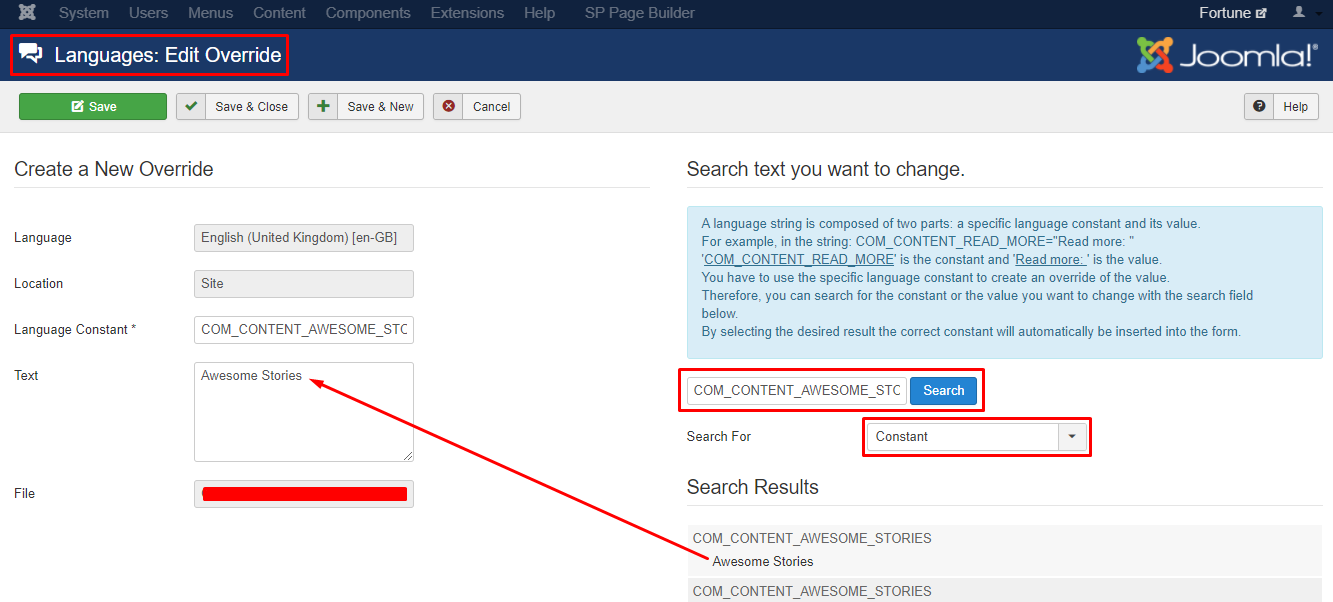
Please go to Extensions -> Language -> Overrides and create an override for your site language. Change this string COM_CONTENT_AWESOME_STORIES to change "Awesome Stories".

Screenshot_545.png

Best regards

3 more replies

Hector Asked this

Thank you Ofi.

Here is some feedback for future templates:

Some of us have different blog categories, such as videos, blog articles, podcast episodes, etc.

If this text string is managed though a language string, then all the different blog categories will have the same text at the top.

It may be better to manage this through a module, so that the headline can be easily tweaked for each individual blog category.

Many thanks,
Hector

Ofi Khan Staff

You are welcome

Good suggestion indeed.

linarob70

Where is it located in version 5.2.0?

Ofi Khan Staff

Hello linarob70,

Thank you for reaching out to our technical support forum. I’m sorry to hear about the trouble you’re experiencing.

Please post a new question regarding your issue. We will check and help you.

Best regards

Log in to reply.