Varista SP LMS: how to change background image for Courses - Forum | JoomShaper
Solved Templates

Varista SP LMS: how to change background image for Courses

Asked by Patricia Lawson 5 years ago Last activity 5 years ago

Varista uses the SP LMS component. I cannot see where to change the background image for the Courses page. In the Preview Demo is has University buildings in it: on my copy I have a blue page with JoomShaper watermark on it. Where do I update?

Thanks!

Accepted answer

Marked as the solution
Ofi Khan Staff

Hello Patricia Lawson

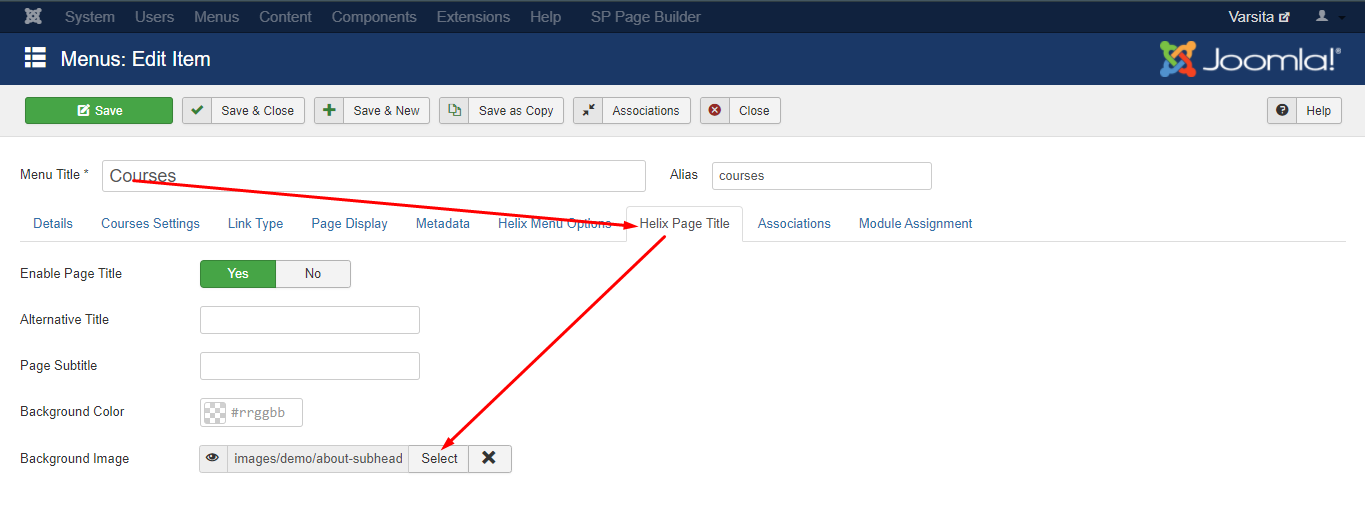
Please go to Main Menu -> Courses and change the image in the Helix Page Title option.

Screenshot_548.png

Best regards

Log in to reply.