

How To Change The Colour Gradient Of The Buttons
H
HDcms
Hi On the theme, the buttons have colours. I would like to put a blue gradient. How do I do it?
See on the page https://demo2.joomshaper.com/2020/wimble/index.php/about , the "Get started" button at the bottom right of the page Regards
6 Answers
Order by
Oldest

Rashida Rahman
Accepted AnswerHi,
Sorry, I was given that specific button code as demo/sample. However, you can try the following:
body .sppb-btn.sppb-btn-default:hover, body .sppb-btn.sppb-btn-default:focus, body .sppb-btn.sppb-btn-default:active, body .sppb-btn.sppb-btn-primary:hover, body .sppb-btn.sppb-btn-primary:focus, body .sppb-btn.sppb-btn-primary:active, body .sppb-btn.btn-primary:hover, body .sppb-btn.btn-primary:focus, body .sppb-btn.btn-primary:active, body .btn.sppb-btn-default:hover, body .btn.sppb-btn-default:focus, body .btn.sppb-btn-default:active, body .btn.sppb-btn-primary:hover, body .btn.sppb-btn-primary:focus, body .btn.sppb-btn-primary:active, body .btn.btn-primary:hover, body .btn.btn-primary:focus, body .btn.btn-primary:active, body .sppb-btn.sppb-btn-primary.sppb-btn-outline:hover{
    background: yellow;
}
body .sppb-btn.sppb-btn-default, body .sppb-btn.sppb-btn-primary, body .sppb-btn.btn-primary, body .btn.sppb-btn-default, body .btn.sppb-btn-primary, body .btn.btn-primary, body .sppb-btn.sppb-btn-primary.sppb-btn-outline{
    background: blue;
}
It includes primary, default, and outlined peimary buttons.
The following blog may help you to find out the ID/class of your desired elements: https://www.joomshaper.com/blog/which-line-of-css-i-have-to-edit-code-inspector-in-action
Best Regards

Ariba
Accepted AnswerHello
Thank you for your query.
Kindly check this documentation link: https://www.joomshaper.com/documentation/joomla-templates/wimble/bottom-layout-settings
You need to open "Bottom" module, inside "button group" the first button is the "Get Started" button. You can choose a different button style from there. Otherwise, you can provide a CSS class name and you will be able to add gradient with custom css.
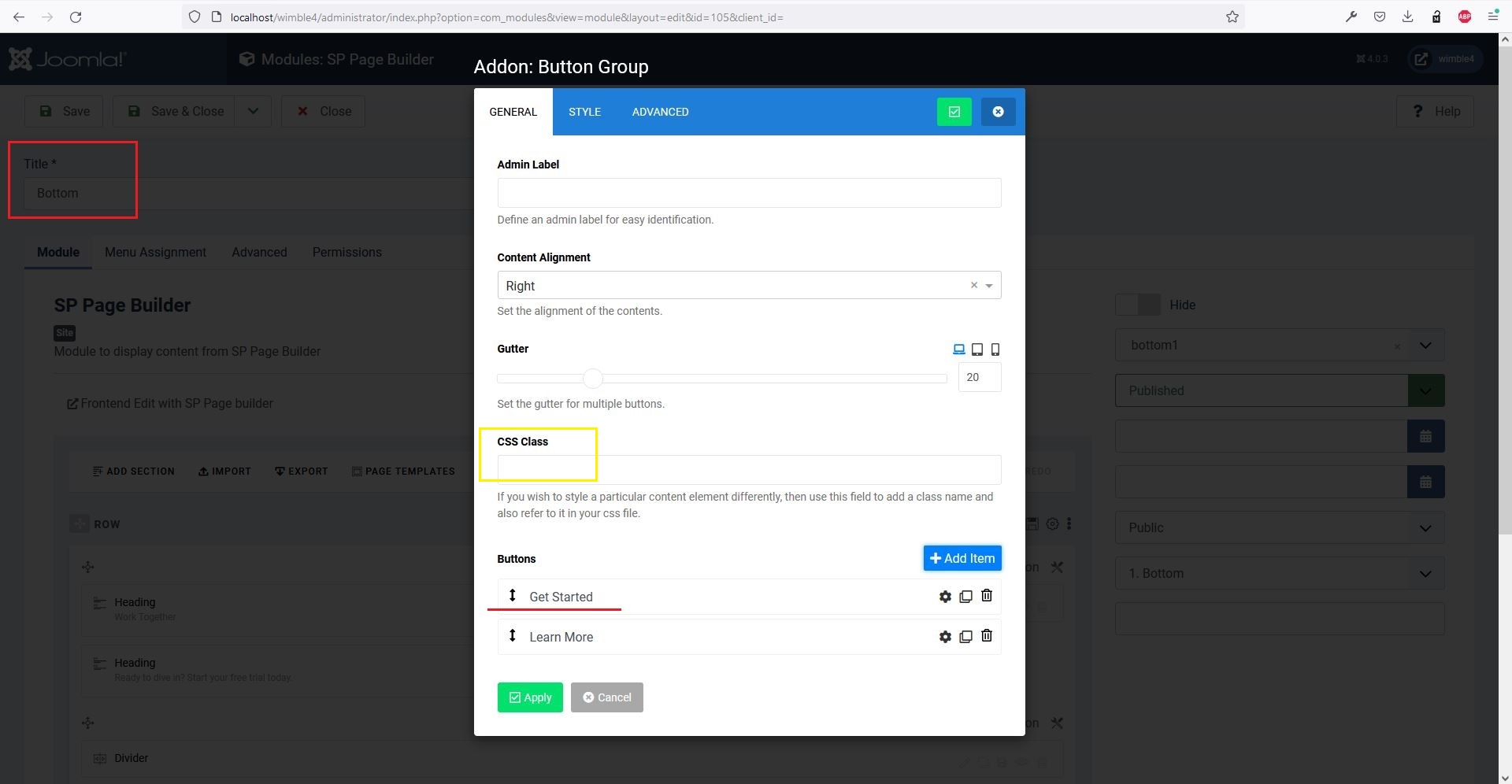
Rashida Rahman
Accepted AnswerHi there!
Yes, Ariba is right. You may change the button style or you can use custom CSS either. Here is sample code for you that you need to put in your custom CSS:
a#btn-1603719505769{
    background: linear-gradient(95.55deg,green 4.25%,red 93.67%);
}
Here is the hover gradient color effect changing code:
a#btn-1603719505769:hover{
    background: linear-gradient(95.55deg,yellow 4.25%,blue 93.67%);
}
You can use your desired colors within the above code.
Note: Path towards custom CSS: Extensions>Templates>Styles> Click on your current default template name then choose Template Options. Then find custom CSS within the custom code.
Best Regards
H
HDcms
Accepted AnswerHi Sorry but I couldn't do it. I started with the module button at the bottom of the acymailing page but I can't find the place to change it in SPPB or the button hover I found this item to disable
body .sppb-btn.sppb-btn-default, body .sppb-btn.sppb-btn-primary, body .sppb-btn.btn-primary, body .btn.sppb-btn-default, body .btn.sppb-btn-primary, body .btn.btn-primary {
    background: var(--gradient);
}

class="btn btn-primary button subbutton"
:root {
        --gradient: linear-gradient(95.55deg, #00c6fb 4.25%, #005bea 93.67%);
}
To simplify, how to have all the buttons in Wimble with only 1 blue colour at rest and only 1 colour on hover? regards