

Update Of SPPage Builder - Editing Articles Button To Select Page Builder Or Article Blued Out

hillary_h
Editing an article,
the joomla aditor and the SPPage Builder option are both blued out and neither can be selected.
Joomla! Version Joomla! 3.9.22 Stable [ Amani ] 6-October-2020 15:00 GMT Joomla! Platform Version Joomla Platform 13.1.0 Stable [ Curiosity ] 24-Apr-2013 00:00 GMT
SP Page Builder Pro Version: 3.7.9
2 Answers
Order by
Oldest

Rashida Rahman
Accepted AnswerHi there!
Thanks for contacting us.
Your issue has been solved now, please check and let me know.
I have applied the following steps:
Best Regards

Paul Frankowski
Accepted AnswerHi Hillary,
- I can confirm it's OK now. It was J2Store configuration problem as Rashida said.
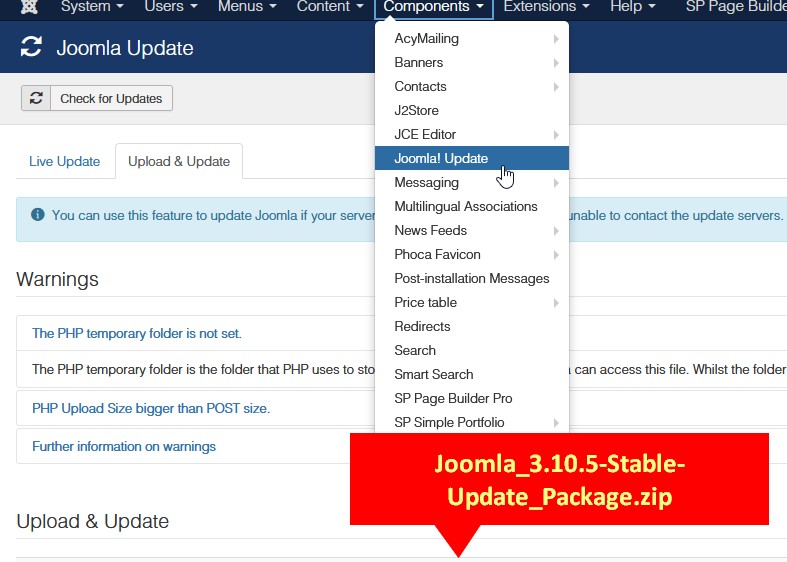
- Please update Joomla, you should have v 3.10.5 (!). In case of core problem, download update package from joomla.org and install in "Upload & Update" tab here: administrator/index.php?option=com_joomlaupdate
- Please update JCE Editor as well.