

Opus Template: Header I Cannot Seem To Change Its Colour.

hillary_h
Hi, the header I cannot seem to change its colour. Where do i find its settings. Thanks
3 Answers
Order by
Oldest

Rashida Rahman
Accepted AnswerHi there!
You are supposed to find Header color option within the Preset tab of your Template Options.
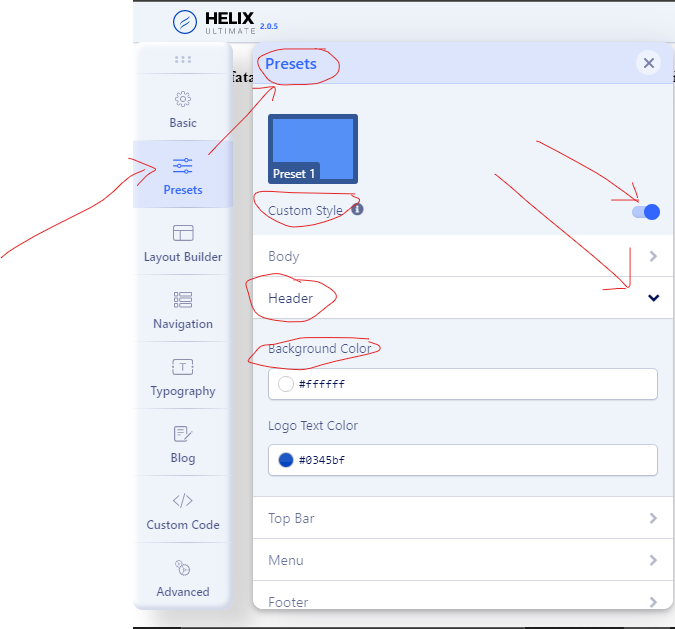
If you are using predefined Header then you may use the following code in your custom CSS to change that:
#sp-header:before {
    background-image: linear-gradient(90deg, #dc3545 0%, #6973fd 100%) !important;
}
You can modify the color within the above code as per your wish!
Note: Path towards custom CSS: Extensions>Templates>Styles> Click on your current default template name then choose Template Options. Then find custom CSS within the custom code.
You will find related info in the template documentation too:
Hope this helps!
Best Regards
hillary_h
Accepted AnswerHi Rashida,
Thank you for the answer above. The first part going to the presets>header>background coour and changing it does not work?