

Dropdown Menu Helix Ulitmate
SG
Stefan Gripa
Hello,
I use the template shaper_helixultimate - Standard.
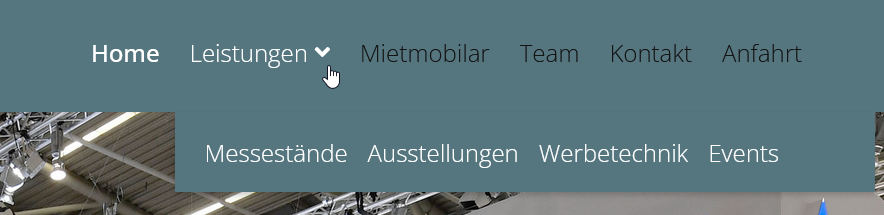
How can I display the menu items of the drop-down menu next to each other instead of one below the other?
Thank you for your answer
Greetings Stefan
Website
http://j4.schauwerbung-gmbh.de/
6 Answers
Order by
Oldest

Mehtaz Afsana Borsha
Accepted AnswerHi
Could you please give me a demo of what's a type of actually you want?
-Regards

Paul Frankowski
Accepted AnswerIf yes (Ja), please follow my guide:
- In Template Options - Menu (Navigation) - edit menu item "Leistunged" and in MegaMenu settings change submenu width to 640px
- Then in Template Options - Custom Code - Custom CSS paste below lines
- Save template settings
.sp-megamenu-parent .sp-dropdown li.sp-menu-item
{display: inline-block; padding: 0 10px;}
Extra law advice! You have important issue with DSGVO law on your site, read more: https://www.joomshaper.com/documentation/sp-page-builder/sp-page-builder-3/google-fonts-and-dsgvo
SG
Stefan Gripa
Accepted AnswerThank you very much Paul. It works.
What do I have to change so that the dropdown menu is in the middle of the item "Leistungen"

Ugur Uygur
Accepted AnswerHi, You can make changes.
body.ltr .sp-megamenu-parent .sp-dropdown.sp-dropdown-main.sp-menu-right {
    left: 0;
}