

Responsive Content Alignment
J
Julian
Hi there,
i've tested out lot of other page builders and I miss one simple but very effective feautre in SPPB. Why i can't set up a responsive or device dependent content alignment of a element?
Example: i have a two colum layout with a text on the left and a button on the right side. I align the button on "Left" Here the dektop view: https://imgur.com/rhh0ObE
The tablet view looks ok for that: https://imgur.com/osbKt89
But for the mobile view it's important to set the alignment for the button on center. Here the screenshot: https://imgur.com/xqMOt6z
Can you please add a feature like this?
Thanks in advance.
23 Answers
Order by
Oldest

Mehtaz Afsana Borsha
Accepted AnswerHi
Thanks for your suggestions, I will note it down on our feature request list. But if possible could you please give me your site URL so that I can check?
-Regards

J
Julian
Accepted Answer@Toufiq I think you misunderstood me. The alignment can only be set for one view and is therefore not responsive. There have to be buttons, such as padding or margin for the different devices. I think this is a huge issue and I don't understand why this feature doesn't exist or why nobody has noticed it yet.
J
Julian
Accepted AnswerAny opinion on this? Do you plan to implement this?
I mean, am I the only one who needs the feature?
J
Julian
Accepted AnswerThat's not a display problem, it's a problem when creating and editing the page. There is no way to algin an item by view (desktop, tablet, and mobile).
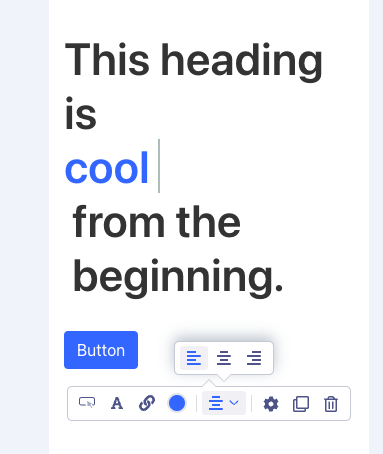
I can only choose left, center and right: https://imgur.com/WJ09djp
I need a platform dependent property such as at margin: https://imgur.com/qEHdgH0
J
Julian
Accepted AnswerCan anyone understand why I started this topic? In my opinion it is very important to have this feature.

Toufiq
Accepted AnswerWhen you are available? I think we should join remote desktop to see the problem live. Thanks
J
Julian
Accepted Answer@Toufiq Why do you want a remote meeting? I think I have explained the problem in detail or do you still have any questions?
Btw: the function is included in SPPB 4.0.
J
Julian
Accepted AnswerThis answer is not justifiable for a support request. If I'm not interested in a solution, I would never have asked the question.
I just don't want a remote meeting. Is it so impossible for you to help me anyway?
I think I gave detailed information about the problem. I asked if you needed more information. Then why this answer?
J
Julian
Accepted AnswerI don't know why you ask me this again.
Anyway, let's do this. Availabele today 18:00 CET.
J
Julian
Accepted AnswerNot possible today.
I'm asking again. Do you need more information? Maybe I'm doing something wrong. Can't you describe a solution somehow?
Why do I have the feeling that this is going nowhere? I don't think we can organize a remote meeting in time.
M
Michelangelo
Accepted AnswerHi,
I need the same thing as Julian. There should be the possibility to set differente values depending on pc, tablet and mobile.
For example, for the same element: Margin on pc 10px ; 10px ; 10px ; 10px ;
Margin on tablet 20px ; 10px ;20px ; 10px ;
Margin on mobile 0px ; 0px ;0px ; 0px ;
Or, for text: On pc text-align: left
Margin on tablet: text-align: center
Margin on mobile: text-align: center
And so on.. summing up, for each element (text, column, row, addon) it is essential that there is the possibility to differentiate the display according to whether the site is visited by PC, tablet or smartphone. Many other builders do this.
J
Julian
Accepted AnswerHere a screencast of the issue. I hope it is now finally clear what is meant.
(Sorry for the bad quality.)
Toufiq
Accepted AnswerGot it your issue. This feature doesn't exist on Button addon. I will add this feature request to your working board. Thanks
RP
Richard Pigden
Accepted AnswerHi
Just want to add another voice to this requirement. It would be so helpful to be able to align text differently for desktop, tablet and mobile.
Currently you set the text alignment to left, centre or right, but if you want left on desktop, centre on tablet & mobile you have to use CSS code. Although not a big deal, it would be nice if the page builder had a setting to change it for each device.
Julian, you made perfect sense :-)