

Carousel Pro Not Recognising Fonts
OJ
Oliver Johnson
I've created a number of pages which have the same first row, that being a Carousel Pro set to 700px high, Fluid Row with a background image and then a title and a line of text underneath. This has displayed fine on every page except the last one and now it won't work on any new page I create either.
On this page the font for the title isn't being displayed correctly but it is for the content. However sometimes if I edit the carousel item, the content text then disappears and I can't get it back again without deleting everything and starting again. If I create a new page then both the title font and the content font show incorrectly.
No matter what I do, the title font appears to be defaulting to Times New Roman or something similar instead of Hammersmith One (or any other font I set it to).
I've tried clearing the site cache, clearing my browser cache, trying a different browser, setting SP Page Builder to Production Mode and purging the cached CSS but nothing seems to make it work.
6 Answers
Order by
Oldest
OJ
Oliver Johnson
Accepted AnswerAs an update to this. If I edit the page in the front end, whilst the page is being edited the font displays correctly. As soon as the editor is closed, it reverts back to Times New Roman.
As a further update: The only way I've been able to 'fix' it on the page so that the font in the carousel is displayed correctly is by changing the font for every heading used on the same page to be the same font. However, if I were to set any one heading back to the default font as defined in the template, than that heading is then displayed in Times New Roman.
Clearly there's a css issue going on but for the life of me I can't work out what it is and why it's been absolutely fine up till now!
OJ
Oliver Johnson
Accepted AnswerAnother update. It's still happening on any new page I create. Unless I have multiple headings on a page ALL set to the same font then it won't display the font correctly.

Ofi Khan
Accepted AnswerHello Oliver Johnson
I see the font is showing okay. I have checked both the pages.
Best regards
OJ
Oliver Johnson
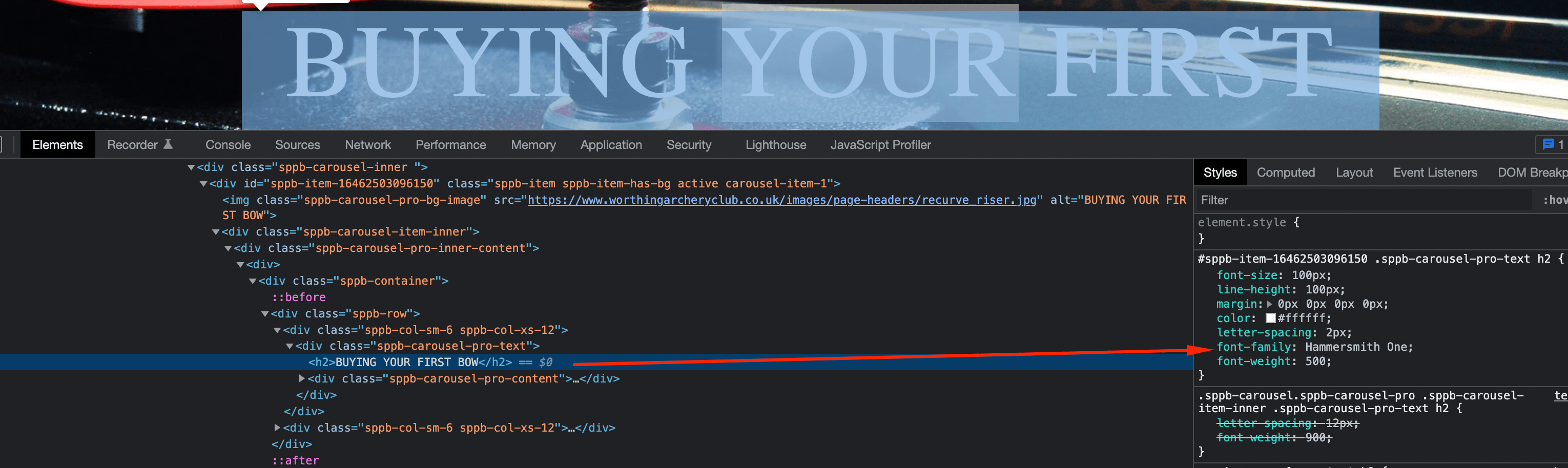
Accepted AnswerSo you are telling me that the font that is being displayed in the image above is Hammersmith One?
 This is Hammersmith One showing correctly on another page
 This is the same as the image you posted above. The CSS says Hammersmith One but does it look like the font above? No, it's Times New Roman
OJ
Oliver Johnson
Accepted AnswerJust to prove my point
This is exactly the same page but this time loaded in the front end editor
 See how the font is displayed correctly as Hammersmith One?
If I save the page and close the editor, it instantly reverts back to Times New Roman
This does NOT happen on any previous page I've created where the fonts are correctly rendered. It does however happen on this page and every single new page I create.