fontawesome icons not displaying - Forum | JoomShaper
Solved SP Page Builder

fontawesome icons not displaying

Asked by Emma Seymour 4 years ago Last activity 3 years ago

Hiya,

SPPagebuilder is up to date (vs. 3.8.3) but I've got an issue with fa icons not showing - I can see them okay to select in the administration side, but they aren't displaying on a live page. Do I need to amend custom.css - I have found a number of archived posts on this subject, but I don't know if they apply.

Accepted answer

Marked as the solution
Paul Frankowski Senior Staff

Hi,

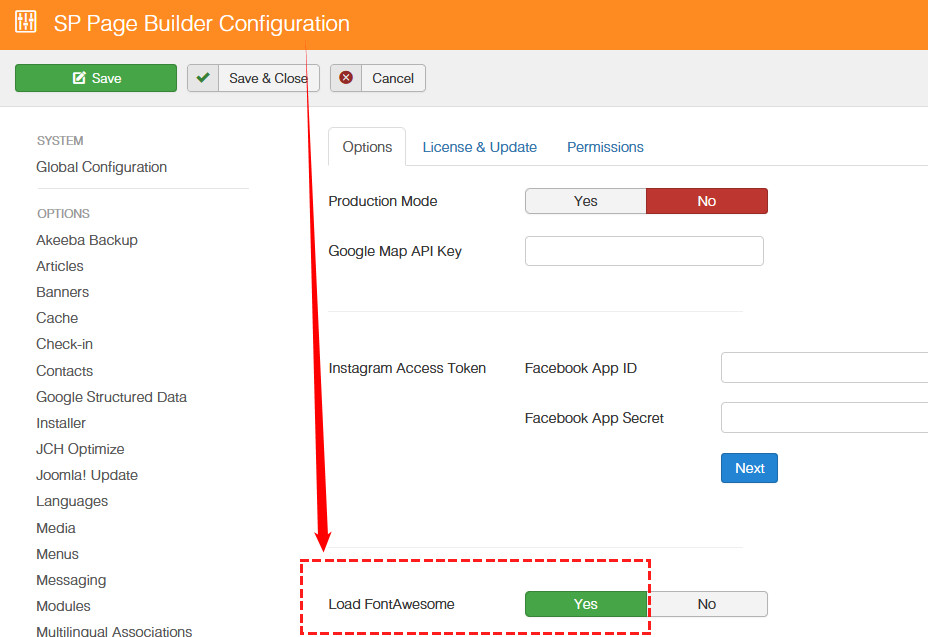
as 1st step enable Font Awesome in SP Page Builder Options.
foto_7963_2022.jpg

BTW

Your template is using old Font Awesome v4.7, not v5 as we use in SPPB and Helix Ultimate. And there are differences between them.

2 more replies

Emma Seymour Asked this

Hi,

Thanks for this - I can confirm that SP Pagebuilder already has Load Font Awesome enabled.

I'm aware that the Pace template we are using is overdue an update, the most recent update predates Font Awesome v5 by two years, so it's not likely to help. Can this be resolved anyway?

Thanks

Emma

Ron Kasteel

Thank you problem has been solved.
Have a nice day
gr Ron

Log in to reply.