

Capital Letter For Each Word
HG
Henk de Gans
For example, if I use the landscaping template and then the homepage, and I change the texts, I get a capital letter for each word. Can I turn that off and how?
16 Answers
Order by
Oldest

Paul Frankowski
Accepted AnswerYes, found.
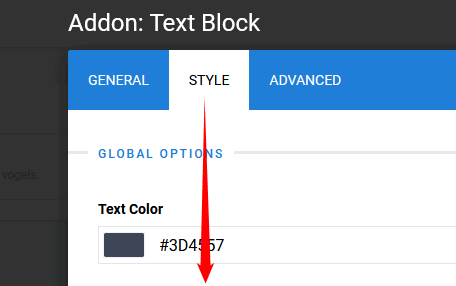
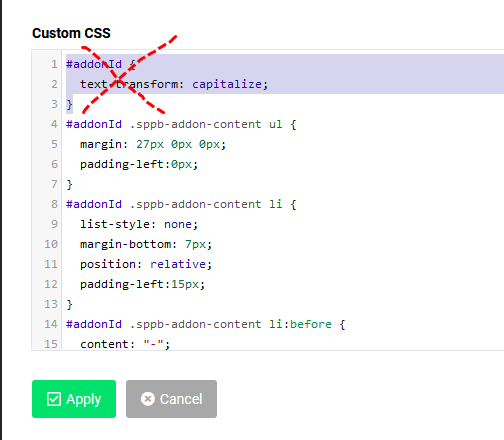
In Addons where you have problem go to tab "Style" - scroll down to "Custom CSS" field and remove this line
#addonId {
    text-transform: capitalize;
}
Save changes. Do it in every single Text addon where you have Capitalize words.
Paul Frankowski
Accepted AnswerHi Henk,
Check site/page CSS styles using Code Inspector (browser tool) for "text-transform" value.
https://developer.mozilla.org/pl/docs/Web/CSS/text-transform
It can be from Addon settings or template styles, anyway it's always possible to turn off or override. Just use your webmaster skills OR share URL so I can preview.
Useful tip: https://www.joomshaper.com/blog/which-line-of-css-i-have-to-edit-code-inspector-in-action
HG
Henk de Gans
Accepted AnswerHello Paul, For example this page: https://www.biancavanessenblog.nl/index.php/component/sppagebuilder/?view=page&id=25
Under LOCATIE:
HG
Henk de Gans
Accepted Answer<h5 class="sppb-addon-title">Regio Gelderland heeft ongeveer 70 leden met een grote diversiteit in vogels.</h5> <address>Wij houden regelmatig bijeenkomsten, waar wij elke keer weer een leuke invulling voor proberen te vinden. Dat kan zijn een lezing of gewoon een gezellige avond met bijvoorbeeld het bespreken van mee genomen vogels. Ontmoeting van elkaar en het delen van kennis en ervaring staan daarbij centraal.</address>
Paul Frankowski
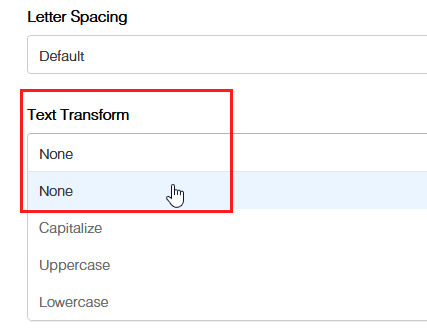
Accepted AnswerThanks. It looks it was enabled in both "Heading" and "Text-block" addon settings.
Please check & correct in "Text transform" and set "None" + Save changes.
HG
Henk de Gans
Accepted AnswerHello Paul,
Maybe a stupid question, but where do I find these settings?
HG
Henk de Gans
Accepted AnswerCould you possibly respond to this? Everything is still new to me and I have little experience
Thanks Henk
Paul Frankowski
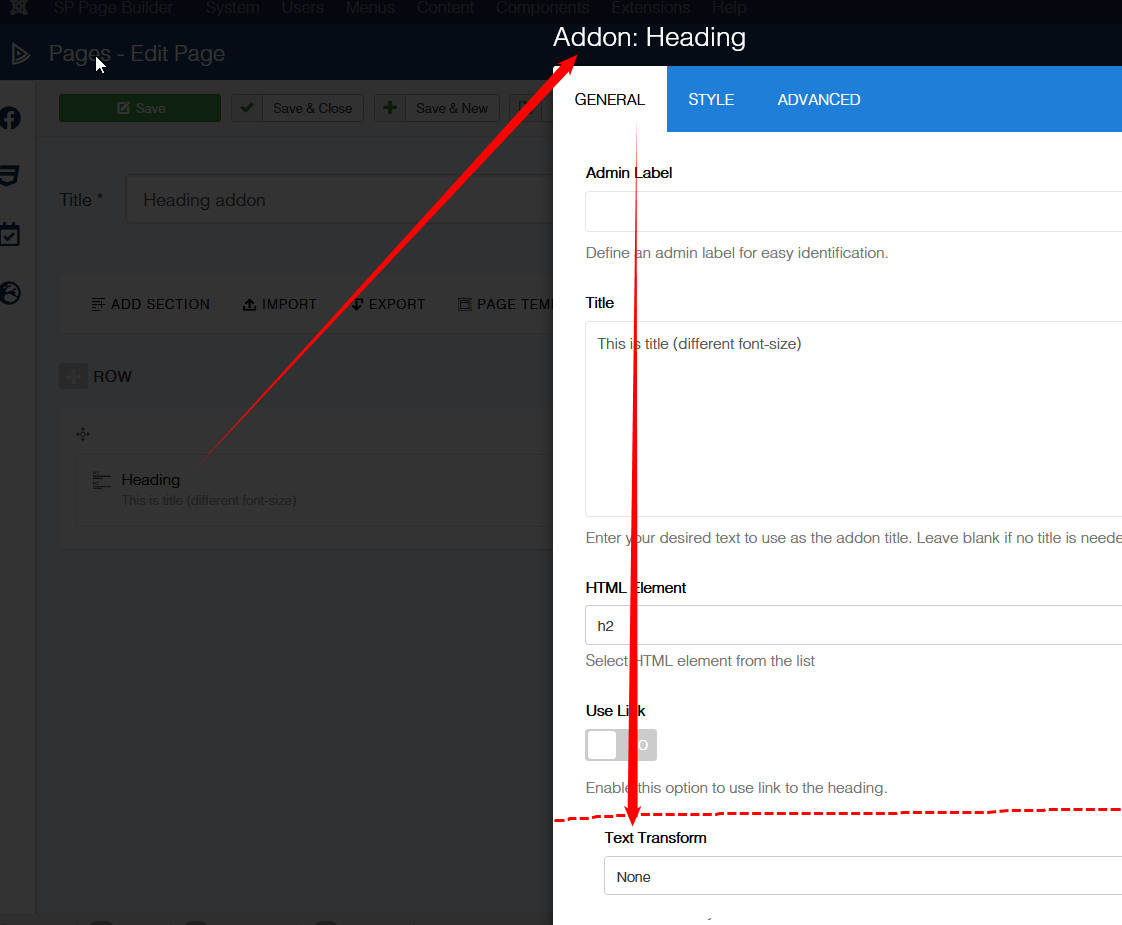
Accepted AnswerOn that Page in edit mode (back-end for example) open:
Heading addon - find option "Text transform" and set "None" - Save changes
do this same in Text addon where you have also "BIG" letters.
Example:
HG
Henk de Gans
Accepted AnswerHello Paul,
This indeed works with the addon heading but not with the addon text! In the adon textblock he use the JCE pro editor?
Paul Frankowski
Accepted AnswerUsername and password do not match or you do not have an account yet.
HG
Henk de Gans
Accepted AnswerHello Paul,
Have you already had time to log in, and have you succeeded now?
groet Henk