

TextBlock does Not Work!
S
Schmidt
Text block does not work, whenever I select it in the page builder I am thrown back to the page where I can add an addon.
Also, my previously saved settings are no longer displayed.
See the images:


Website
https://hebamme-herdecke.de
4 Answers
Order by
Oldest

Paul Frankowski
Accepted AnswerHi Schmidt,
What editor you have set in Global Configuration: TinyMCE, JCE or CodeMirror or None ? Only the first two from my list are supported (screenshot) That's why you may not see editor.
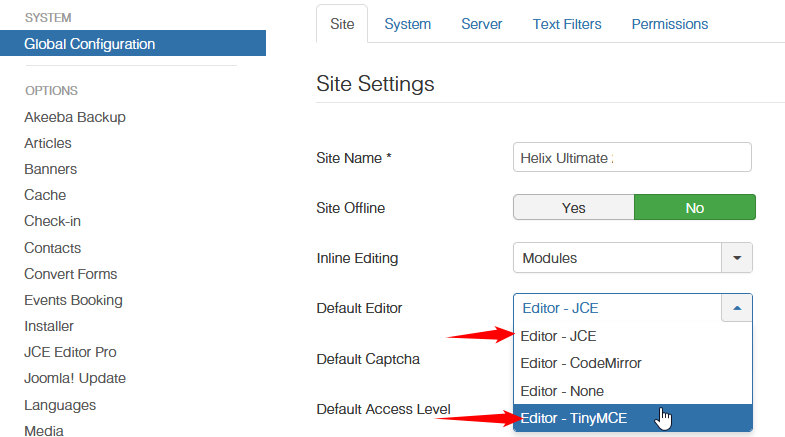
If you have JCE - make sure that it's updated to last version 2.9.22
S
Schmidt
Accepted AnswerThank you very much this fix the issue, but why isn´t the CodeMirror supported?
I hate TinyMCE it blocks some commands and i have to add them into whitelist. In CodeMirror i can write everything i want :-D
Thank you for the Solution.
Paul Frankowski
Accepted AnswerI don't know. It wasn't my idea.
for html code you can use raw html addon or inside JCE Pro you can enable html mode.
you're welcome, please mark topic as solved