

Helix Ultimate & SPPB
G
Gregorio Hernández Jiménez
Hi team, I added 3 pics in my Joomla so I can share them for a better understanding...
First of all, I tried change in Joomla Redirect the NEW URL per EXPIRED URL (as I see the new is like the unfriendly and the expired is the friendly url...), but that didn't help, just the opposite, the page gave 404 error. So I don't know if it's ok like this.
I think the problem is SP Page Builder, is showing different links instead of the ones I used. Like in a button, I try to point to an old existing article, it shows it, but the link it comes in the URL is not the same that in the old page... The Friendly URLs and URL Rewritting are enabled in global configuration, so no idea of why is that happening. Maybe it's good and not a problem, I am just afraid of not maintaining the SEO. Should I stop using SPPB and not redesign the website with that? What's your advice?
So I think there might be a problem since I'm using SP Page Builder and Helix in this redesigned site http://www.pruebasieb.info/ and the old website and currently working is https://www.invertirenbolsa.info/ . So I think that's what is making the link problem... So an example, go to the first website, the new, and go to the footer and look for "AVISO LEGAL", the next article appears with the URL showed in the next pic: https://www.pruebasieb.info/images/ieb_22/joomlaForum/newAndWrongURL.jpg

If you go to the second website, the old one and currently working, go also to the footer and look for the same button "AVISO LEGAL". The same article will open showing the FRIENDLY URL showed in the next pic: https://www.pruebasieb.info/images/ieb_22/joomlaForum/oldAndRightURL.jpg

So the article is the same, and in the new website, I put in the AVISO LEGAL button made by SP Page Builder the same link of the old website, but it appears the new non friendly link http://www.pruebasieb.info/component/content/article/1379-aviso-legal.html?catid=79&lang=es&Itemid=100 ..... That's what I wanna solve... Here you have a pic of how this page links look in my new Joomla 4 redirect component: https://www.pruebasieb.info/images/ieb_22/joomlaForum/JoomlaRedirect.jpg

Thank you very much for your help
11 Answers
Order by
Oldest

Toufiq
Accepted AnswerHi there,
Thanks for contacting us. Sorry for the inconvenience. Can you share an screencast video about the full scenario?
-Thanks
G
Gregorio Hernández Jiménez
Accepted AnswerHi Toufiq, sorry, I was out! https://youtu.be/51xIaI9cz7s
So there you have it. The problem is that, when pointing to the same article in the new website, the link is different. It's a good link because still friendly, but still it's not the same that appears in the old one... That happens everywhere... So just afraid that might not keep the SEO of the old website...
Thank you

Paul Frankowski
Accepted AnswerHi Nilo.
On your 2nd site, where the links are not OK, check:
- if you have .htaccess file
- and enabled SEO in Global Configuration
- And all articles are assigned to category view that it's inside Menu as menu item!
This is the main reason why links are displayed in a long form. SPPB does not generate links only Joomla does.
For Links redirect it's also good to use Akeeba Tools (Core/Pro) it has redirect option that in my opinion works much better than default Joomla.
Paul Frankowski
Accepted Answer- If you can share link (URL) to subpage where is a LONG LINK - I can find a source of mistake.
- In Buttons Addon always use short links taken from Menu item "Alias" field. Than you can be sure that sort URL will be used or ... Error404 when you disable it.
G
Gregorio Hernández Jiménez
Accepted AnswerHi Paul, thanks you too for answering, yes, SEO is enabled, I got .htaccess, etc. Let's try something:
So here you have a link to a video I uploaded on YouTube, I explain the problem with one article and one menu item. The problem is with all, but maybe it's more understandable like this... https://youtu.be/xQ_FfzRej_k
So I just imported the website into the new installation and added SPPB, Helix Ultimate and working with that... But the articles, etc. Remains the same in almost all cases. For example the article showed in the video, the difference is that I redesigned it using SPPB, but using the article itself, so didn't touch the nickname or created a new one, etc... So the URL I get it's friendly, it's nice, but it's just different from the old website, so I'm just afraid this means this is not keeping the SEO, right? Because the URL is different... That's what I mean. In the video is well shown I think.
Let me know then if you need anything more... Thank you very much.
Paul Frankowski
Accepted AnswerQ: What is difference between OLD site and NEW site, new Joomla, new Joomla settings - or just a new hosting?
Becuase as you may noticed (or not?) In Article Options - Inetgration - Routing : Modern/Legacy
it make big difference also with option "Remove IDs from URLs"
Helix template do not change links, it's on Joomla level only, it just use what Joomla generate.
Menu alias are the most important - not aliases from Article edit page.
Paul Frankowski
Accepted AnswerGracias for VIDEO.
- I think you changed menu structure
- About "missing" .html in alias URL -- it's from Joomla Global Configuration - SEO - Add Suffix to URL: Yes
Is possible to get access to both sites, so I will be able to record you a short video what is missing, where is mistake.
G
Gregorio Hernández Jiménez
Accepted AnswerHi Paul, thanks again! ;-)So the old website is Joomla 3 and quite old, I was not the developer then. Now I am redesigning it following the graphic design from the graphic team. So we use Ionos hosting, the old site is in Ionos Dedicated Server and the new one is in a Ionos Expert hosting.... When the new site is ready we will change to invertirenbolsa.info (like the old and current) instead of pruebasieb.info.So we migrated the website and upgraded to Joomla 4, deleting the deprecated things, etc. The new things are the new server, Helix Ultimate template and SPPB.... So we have created 2 super users, one in pruebasieb.info/administrator (new site) and the other in invertirenbolsa.info (old and current website). Both have the same credentials:Thank you very much for your help! I think that will be the best. (By the way, add suffix was activated, yes...)Hi Paul, thanks again! ;-)So the old website is Joomla 3 and quite old, I was not the developer then. Now I am redesigning it following the graphic design from the graphic team. So we use Ionos hosting, the old site is in Ionos Dedicated Server and the new one is in a Ionos Expert hosting.... When the new site is ready we will change to invertirenbolsa.info (like the old and current) instead of pruebasieb.info.So we migrated the website and upgraded to Joomla 4, deleting the deprecated things, etc. The new things are the new server, Helix Ultimate template and SPPB.... So we have created 2 super users, one in pruebasieb.info/administrator (new site) and the other in invertirenbolsa.info (old and current website). Both have the same credentials:Thank you very much for your help! I think that will be the best. (By the way, add suffix was activated, yes...)
Paul Frankowski
Accepted AnswerThanks, Found.
On old website you have installed component "sh404SEF" it's advanced URL links manager, it allows you control aliases of subpages (menu items) and change even default one created by Joomla itself. And as I checked some links from menu were overriden/customized by this extension (and webmaster choices). Example from "Libros Gregorio Hernández" (open image in new window to see details)
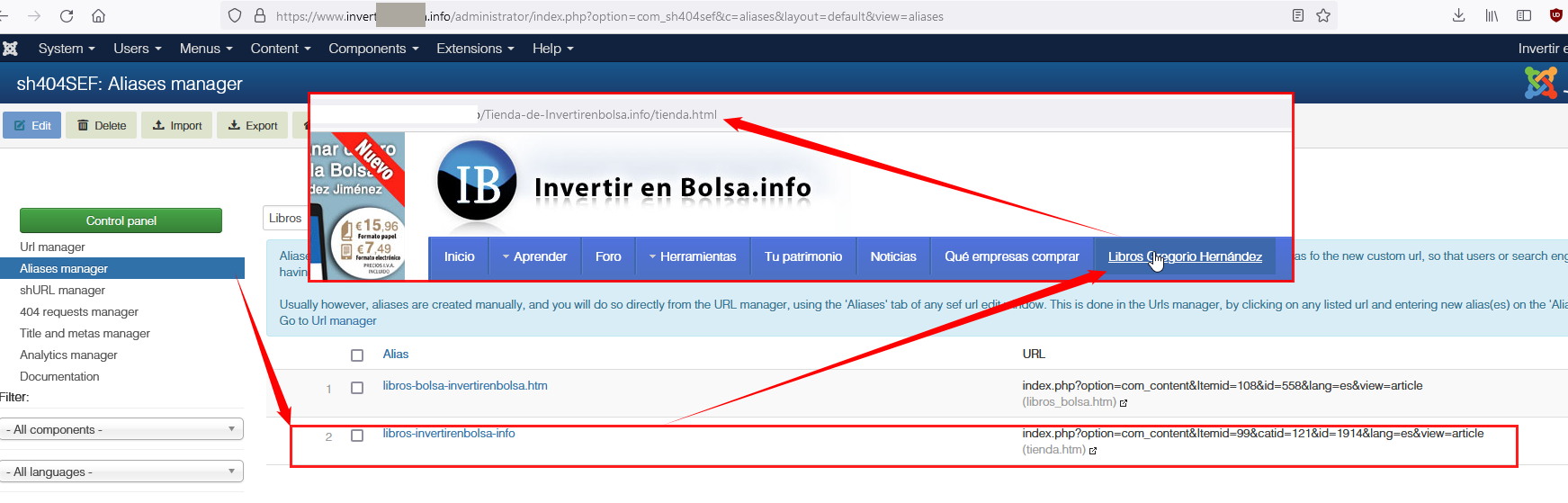
So now you have two options:
- Export-Import sh404SEF settings from old site to new one
- Or create a new links structure, add 301 redirections, and update website sitemap to Google
For sure it's beyond us, and it never was issue made by our software. As I told you before, only Joomla and extra extensions can manage links, not template nor SPPB. I hope now is more clear. You're welcome.
G
Gregorio Hernández Jiménez
Accepted AnswerHello again, thanks for everything! ;-) Yeah they didn't want to use sh404SEF anymore and use the Joomla Redirect. So importing the settings would be just useful if using the same component I guess. Ok gonna look at what to do as I'm not quite sure now... Any advice? Thank you very much Paul.