

Error Updating Templates - The Request Timed Out.

José Antonio Camejo González
I just activated my account and when trying to download the update of the templates (fixter and floox) I get the following error:
500 - The request timed out. The web server failed to respond within the specified time.
17 Answers
Order by
Oldest

Paul Frankowski
Accepted AnswerHi José,
It can be caused by temporary server traffic, so please download those templates directly from our website - https://www.joomshaper.com/downloads
in case of problems, wait 1h and try again.
After download template package - install it - it will update current template.
José Antonio Camejo González
Accepted AnswerThe automatic download is still giving error today, so I finally updated it by hand with no problem. Thanks. However, after upgrading, Joomla 4.1.5 pre-check still reports failure to check compatibility of template and SP page builder and sp page builder pro and tells me that upgrading sp cookie consent is required (although I understand that the latter is simply to remove and reinstall when switching to Joomla 4.1.5) Is there something else I need to update that I'm not seeing?
Extensions Pre-Update Check [ More Detail ]Update Information Unavailable Extension does not offer a compatible version for the selected target version of Joomla. This could mean the extension does not use the Joomla update system or the developer has not provided compatibility information for this Joomla version yet.
Extension Name Extension Type System - SP PageBuilder Potential Upgrade IssueMore Information Plugin Smart Search - SP Page Builder Plugin System - SP Page Builder Pro Updater Potential Upgrade IssueMore Information Plugin Search - SP Page Builder Plugin SP Page Builder Module SP Page Builder Module SP Page Builder Admin Menu Module SP Page Builder (es-ES) File Spanish (es-ES) Language Pack Package BreezingForms Free Component shaper_floox Template sysbreezingforms Potential Upgrade IssueMore Information Plugin shaper_fixter Template BreezingForms Module Content - SP Page Builder Plugin Responsive Tables Plugin eshiol\core Library BreezingForms Plugin eshiol\phpxmlrpc Library eshiol\J2xml Library SP Simple Portfolio - SP Page Builder Plugin
[ More Detail ]Update Required Please update these extensions before updating Joomla.
Extension Name Extension Type System - SP Cookie Consent Potential Upgrade IssueMore Information Plugin
Paul Frankowski
Accepted Answer- Uninstall all templates and extensions that you don't use anymore (!)
- Check if all installed extensions have current version. Check one by one, compare with info on developer site. If they are ready for Joomla 4.x if not, uninstall and find different one. Or wait with Joomla upgrade.
- If you have SPPB Pro 3.8.6/3.8.7 it's fully OK on Joomla 4.1- so you don't have to be worry. You can use it etc.
- Backup first
José Antonio Camejo González
Accepted AnswerI have SPPB 3.8.7 but I can't see if is "Pro"
Content - SP Page Builder Site Plugin 1.9.0 Sep 2016 Search - SP Page Builder Site Plugin 1.5 July 2015 Smart Search - SP Page Builder Site Plugin 1.6.1 March 2018 SP Page Builder Administrator Component 3.8.7 Sep 2014 SP Page Builder Site Module 1.6 Oct 2016 SP Page Builder Administrator Module 1.0.2 August 2014 SP Page Builder (es-ES) Site File 1.0 13 Apr 2017 SP Page Builder Admin Menu Administrator Module 1.4 August 2014 SP Simple Portfolio - SP Page Builder Site Plugin 1.1 Mar 2019 System - SP Page Builder Pro Updater Site Plugin 1.1 Jul 2015 System - SP PageBuilder Site Plugin 2.0.0 Sep 2016
It's ok?
Paul Frankowski
Accepted AnswerSystem - SP Page Builder Pro
I saw in your text. So I guess you have it. Besides just in SPPB tabs check About tab. Check what version you have installed. If current - yes, it's OK.
José Antonio Camejo González
Accepted AnswerThanks for your prompt response.
I have followed your recommendations and finally uploaded to joomla 4.1.5. The back-end works correctly but not the web. I have the error "Cannot access protected property Joomla\CMS\Menu\MenuItem::$params" I have read in your forum that it happens because the template is not updated to Joomla 4, but I am using FLOOX and FIXTER both in version 2.0.0 updated to Joomla 4. any suggestion?
José Antonio Camejo González
Accepted AnswerI saw that there was the update to the new version of Helix and I assumed that I was trying to solve my problem. I've installed it and now I can't see the backend either. I just see:
An error has occurred 0 Class 'ComposerAutoloaderInit03de505cc53b36971260b46d9d0f25c6' not found
I can't even go back anymore, please help
Paul Frankowski
Accepted Answercan you recover /plugins folder from backup?
ask hosting support they should have it
and tomorrow let me know
José Antonio Camejo González
Accepted AnswerThe hosting is Microsoft Azure and in 1 minute they have referred me to a new installation or a backup restore that I cannot do.
It seems that the problem comes from a joomla update that, I understand, should not offer me "Installer - Install from Web" https://appscdn.joomla.org/webapps/jedapps/webinstaller.xml
I have rolled back that install and see that the Helix update makes the template work except for:
On the backend:
- In the left side menu, under "Help" a drop-down with the name "SP Page Builder" is shown in blue or red that does not show anything (and I imagine it should not be here). I don't see how to send you a screenshot that would be clearer.
On the front end:
- Slideshow (full width) does not work. It doesn't show anything. I have tried several of its functions in case I detect the incompatibility but nothing works.
- Off Canvas Menu: The dropdown doesn't work. Submenus cannot be accessed.
- The Off Canvas menu and the Mega menu are shown in all views (Desktop, tablet and mobile) even if you hide it in some of them. Thanks for your help
Paul Frankowski
Accepted Answerback-end >> read tip 15 : https://www.joomshaper.com/documentation/sp-page-builder/sp-page-builder-3/troubleshooting#admin-area-of-sp-page-builder-is-broken-the-pages-and-editor-design-doesn-t-look-as-it-should
front-end >> I have to get access to check
José Antonio Camejo González
Accepted AnswerBack-end Resolved. Hidden Content for credential for our web Thanks
Paul Frankowski
Accepted AnswerThanks, I saw that you have two different Helix enigne installed.
Floox is based on Helix3 and Fixter on Helix Ultimate (which is more modern!) - it also may cause some problems. I suggest to uninstall not used template and plugin from it.
About Floox which is your default - I am checking it. I guess I know why you have problems.
Paul Frankowski
Accepted AnswerPlease use "Slideshow" addon instead - it's improved version and more solid.
Off Canvas Menu - fixed.
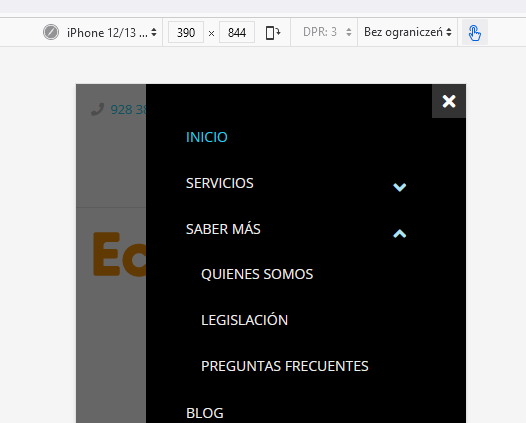
Site Preloader is not needed anymore, it's better for Google to not have it, belive me! I disabed it.
José Antonio Camejo González
Accepted AnswerI have updated the slideshow and it already works correctly, Thanks.
However, although I see your screenshot with the canvas menu unfolded I can not see that it works.
On the other hand The Off Canvas menu and the Mega menu are shown in all views (Desktop, tablet and mobile) even if you hide it in some of them.
Thanks again for your help
Paul Frankowski
Accepted AnswerIcon from Mobile [=] menu from desktop view already hidden. Just refresh browser cache to see changes.
In that template a mobile menu [=] is displayed on Mobile/Tablet view, check
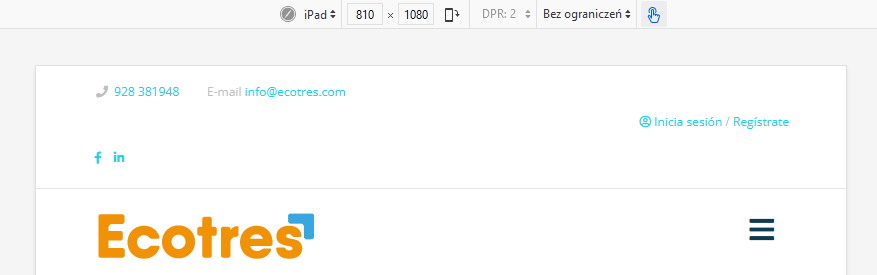
But on iPad Pro 12" - there is classic MegaMenu without mobile [=] that device has bigger screen.
José Antonio Camejo González
Accepted AnswerThank you very much it seems that everything works correctly now, except that the Editor of the front end of the Home page has stopped working showing only the header. I have tried to remove the modifications without success and I have checked the maintenance section and everything seems to be correct. Can you help me?