

Suffix CSS
UL
UNIGIRO LIMITED
Hi,
I have to change the style of a module , using Helix Ultimate template. Image, color, scroller... And I am following your guide "custom code" in order to insert the right code in the module class CSS. can you please give an hints for the syntax to be followed ? Thanks
4 Answers
Order by
Oldest

Paul Frankowski
Accepted AnswerHi Serena,
It works this same in all templates I guess since J 1.5.
as 1st step in new Module in tab "Advanced" - Module Class Suffix : put extra class name, for example, pepsi
I mean: [space] pepsi
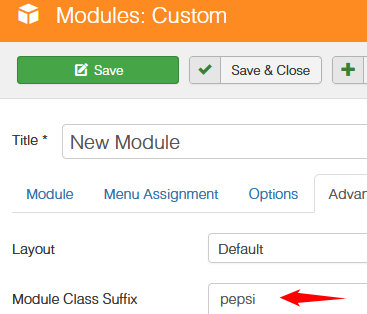
- The use custom CSS to definie new style for that module
.sp-module.pepsi  {   ....  }

.pepsi h3.sp-module-title { ... }
Whole rest is in your hands / keyboard.
UL
UNIGIRO LIMITED
Accepted Answerthank you Paul.
I put this:
legend { background-color: #33333 } p { border : 5px solid red; }
but it does not work .... why ???
Paul Frankowski
Accepted AnswerIf instead of "pepsi" you used word "legend" - you forgot to put dot (.) before legend
.sp-module.legend, .sp-modulelegend { background-color: #33333 }
2nd lines is too general, it's not releated to .legend class name (!)
Sorry, but we cannot teach you CSS here. You have to study more.