Articles Add-On and Joomla Articles - Forum | JoomShaper
Solved SP Page Builder

Articles Add-On and Joomla Articles

Asked by SPD 4 years ago Last activity 4 years ago

Hi,
I was thinking of using the Articles Add-on just to display two articles on my home page but had a question about the following from the add-on documentation.

Article Addon cannot display content from SPPB mode, you have to add INTRO text in tab "JOOMLA EDITOR".

Does this mean that if I want to have intro text in Articles Add-On on my home page, I can't use the SP Page Builder at all for those articles? If not, can you recommend another method of displaying a couple of article 'snippets' on my home page, based on categories and/or tags, that could include intro text but allow me to use SP Page Builder?
As always, thanks for your help.

Accepted answer

Marked as the solution
Paul Frankowski Senior Staff
4 years ago · edited

Hi SPD,

Yes, you still can but in Article edition:

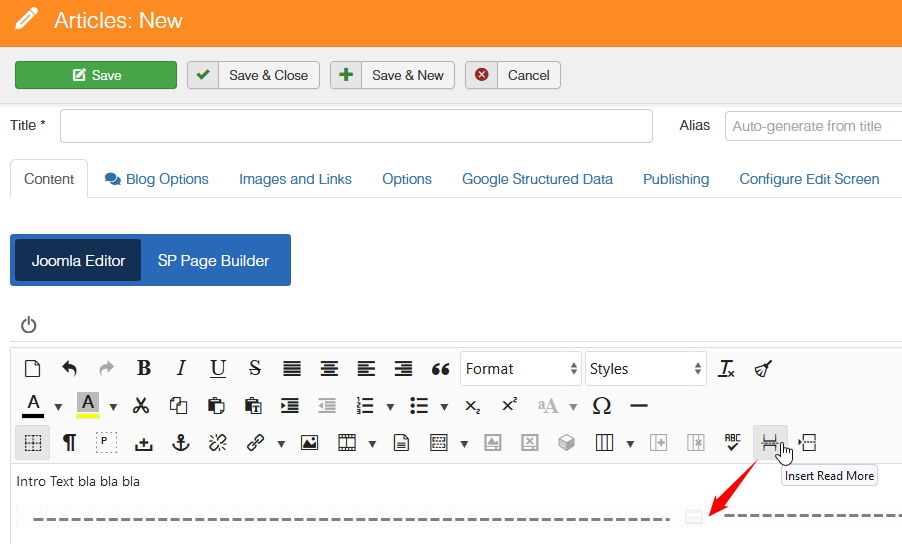
  1. In "Joomla Editor" (1st tab) insert intro text + click Read more under it (screenshot below)
  2. In "SP Page Builder" (2nd tab) insert content using Rows and Addons etc.

Then using News module (joomla default) or Article addon (SPPB) - you should be able to display intro text. And if somebody click read more link then he/she would see whole article content with rows, columns and addons etc.

screenshot for point 1

foto_8373_2022.jpg

2 more replies

SPD Asked this

Once again, you da man! I did try that before but it didn't work but I did the SP PB stuff 1st, worked the other way.
I am missing the more text, turned it on whereever I found it and added the actual text but I'll take this as a complete win fer sure!

One final ask... is there anyway to control the Header style (H1-6) used in the Article Add-on. It is sort as if its dictating what the other header styles would be on the page, so would be nice if i could control it. If not, no worries, still flag you as Answered
Cheers

Log in to reply.